
timothytimes
Level 1
It's my security config for 2025.
Last edited:


Open MalwareTips from your Home Screen or desktop. Follow discussions, find answers and pick up where you left off.
If you cannot find an install option, update your browser or use its bookmark option to keep MalwareTips close.
After installation, open the app and sign in. Enable push notifications in Preferences if you want alerts. On iPhone and iPad, push requires a Home Screen web app and iOS or iPadOS 16.4 or later.
Sign in to manage notificationsInstallation is optional. Your notification settings stay under your control.
 Thread starter
timothytimes
Thread starter
timothytimes

To me it seems like you are trying to set your focus mainly on privacy according to all the privacy extensions you are using. The problem is that more privacy extensions do not actually improve, but lower your privacy and security on the web.It's my security config for 2022. In 2021 I used the similar one (without Avast AntiTrack and Simplewall).


What addons do you think I ought to remove?To me it seems like you are trying to set your focus mainly on privacy according to all the privacy extensions you are using. The problem is that more privacy extensions do not actually improve, but lower your privacy and security on the web.
Some articles about this topic:
1. How anti-fingerprinting extensions tend to make fingerprinting easier
2. Why you should be careful with browser extensions
Thats up to you. I personally would remove all extensions that provide some kind of tracking protection (CleanURLs, PrivacyBadger, DuckDuckGo Privacy Essentials and LocalCDN if you have Strict tracking protection enabled in Firefox. Firefox has solid integrated tracking protections that cover quite a lot of tacking mechanisms and uBlock Origin would be a good and simple addition.What addons do you think I ought to remove?
Thanks! I've removed Privacy Badger and DDG Privacy Essentials, and medium blocking mode has been enabled in uBoThats up to you. I personally would remove all extensions that provide some kind of tracking protection (CleanURLs, PrivacyBadger, DuckDuckGo Privacy Essentials and LocalCDN if you have Strict tracking protection enabled in Firefox. Firefox has solid integrated tracking protections that cover quite a lot of tacking mechanisms and uBlock Origin would be a good and simple addition.
Consider setting up one of those modes for uBlock Origin for enhanced security: Blocking mode · gorhill/uBlock Wiki
Great! I personally also used LocalCDN for a long time but found out that it is not really needed if you have First Party Isolation (FPI) or Total Cookie Protection / Dynamic First Party Isolation (dFPI) enabled.Thanks! I've removed Privacy Badger and DDG Privacy Essentials, and medium blocking mode has been enabled in uBo

Great! I personally also used LocalCDN for a long time but found out that it is not really needed if you have First Party Isolation (FPI) or Total Cookie Protection / Dynamic First Party Isolation (dFPI) enabled.
Total Cookie Protection or dFPI will automatically be enabled when you choose to set Firefox's Enhanced Tracking Protection to Strict --> Firefox 86 Introduces Total Cookie Protection – Mozilla Security Blog
If you don't want to do that you can still enable FPI in about:config by setting the value of privacy.firstparty.isolate to true.
Here a Reddit thread about all this:
Hope it's not too confusing.
I use Adguard Extra script which I added in Tampermonkey. In my opinion, Adguard Extra is a good decision to block YandexDirect (and not only this) advertisements where it won't delete by DNS and uBo filters.I agree with @SecureKongo. What do AdGuard Extra do for you? Are you using it as a script built in Tampermonkey?
I'm using 'Legitimate URL Shortener' filter instead of ClearURLs.
If you have set the tracking protection to "Strict" you should disable FPI as it can conflict with dFPI.Great! I appreciate your kindness and efforts to make my config better. I've just deleted LocalCDN and set my tracking protection to scrict. Also, I've enabled FPI, but it might be unnecessarily
Hehehe. Now it's doneIf you have set the tracking protection to "Strict" you should disable FPI as it can conflict with dFPI.
Nice recommendation. The filters "Legitimate URL Shortener" and "AdGuard URL Tracking Protection" in uBlock Origin are basically doing the same as ClearURLs @timothytimesI agree with @SecureKongo. What do AdGuard Extra do for you? Are you using it as a script built in Tampermonkey?
I'm using 'Legitimate URL Shortener' filter instead of ClearURLs.
Thank you! I added Legitimate URL Shortener. Adguard URL Tracking Protection has been already enabledNice recommendation. The filters "Legitimate URL Shortener" and "AdGuard URL Tracking Protection" in uBlock Origin are basically doing the same as ClearURLs @timothytimes
I use the Custom setting in Firefox. This is what it looks like. So far, no problems--since about 4-5 months. I still get "breakthrough" cookie notices occasionally so the Element Picker comes in handy rather than scrounging around for more lists.If you have set the tracking protection to "Strict" you should disable FPI as it can conflict with dFPI.

 www.wilderssecurity.com
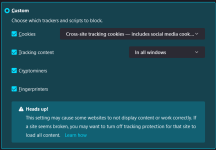
I am not quite sure about that but I think that setting tracking protection to custom might not trigger the dFPI feature of Firefox. At least they are only stating that "Strict" will enable it on their site: Firefox 86 Introduces Total Cookie Protection – Mozilla Security BlogI use the Custom setting in Firefox. This is what it looks like. So far, no problems--since about 4-5 months. I still get "breakthrough" cookie notices occasionally so the Element Picker comes in handy rather than scrounging around for more lists.
µBlock, a lean and fast blocker
Yes, I was dimly aware of this but I figured: if it works even once, then it's OK to keep it enabled--and if a mainsteam browser still offers this...

I'm not either but I found this on Reddit Who knows what to believe on R when there are no references/documentation.I am not quite sure about that but I think that setting tracking protection to custom might not trigger the dFPI feature of Firefox. At least they are only stating that "Strict" will enable it on their site: Firefox 86 Introduces Total Cookie Protection – Mozilla Security Blog
Note: Italics are mine.In Private Browsing Mode and Strict Mode, Firefox includes Total Cookie Protection, which confines every cookie to the website where it was created. This prevents cookies from tracking you across sites. Strict Mode also includes Enhanced Cookie Clearing, which allows users to clear third-party cookies more effectively.
Members who viewed this thread in the last 5 minutes


