New Update TrafficMonitor Updates Thread

lokamoka820

Level 41
Thread author
Verified
Top Poster
Well-known
Mar 1, 2024
3,074
3
9,892
3,969
Banana Republic
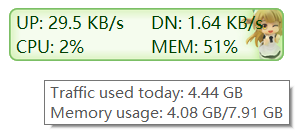
TrafficMonitor is a network monitoring software with floating window feature for Windows. It displays the current internet speed and CPU and RAM usage. There are also other capabilities like an embedded display in the taksbar, changeable display skins, and historical traffic statistics.
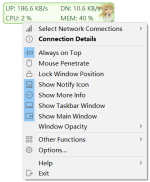
main1.pngmain.pngtaskbar.png

Main Features​

  • Displays current network transmission speed and CPU and RAM usage
  • If multiple network adapters are available, users can automatically or manually select networks to connect
  • Display network connection details
  • Support embedded display in taskbar
  • Support skin change and customizable skins
  • Historical traffic statistics
  • Hardware information monitoring
  • Plug-in system
 
TrafficMonitor 1.85
Jan 21, 2025
Functional updates:
  • The taskbar window adds Direct2D rendering to solve the problem of jagged font edges
  • The graphics card monitoring function adds support for Intel display
  • Add a plug-in menu to the right-click menu when right-clicking a plug-in item
  • The plug-in management interface adds the display of plug-in icons and plug-in commands to the right-click menu
  • The maximum value of the monitoring time interval is adjusted to 30s
  • Add "window top margin" and "vertical margin" options in the taskbar window settings
  • The main window adds support for transparent background images in png format
  • Add the function of automatically switching skins according to Windows dark and light color modes #1013
  • Add the function of displaying resource usage graphs in the plug-in items of the taskbar, and update the corresponding plug-in interface #1077
  • Add the display of today's total traffic in the main window and taskbar window #1174
  • Add the option of "use color emoji" in the taskbar window settings (only Direct2D rendering method)
  • The upper limit of temperature notification in general settings is adjusted to 120 degrees #1814
  • Add support for Arm64EC
  • Add the function of displaying CPU frequency in Lite version
  • Taskbar Settings - Added default text color to Scheme 2 and Scheme 3 in Preset Schemes
Bug fixes:
  • LibreHardwareMonitorLib.dll updated to version 0.9.4 to solve the problem that hardware monitoring information of some devices cannot be displayed normally
  • Fixed the incorrect position of the taskbar window on touch-screen devices after Windows 11 build 22621
  • Fixed the incorrect position of the taskbar window when the widget does not exist under Windows 11
  • Fixed the problem that when the taskbar window is displayed on the right side, it will overlap with the system widget under Windows 11
  • Fixed the problem of scrolling too fast when using touchpad gestures in the option settings dialog box
  • Fixed the problem of incorrect display of CPU frequency in the mouse prompt of the main window
  • Fixed the problem of invalid display text of plug-in items in skin files #1813
  • Fixed the problem that if the notification area icon is hidden, the notification area icon will appear again after the notification pops up #1814 #1812 #1811
 
  • Like
Reactions: Parkinsond
TrafficMonitor 1.85.1
Feb 10, 2025
Issue fixed:
  • Fixed the problem that when using third-party software to change to the classical taskbar in Windows 11, the option "Taskbar window appears to the left of the taskbar" in the Taskbar Window Settings is not available.
  • Fixed the problem that the position of the taskbar windows is not correct when there is no any icon on the taskbar. #1913
  • Fixed the problem that the "Network speed data width" does not take effect when clicking "Apply" in the Taskbar Window Settings. #1916
  • Windows 11 related settings in Taskbar Windows Settings moved to the new dialog. Add an option to avoid overlapping with right Widgets.
  • Fixed the problem that when "CPU" in Hardware Monitoring is not enabled, the "CPU usage acquisition method" will be changed back to the "Based on CPU time" when set it to "Use the performance counter".
  • Fixed the problem of messy charactors in the acknowledgement dialog.
  • Fixed the problem that the displayed net speed may be larger than the actual net speed when the "Monitoring intervals" is set too small. #1263 #1674
  • Fixed the problem that the "Memory available" in the taskbar window cannot be fully displayed when the memory exceeds 100G. #1722
 
  • Like
Reactions: Parkinsond
V1.86
New Features
  • Added the feature to display the taskbar window on secondary monitors. #2037 #1974 #1952 #1944 #1875 #1870 #1863 #1734
  • Refactored multilingual code; multilingual strings are now configured in external INI files for easier localization. Added support for new languages such as German, Italian, Russian, Polish, Brazilian Portuguese, Turkish, Hebrew.
  • Replaced the skin list control in the skin selection interface with a ListBox.
  • Controls in the Options Settings dialog now support dynamic resizing.
  • The vertical scrollbar in the Options Settings dialog no longer resets when resizing.
  • The width of items in the taskbar window now supports dynamic adjustment.
  • Added the feature for the taskbar resource usage graph background color to follow the Windows theme color.
  • Added the ability to save fonts, text colors, and display text separately for each skin.
  • Added a right-click menu in the Display Text Settings dialog to restore defaults for individual items.
  • Added the display of call stack in crash information dialog. Add the function of writing the crash information to the log file.
  • Added the display of GPU and hard disk utilization for the Lite version.
Bug Fixes
  • Fixed the issue where the update source in "General Settings" was not saved. #2020 #1561 #1119
  • Fixed incorrect font size in the preview image of the skin selection dialog when DPI settings differ across multiple monitors.
  • Fixed incorrect DPI when the floating window moves between monitors with different DPI settings.
  • Fixed the issue where built-in items in the taskbar could not be fully removed when plugin items were displayed, leaving an upload speed item. #1965
  • Optimized the style of color display in the "Color Display" control in the Options Settings dialog. Fixed the issue where noticeable blank space appeared on the right side of the control when more than 8 colors were displayed.
  • Fixed the issue where changing the value in the "Font Size" text box in the main window and taskbar window settings did not take effect after clicking "Apply."
  • Fixed the inconsistency between the network speed unit in the taskbar window tooltip and the settings.
  • Fixed the issue where CPU frequency did not follow the "Separate value and unit with a space" option.
  • Added handling to reinitialize connections after resuming from sleep mode, resolving the issue where network speed could not be retrieved after waking from sleep.
  • Fixed the issue that the correct font could not be obtained when font name in the skin file contains Unicode characters. Fixed some logical problems when parsing the skin file.
  • Improved in other details.
 
V1.86

Replaced its vulnerable driver? It was blocked by MD.