

The MalwareTips app
Your community, one tap away.
Open MalwareTips from your Home Screen or desktop. Follow discussions, find answers and pick up where you left off.
- Home Screen access
- Optional push alerts
- Your community
You're ready to explore.Explore what's new
Installation instructions
iPhone & iPad
- Open MalwareTips in Safari and tap Share. You may need to open the Page Menu first.
- Choose Add to Home Screen. If it is not listed, use Edit Actions to add it.
- Keep Open as Web App enabled if shown, then tap Add.
Android
- Open MalwareTips in Chrome or another browser that supports app installation.
- Open the browser menu and look for Install app, Install and create shortcut, or Add to Home screen.
- Choose Install and confirm. Wording varies by browser.
Desktop
- Chrome: use the install icon in the address bar, or the menu under Cast, save and share.
- Edge: open the menu, then More tools, Apps and Install this site as an app.
- Safari on Mac: choose Share or File, then Add to Dock. Firefox on Windows: look for the web apps button in the address bar.
If you cannot find an install option, update your browser or use its bookmark option to keep MalwareTips close.
Keep up with your conversations
After installation, open the app and sign in. Enable push notifications in Preferences if you want alerts. On iPhone and iPad, push requires a Home Screen web app and iOS or iPadOS 16.4 or later.
Sign in to manage notificationsInstallation is optional. Your notification settings stay under your control.
You are using an out of date browser. It may not display this or other websites correctly.
You should upgrade or use an alternative browser.
You should upgrade or use an alternative browser.
Advanced Plus Security Trooper's PC Security Config
-
 Thread starter
Trooper
Thread starter
Trooper
- Start date
- 45 Replies
- 8,800 Views
Archived configuration (not current) · expand details
Thread details
- Last updated
- Jun 5, 2022
- Main use of this computer
- For home and private use
- Operating system
- macOS 15 Sequoia
- On-device encryption
- Device sign-in security
- Security updates
- Allow security updates and latest features
- User Account Control (UAC)
- Always notify
- Smart App Control
- Network firewall
- Real-time protection
- Emsisoft Anti-Malware Home
- Device firewall
- Custom security settings
- Windows Firewall.
Simple Windows Hardening
- Periodic malware scanners
- EEK
- Malware sample testing
- I do not participate in malware testing
- Browsers and extensions
- Microsoft Edge
uBlock Origin
Bitwarden Password Manager
Reddit Enhancement Suite
Emsisoft Browser Security
- Secure DNS
- NextDNS
- Desktop VPN
- Mullvad
- Password and passkey manager
- Bitwarden
- Maintenance tools
- Combination of CCleaner and Manual Cleaning
- File and photo backups
- Local Backup to External Drive
- System recovery
- Macrium Reflect 8.0
- Usage and exposure
- Working from home
- Visiting familiar websites
- Visiting unknown or untrusted websites
- Opening email attachments
- Online shopping and card payments
- Logging into my bank account
- Streaming audio/video content from trusted sites or paid subscriptions
- Streaming from untrusted sites
- Computer specs
- HP Z1 Entry Tower G5
Intel Core i7 9700
Radeon RX580
32GB
SSD Drive 512GB
- Feedback preference
Suggestions on the main improvements

Periodic security scanners -> one or 2 3rd party second opinion scanners are always welcome: KVRT, EEK...
Thanks for sharing
Thanks for sharing

Gandalf_The_Grey
Level 86
Verified
Honorary Member
Top Poster
Content Creator
Well-known
Forum Veteran
I would set UAC to always notify to prevent bypasses:
 www.bleepingcomputer.com
Gebert's straightforward mitigation advice to prevent UAC bypass attacks is setting UAC to "Always Notify." Doing so will always show the user UAC prompts before high-risk applications are executed.
Bypassing Windows 10 UAC with mock folders and DLL hijacking
A new technique uses a simplified process of DLL hijacking and mock directories to bypass Windows 10's UAC security feature and run elevated commands without alerting a user.

Periodic security scanners -> one or 2 3rd party second opinion scanners are always welcome: KVRT, EEK...
Thanks for sharing
It's been awhile and I kind of just plain forgot. Good idea, will add a few and report back. Thanks.
I would set UAC to always notify to prevent bypasses:
Bypassing Windows 10 UAC with mock folders and DLL hijacking
A new technique uses a simplified process of DLL hijacking and mock directories to bypass Windows 10's UAC security feature and run elevated commands without alerting a user.
UAC is now set to max. Cheers!
Please reflect the changes editing Your config, thanks
Please reflect the changes editing Your config, thanks
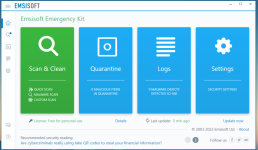
UAC bumped up to Max. Added EEK and ran a scan. All good.
Last edited by a moderator:
I guess I am ok then? Lol. Norton has been running well. I guess part of me struggles with two things. The crypto deal (I have it off), and waiting for the day when Norton fubars something on my machine. But I suppose that is what backups are for. I used to use ESET and Kaspersky but for some reason neither of these av's play nice on this computer.
Since you are using the enterprise version make the best of it and study hardening windows using group policy.
Since you are using the enterprise version make the best of it and study hardening windows using group policy.
Not a bad idea. I go gpo's all the time for work, but never for myself.


Why ditched ?Ditched BitDefender for F-Secure Safe. Everything else remains the same at the moment.
Why ditched ?
Performance and felt a bit too heavy for my liking. F-Secure running much lighter for me.
I also used f-secure before , good protection.Performance and felt a bit too heavy for my liking. F-Secure running much lighter for me.
For me BD Total runs so smooth and protection wise is superb.

Setup PCPC setup
The biggest problem I had with BD is the update size is much larger than other AVs. On an SSD that does cause a lot of writes. Not the end of the world, but it is a bit harder on SSDs than others.
SSD can handle this , for me protection is the most importantThe biggest problem I had with BD is the update size is much larger than other AVs. On an SSD that does cause a lot of writes. Not the end of the world, but it is a bit harder on SSDs than others.
I noticed this as well. Forgo to mention it.The biggest problem I had with BD is the update size is much larger than other AVs. On an SSD that does cause a lot of writes. Not the end of the world, but it is a bit harder on SSDs than others.
Setup PCPC setup
I agree, but there are other effective options that don’t use the BD engine.SSD can handle this , for me protection is the most important
Yes correct , I like the BD engineI agree, but there are other effective options that don’t use the BD engine.
Recently browsing
Members who viewed this thread in the last 5 minutes
You may also like...
-
 Advanced Security RoxasDev's PC Security Config
 -
 Advanced Security Bill7's PC Security Config
 -
 Advanced Security Spartan's PC Security Config
 -

-
 Advanced Plus Security harlan4096's PC Security Config