

The MalwareTips app
Your community, one tap away.
Open MalwareTips from your Home Screen or desktop. Follow discussions, find answers and pick up where you left off.
- Home Screen access
- Optional push alerts
- Your community
You're ready to explore.Explore what's new
Installation instructions
iPhone & iPad
- Open MalwareTips in Safari and tap Share. You may need to open the Page Menu first.
- Choose Add to Home Screen. If it is not listed, use Edit Actions to add it.
- Keep Open as Web App enabled if shown, then tap Add.
Android
- Open MalwareTips in Chrome or another browser that supports app installation.
- Open the browser menu and look for Install app, Install and create shortcut, or Add to Home screen.
- Choose Install and confirm. Wording varies by browser.
Desktop
- Chrome: use the install icon in the address bar, or the menu under Cast, save and share.
- Edge: open the menu, then More tools, Apps and Install this site as an app.
- Safari on Mac: choose Share or File, then Add to Dock. Firefox on Windows: look for the web apps button in the address bar.
If you cannot find an install option, update your browser or use its bookmark option to keep MalwareTips close.
Keep up with your conversations
After installation, open the app and sign in. Enable push notifications in Preferences if you want alerts. On iPhone and iPad, push requires a Home Screen web app and iOS or iPadOS 16.4 or later.
Sign in to manage notificationsInstallation is optional. Your notification settings stay under your control.
You are using an out of date browser. It may not display this or other websites correctly.
You should upgrade or use an alternative browser.
You should upgrade or use an alternative browser.
Troubleshooting Ublock Origin Problem
-
 Thread starter
Rengar
Thread starter
Rengar
- Start date
- 16 Replies
- 4,948 Views
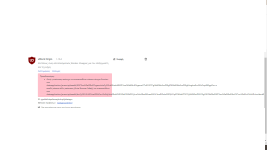

error message:And what does it mean in English?
Warning:
This extension failed to redirect a network request to about:blank because another extension (Avira Browser Safety) redirected it to.....
Upvote
0

Hello Greek friend. Remove Avira Browser safety and get this one. Works really good with Ublock origin and does the same thing basically.
Avast Online Security
Avast Online Security
Upvote
0
It's not so much for phishing but for the visual guidance for site safety. That's why i recommend it. Similar to WOT if you ever used it.No need for Avast Online Security to replace uninstalled extensions. uBlock Origin and Chrome's default security services are sufficient for most.
Upvote
0

Stopped using WOT many years ago, going back is a step-backwards. Being independent of any website advisory extensions is the better way to surf the web, alongside everyday practice of safe browsing.
In the long-run, no need a babysitter to tell you what sites to visit - make your own judgement.
In the long-run, no need a babysitter to tell you what sites to visit - make your own judgement.
Upvote
0


If you remove Avira browser safety then you can add malwaredomains, Spam 404 and Disconnect malvertising filters and you're good to go.
Optionally you can replace uBlock0 with Adguard which has also built in malware and phishing protection.
Optionally you can replace uBlock0 with Adguard which has also built in malware and phishing protection.
Upvote
0
there is no need to uninstall any of them. This problem is not severe and doesn't affect anything. I have been using them with this problem for years
Upvote
0

That's true. Adguard Browser Extension has really good malware and phishing protection. They also use Google Safe Browsing, Yandex Safe Browsing and WOT API to check websites.If you remove Avira browser safety then you can add malwaredomains, Spam 404 and Disconnect malvertising filters and you're good to go.
Optionally you can replace uBlock0 with Adguard which has also built in malware and phishing protection.
Upvote
0
also you can uncheck "Disable pre-fetching (to prevent any connection for blocked network requests)"
this may be the source of confliction but I'm not so sure
this may be the source of confliction but I'm not so sure
Upvote
0
Recently browsing
Members who viewed this thread in the last 5 minutes


