uBlock Origin v1.17.0 released

DuckDuckGo?
Toggle Advertisement on DDG here: DuckDuckGo Settings

Thanks I will replace Startpage with DuckDuckGo and try it with SafeScript on Firefox.

EDIT: DuckDuckGo has like Startpage the option to generate an URL with the settings selected (Startpage can be told to use EU-servers, DuckDuckGo to omit Ads). On my sandboxed Run As Secure_Surfer firefox I now use Scriptsafe without blocklists but with third party blocking. On my regular (admin) user I use Malware Bytes Add-on. Thx for the tip (y)
 
Last edited:
uBlock Origin gets option to block all JavaScript execution by default | ZDNet

Article that talks about the new version.

1537913578893.png
 
I don't know what is going on with Ublock Origin on Firefox, but it's not blocking those annoying cookie notices on any website for me and on Youtube there is some big ad that quickly flashes and disappears. Some other ads get past it and i don't now if Firefox tracking protection is messing with it somehow, but Ublock Origin is getting uninstalled from my browsers now.

I'm not even going to bother to report anything to the developer, because in the past he really didn't like when i had problems with Ublock Origin. :ROFLMAO:

Adguard Browser Extension blocks all of those that Ublock isn't blocking and i quess thats my adblocker for now.
 
I don't know what is going on with Ublock Origin on Firefox, but it's not blocking those annoying cookie notices on any website for me and on Youtube there is some big ad that quickly flashes and disappears. Some other ads get past it and i don't now if Firefox tracking protection is messing with it somehow, but Ublock Origin is getting uninstalled from my browsers now.

I'm not even going to bother to report anything to the developer, because in the past he really didn't like when i had problems with Ublock Origin. :ROFLMAO:

Adguard Browser Extension blocks all of those that Ublock isn't blocking and i quess thats my adblocker for now.
Probably because adguard has annoyances filter on by default?
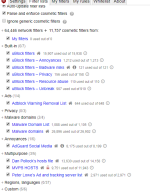
annoyances.png

You should enable these, fanboy's annoyance is usually enough to get rid of any cookie messages
 
Just so you know, Fanboy's Annoyances List already contains the Cookiemonster and Social Blocking lists.
1hosts probably do have most of my lists doubled aswell, but i dont see any difference there. I used to use opera with built in adblocking + just fanboys annoyances and it was pretty good
 
1hosts probably do have most of my lists doubled aswell, but i dont see any difference there. I used to use opera with built in adblocking + just fanboys annoyances and it was pretty good
I'm using Brave's built-in adblocking, does a basic job. Just lowering my count on extensions.

~LDogg
 
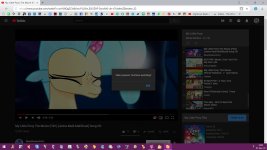
Anybody knows, how to disable "Video paused. Continue watching?" on Youtube.

I need to put it to filter, I just have no idea, what. It is probably caused by this:
Code:
youthere_innertube_actions":true
disable_youthere_lact_threshold_check":true
This script is supposed to disable it, but no idea, how to run it either. Please help. :oops:
Code:
// ==UserScript==
// @name        YouTube Activity Check Removal
// @namespace   https://chylex.com
// @include     https://youtube.com/*
// @include     https://*.youtube.com/*
// @version     1
// @run-at      document-end
// @grant       none
// ==/UserScript==

let timeout = 0;

let check = setInterval(function(){
  if (_yt_www.J){
    clearInterval(check);
  
    let prev = _yt_www.J;

    _yt_www.J = function(cls){
      if (cls && cls.startsWith("youthere-")){
        return null;
      }

      return prev.apply(this, arguments);
    };
  }
  else if (++timeout > 500){ // average should be about 5-10
    clearInterval(check);
  }
}, 1);
 

Attachments

  • capture_11072018_144337.jpg
    capture_11072018_144337.jpg
    122.5 KB · Views: 316
I have these setting and still get the cookie thing when coming to this site before I log in.
Some lists can overlap badly, and cause its not to work. I have 400k webfilters and 115k cosmetic filters + medium mode enabled, never had cookie messages
 
  • Like
Reactions: oldschool
I use Ublock for Edge. Maybe that's why, I don't know

Have you tried Nano Adblocker (by JSPenguin) for Edge? It's based on the latest version of uBO and has some added features. Probably the best choice for Edge since uBO for Edge is maintained by Nik Rolls lags behind Gorhill's uBO in development.
 
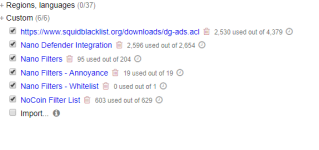
Here's a faster, lighter option to Nano Adblocker using uBlock Origin with Nano filters enabled with this easy tweak: Integrate Nano Defender with uBlock Origin to block Anti-Adblocker - gHacks Tech News and these filter lists enabled:

uBO filters 2019-04-30 170134.png

This setup is faster than Nano Adblocker. I generally use uBO in advanced user Medium Mode (block 3rd party scripts & frames) and these filters cover what I need even if I switch temporarily to Easy Mode. It's a simple, lean & secure configuration. I'm posting this for those who wish to use or might experiment with medium mode. Most websites remain usable and may require an extra click those sites where you need to login or use certain features. Using uBO this way does not suit some people browsing styles but the advantage is a virtual firewall for your browser which is not difficult to master. All it takes is familiarity using it this way. Give it a good trial run before you pass judgement and see what you think. (y):)
 

Attachments

  • uBO filters #2 2019-04-30 170515.png
    uBO filters #2 2019-04-30 170515.png
    25.6 KB · Views: 265