
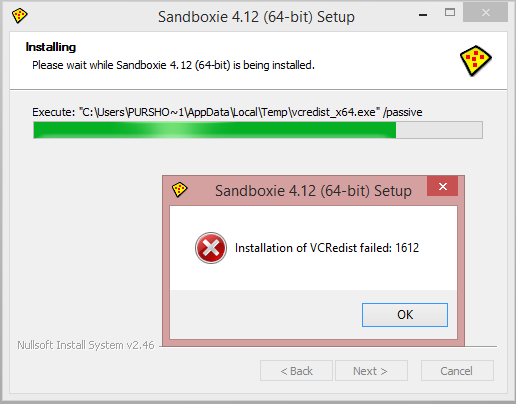
Whenever I try to install sandboxie latest version i downloads some file . During the installation it shows some error. I want some help to fix this one.


Open MalwareTips from your Home Screen or desktop. Follow discussions, find answers and pick up where you left off.
If you cannot find an install option, update your browser or use its bookmark option to keep MalwareTips close.
After installation, open the app and sign in. Enable push notifications in Preferences if you want alerts. On iPhone and iPad, push requires a Home Screen web app and iOS or iPadOS 16.4 or later.
Sign in to manage notificationsInstallation is optional. Your notification settings stay under your control.
 Thread starter
Purshu_Pro
Thread starter
Purshu_Pro


Try installing from here and then install SB.Whenever I try to install sandboxie latest version i downloads some file . During the installation it shows some error. I want some help to fix this one.
View attachment 17976

Isn't there another way ?I have that problem too. Even though I have VCRedist (32) it still insists to download and install that first before installing sandboxie. The author should opt for a better installer that install VC++ only if it's not present on the PC.

Try here:Sorry Problem still persists.
What do u mean by this? How is it related to sandboxie installation?Yesterday I have installed http://slproweb.com/products/Win32OpenSSL.html (1.7 MB installer, for my Windows XP) - cause SlimBOAT - look on our topic (my latest post page #3 here) : http://malwaretips.com/threads/slimboat-browser-fast-secure-powerful.15423/page-3
And this works - no problem.
I dont get it. Its completely different here. I downloaded the file from ur link and tried to run but Sbie still downloads Vcredist_X64 and during installation same error as usual.
- From my link, you have: Visual C ++ Redistributables 2008 (64) : http://www.microsoft.com/downloads/details.aspx?familyid=bd2a6171-e2d6-4230-b809-9a8d7548c1b6What do u mean by this? How is it related to sandboxie installation?
After doing this will i able to install Sbie without downloading the vcredist file automatically ?- From my link, you have: Visual C ++ Redistributables 2008 (64) : http://www.microsoft.com/downloads/details.aspx?familyid=bd2a6171-e2d6-4230-b809-9a8d7548c1b6
'The Microsoft Visual C++ 2008 Redistributable Package (x64) installs runtime components of Visual C++ Libraries required to run 64-bit applications developed with Visual C++ on a computer that does not have Visual C++ 2008 installed.'
- From my link, you have: Visual C ++ Redistributables 2008 (64) : http://www.microsoft.com/downloads/details.aspx?familyid=bd2a6171-e2d6-4230-b809-9a8d7548c1b6
'The Microsoft Visual C++ 2008 Redistributable Package (x64) installs runtime components of Visual C++ Libraries required to run 64-bit applications developed with Visual C++ on a computer that does not have Visual C++ 2008 installed.'
I hope, if not it's easy to remove what you download, and no longer wish, from Add/Remove Programs ..

My friend where were u all this time ? Did God tell u that i was in trouble ? Well He was not wrong at all. Thanks a lot it worked by your help. I finally managed to install it.from what i have read if you use the 64bit installer from this page it should not have V C++
All Versions
http://www.sandboxie.com/index.php?AllVersions
but if you get the download from here it has V C++ with it
http://www.sandboxie.com/index.php?DownloadSandboxie
so i would try the 64bit version from the all versions page
James

Isn't there another way ?
Members who viewed this thread in the last 5 minutes
