


when computer was some black show and gone then my chrome auto open with unknown website. so i go in resource monitior in network activity 1 proceess is running name regsvr32.exe when i end this process chrome become working normal. after some it again start going same thing then again i do same thing. i am using windows 7
unable to remove regsvr32.exe virus
- Thread starter naeemali
- Start date
You are using an out of date browser. It may not display this or other websites correctly.
You should upgrade or use an alternative browser.
You should upgrade or use an alternative browser.


Please download Malwarebytes Anti-Malware and save it to your desktop.
- Install the progam.
- Click the Scan tab, choose Threat Scan is checked and click Start Scan.
- If threats are detected, click the Quarantine Selected button. You will now be prompted to reboot. Click Yes.
- Upon completion of the scan (or after the reboot), click the Reports tab.
- Double-click the Scan Log.
- At the bottom click Export and choose Text file.
Very good. How is the situation now?
 Scan with Farbar Recovery Scan Tool
Please re-run Farbar Recovery Scan Tool to give me a fresh look at your system.
Please re-run Farbar Recovery Scan Tool to give me a fresh look at your system.
- Right-click on icon and select
Run as Administrator to start the tool.

(XP users click run after receipt of Windows Security Warning - Open File). - Make sure that Addition.txt option is checked.

- Press Scan button and wait.
- The tool will produce two logfiles on your desktop: FRST.txt and Addition.txt.
its actually good ads to stop to popup but this virus also effect my chrome means my chrome notification is allow all website by default and i am not able to disable it it say "allowed by your administrator" but i am the only administrator. i also attached the screen shot of that.
Attachments
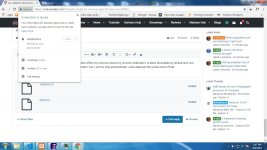

Download attached fixlist.txt file and save it to the Desktop:
Both files, FRST and fixlist.txt have to be in the same location or the fix will not work!
- Right-click on icon and select
Run as Administrator to start the tool.
(XP users click run after receipt of Windows Security Warning - Open File). - Press the Fix button just once and wait.
- If for some reason the tool needs a restart, please make sure you let the system restart normally. After that let the tool complete its run.
- When finishes FRST will generate a log on the Desktop, called Fixlog.txt.
Please attach it to your reply.
Attachments
You may also like...
-
Solved Help to remove a virus
- Started by Jone Doh
- Replies: 31
-
unable to remove search-great browser hijacker from Chrome
- Started by NeilH
- Replies: 3
-
 App Review Entreprise Antivirus Comparative : Cylance - CrowdStrike - Cynet - DeepInstinct
- Started by Shadowra
- Replies: 18
-
Question Safe ways to run an exe with potential trojan.
- Started by tryxed
- Replies: 14