
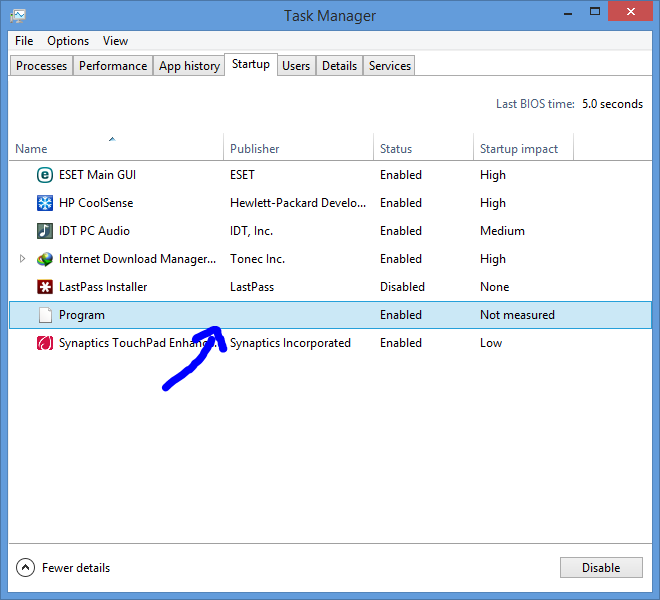
I dont know what is this, is it a virus or a program of mine or whatever. I found this program running along with my startup. Does any one had seen in ur PC this kind before, then what could it be?


Open MalwareTips from your Home Screen or desktop. Follow discussions, find answers and pick up where you left off.
If you cannot find an install option, update your browser or use its bookmark option to keep MalwareTips close.
After installation, open the app and sign in. Enable push notifications in Preferences if you want alerts. On iPhone and iPad, push requires a Home Screen web app and iOS or iPadOS 16.4 or later.
Sign in to manage notificationsInstallation is optional. Your notification settings stay under your control.
 Thread starter
Purshu_Pro
Thread starter
Purshu_Pro

Never seen it on my system,but you could open the file location and do a VT check.I dont know what is this, is it a virus or a program of mine or whatever. I found this program running along with my startup. Does any one had seen in ur PC this kind before, then what could it be?
View attachment 17734


It's a windows media player setup. It's the built-in Media Player, at least it says so. Hopefully it's not disguise, I had a windows infection that disguised itself as a windows system file.Sorry Friends @venustus and @Chromatinfish 123 could not find the path of the program. @MrXidus Ran Autoruns But Not sure which program is that.
View attachment 17737
Any idea what to do with those?It's a windows media player setup. It's the built-in Media Player, at least it says so. Hopefully it's not disguise, I had a windows infection that disguised itself as a windows system file.
On the other highlighted one, that's Malwarebytes Anti-Exploit but it seems like the program is corrupted as the file couldn't be found. It's also preinstalled by HP...
Try checking those with ESET Live Grid (You have ESET, right?). Post the results.Any idea what to do with those?
I'm guessing the core program file is gone, so it can't load up.
I would spot that this is the culprit.
Right click on this entry and click "Delete", then re-open Windows Task Manager > Startup tab and see if the Program entry has disappeared.
Live Grid says everything is fine . And i could not find that program over there.Try checking those with ESET Live Grid (You have ESET, right?). Post the results.
Uncheck the Anti-Exploit option and see if it's still there. The file seems to be deleted.Live Grid says everything is fine . And i could not find that program over there.

Members who viewed this thread in the last 5 minutes


