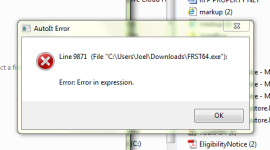
J Joel New Member Thread author Nov 30, 2014 14 0 5 39 Dec 21, 2014 #21 I have an error. Restarted and seems the same. I reran Fabar and attached for you. You are one determined person...good for you! Attachments capture-20141221-170652.png 35.9 KB · Views: 42 Addition.txt Addition.txt 32 KB · Views: 91 FRST.txt FRST.txt 64.1 KB · Views: 31
I have an error. Restarted and seems the same. I reran Fabar and attached for you. You are one determined person...good for you!
TwinHeadedEagle Level 41 Verified Mar 8, 2013 22,627 2,906 3,979 Dec 22, 2014 #22 Hm, it is probably some kind of bug. Delete current FRST icon and download fresh one from the link below: http://www.bleepingcomputer.com/download/farbar-recovery-scan-tool/
Hm, it is probably some kind of bug. Delete current FRST icon and download fresh one from the link below: http://www.bleepingcomputer.com/download/farbar-recovery-scan-tool/
J Joel New Member Thread author Nov 30, 2014 14 0 5 39 Dec 22, 2014 #23 Success executed fixlist, reran and attached. Thanks I think there has been improvement. Attachments Addition.txt Addition.txt 37.1 KB · Views: 40 FRST.txt FRST.txt 66.4 KB · Views: 44
J Joel New Member Thread author Nov 30, 2014 14 0 5 39 Dec 22, 2014 #25 Fixlog is attached. Attachments Fixlog.txt Fixlog.txt 3 KB · Views: 48
J Joel New Member Thread author Nov 30, 2014 14 0 5 39 Dec 22, 2014 #26 I ran combo and attached the combofix file. There has been a great improvement. Lag time is much shorter and my cooling fan is running much less..lower processing. Thanks! Attachments ComboFix.txt ComboFix.txt 38.8 KB · Views: 70
I ran combo and attached the combofix file. There has been a great improvement. Lag time is much shorter and my cooling fan is running much less..lower processing. Thanks!
TwinHeadedEagle Level 41 Verified Mar 8, 2013 22,627 2,906 3,979 Dec 23, 2014 #27 Good. Everything okay now?