Serious Discussion Did Microsoft Defender change the way it responds to file downloads?

nickstar1

Level 19
Thread author
Verified
Top Poster
Well-known
Dec 10, 2022
930
4,561
1,768
I got bored and decided to test Microsoft Defender, but I noticed something strange. When I downloaded several malicious EXE files, Microsoft Defender didn't block or quarantine them during the download. Instead, Defender only detected them after I actually ran or executed the files. I also noticed that VirusTotal showed Microsoft Defender detecting the threats, so the files were clearly being recognized as malicious by Defender's engine. Has Microsoft changed the way Defender detects malware? Does it now require a malicious file to be executed before it detects it, similar to how some behavioral detection works in Malwarebytes? Or should Defender still be detecting and blocking known malicious EXE files before they are executed?

My system is clean, and I even performed a clean installation of Windows. I also used ConfigureDefender with the settings configured to High, and all of the relevant protection settings appeared to be enabled.I'm trying to understand whether this is normal behavior with the current version of Microsoft Defender or if something might be misconfigured on my system. Before, Microsoft Defender would detect and block malicious files while they were being downloaded, before I had a chance to run or execute them. Now, however, it seems like Defender is allowing the files to finish downloading and only detects them after I execute them.
 
I got bored and decided to test Microsoft Defender, but I noticed something strange. When I downloaded several malicious EXE files, Microsoft Defender didn't block or quarantine them during the download. Instead, Defender only detected them after I actually ran or executed the files. I also noticed that VirusTotal showed Microsoft Defender detecting the threats, so the files were clearly being recognized as malicious by Defender's engine. Has Microsoft changed the way Defender detects malware? Does it now require a malicious file to be executed before it detects it, similar to how some behavioral detection works in Malwarebytes? Or should Defender still be detecting and blocking known malicious EXE files before they are executed?

My system is clean, and I even performed a clean installation of Windows. I also used ConfigureDefender with the settings configured to High, and all of the relevant protection settings appeared to be enabled.I'm trying to understand whether this is normal behavior with the current version of Microsoft Defender or if something might be misconfigured on my system. Before, Microsoft Defender would detect and block malicious files while they were being downloaded, before I had a chance to run or execute them. Now, however, it seems like Defender is allowing the files to finish downloading and only detects them after I execute them.
I have a worse scenario; once MD did not detected the exe file after being downloaded and after being manually scanned, although it flags it on VT.
 
I got bored and decided to test Microsoft Defender, but I noticed something strange. When I downloaded several malicious EXE files, Microsoft Defender didn't block or quarantine them during the download. Instead, Defender only detected them after I actually ran or executed the files. I also noticed that VirusTotal showed Microsoft Defender detecting the threats, so the files were clearly being recognized as malicious by Defender's engine. Has Microsoft changed the way Defender detects malware? Does it now require a malicious file to be executed before it detects it, similar to how some behavioral detection works in Malwarebytes? Or should Defender still be detecting and blocking known malicious EXE files before they are executed?

My system is clean, and I even performed a clean installation of Windows. I also used ConfigureDefender with the settings configured to High, and all of the relevant protection settings appeared to be enabled.I'm trying to understand whether this is normal behavior with the current version of Microsoft Defender or if something might be misconfigured on my system. Before, Microsoft Defender would detect and block malicious files while they were being downloaded, before I had a chance to run or execute them. Now, however, it seems like Defender is allowing the files to finish downloading and only detects them after I execute them.


Hi, Defender should not generally require a known malicious EXE to execute before detecting it. What you observed can happen, but it does not by itself show that Microsoft changed Defender into execution-only protection. It more likely means the download did not trigger—or did not produce a verdict from—the expected file-scanning path, while access at execution did.

Why the timing can differ​

VirusTotal is not a reliable prediction of what Defender on your PC must do at download time. Its Microsoft result may use a different signature or cloud state, scan the completed file later, and lack the same file origin and delivery context. A VirusTotal detection confirms recognition in that particular scan; it does not prove your local Defender had the same verdict when the download completed.

Defender has several opportunities to intervene: browser or reputation checks, scanning when a file is written or closed, later background scanning, and scanning when the file is opened or executed. Execution can therefore be the first moment at which Defender blocks a file without implying that only behavioral detection is active.

Also distinguish the download finishing from the payload running successfully. If launching it immediately produced a Defender alert and quarantine, Defender may have blocked access before meaningful execution. Protection History and Event Viewer are better evidence of the detection stage than the visible timing of the notification.

Checks that isolate the problem​

Do not execute more live malware for testing. Use the harmless EICAR test file or another vendor-provided test artifact, then change one variable at a time.

  1. Check Windows Security status directly. Under Virus & threat protection settings, confirm Real-time protection, Cloud-delivered protection and Automatic sample submission are enabled. Under App & browser control, check reputation-based protection as well; that layer is separate from antivirus scanning.
  2. Check exclusions and conflicts. Review Defender exclusions and confirm no other antivirus is registered. In PowerShell, `Get-MpComputerStatus` can show whether antivirus, real-time and behavior monitoring are enabled; `Get-MpPreference` can reveal exclusions and relevant scan preferences. Redact usernames and paths before posting output.
  3. Temporarily return ConfigureDefender to its Windows defaults, reboot, and repeat only the harmless test. “High” is a third-party policy preset, not proof that every local protection path is functioning. If defaults restore download-time detection, the preset or a resulting policy deserves inspection.
  4. Compare browsers with the same harmless test. If only one browser differs, its download handling or reputation integration becomes more likely. If all browsers behave identically, concentrate on Defender policy and service state.
  5. Examine Protection History and `Applications and Services Logs > Microsoft > Windows > Windows Defender > Operational`. Note the detection time, action, file path and whether remediation occurred—never upload or share the malware itself.

If EICAR is detected when saved or extracted, but those samples were caught only when opened, that does not establish a general Defender failure; the individual files, archive/container handling, cloud verdict timing and delivery method matter. If EICAR also remains untouched until launch, despite real-time protection being reported active, that is strong evidence of a configuration or protection-path problem rather than normal expected behavior.

Practical conclusion​

Defender still uses pre-execution scanning and reputation controls; execution is not supposed to be a universal prerequisite for detecting known malware. The precise cause here cannot be assigned from notification timing or VirusTotal alone.

Because live malicious files were executed, a clean installation performed afterward addresses that installation, but further live testing is an unnecessary gamble. If any sample ran before Defender intervened—or if there is doubt whether it did—disconnect that test system from sensitive accounts and use the MalwareTips Malware Removal Assistance team for individualized checking. A negative scan would not conclusively settle an actually executed sample.
 
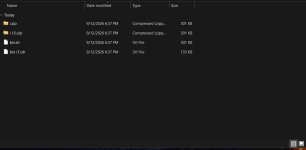
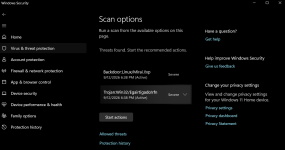
This is strange. I also tested it with non-EXE files, and Microsoft Defender still isn’t detecting or blocking the threats when the files are downloaded. It only detects them when I try to execute the files or manually scan them. Is this normal behavior? Can anyone explain why this is happening? It definitely didn’t used to work this way for me. Yeah, Microsoft Defender isn’t detecting anything until the file is either scanned or executed. I’m not sure why Defender is behaving this way. I’ve tested several more samples, and I’m still seeing the same behavior. It’s pretty odd. No matter what samples get downloaded they have to be executed or right click scanned for a detection to occur it's strange...

Screenshot 2026-09-12 183803.pngScreenshot 2026-09-12 183827.png
 
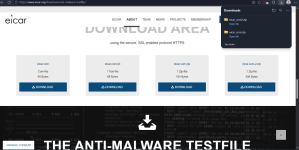
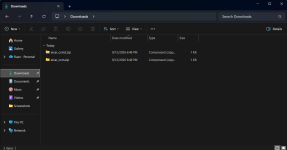
Does Windows Defender detect EICAR test files? Mine doesn’t seem to detect them automatically, as shown in my proof. It only detects the file when I right-click it and select “Scan with Microsoft Defender.” Is this normal? It seems pretty crazy that it doesn’t detect the file immediately. it allowed them all to download. It's not even blocking Eicar test files when i bypass edges warning to download it just allows it to download no problem. edge detects it but Microsoft security does not.
 

Attachments

  • Screenshot 2026-09-12 184913.png
    Screenshot 2026-09-12 184913.png
    333.5 KB · Views: 5
  • Screenshot 2026-09-12 184924.png
    Screenshot 2026-09-12 184924.png
    67.2 KB · Views: 6
  • Like
Reactions: Parkinsond
Does Windows Defender detect EICAR test files? Mine doesn’t seem to detect them automatically, as shown in my proof. It only detects the file when I right-click it and select “Scan with Microsoft Defender.” Is this normal? It seems pretty crazy that it doesn’t detect the file immediately. it allowed them all to download. It's not even blocking Eicar test files when i bypass edges warning to download it just allows it to download no problem. edge detects it but Microsoft security does not.

I don't know if and what's changed, as I just started using WD about 4 days ago. It is flagged when I scan it, but not on download using FF.
F-Secure was the same way with a couple of these EICAR test files.
 
On my side, happened once or twice; the rest are detected once downloaded, or even before start of download if using Edge

I don't know if and what's changed, as I just started using WD about 4 days ago. It is flagged when I scan it, but not on download using FF.
F-Secure was the same way with a couple of these EICAR test files.
Before, Microsoft Defender would completely block a malicious download and wouldn’t even allow the file to be saved in the Downloads folder. I’m not sure why they decided to change that behavior. Personally, I think it feels much better and safer when malicious files are blocked completely before they ever make it into the Downloads folder, rather than being downloaded first and then detected or removed afterward. Alright, all you hardcore Microsoft Defender users can you explain what’s going on here? When did Defender start making all these changes? I haven’t used Defender since around 2022, and back then, if I downloaded an EICAR test file, Defender would detect and block it before it even made it into the Downloads folder.

Now I’m seeing completely different behavior, and I’m curious why. Did Microsoft change how Defender handles EICAR test files or downloaded threats? Was there a specific update or change in the way real-time protection works? Calling all the Defender experts, lol. What changed, and when did it happen?
 
Last edited:
WEB scanning is my #1 protection requirement behind ad-blocking. I scan my downloads folder after every time I download updates so I'm so fresh and so clean.

Anyway as I've said most even the most technical user would and could not tell if they were infected by a advanced attacker using zero day exploits.

So take it easy, have a :emoji_beer:🍹🍺🍻🍸🍾🍷🥂 & have 🚬 or take a chill 💊 and watch cat videos on YouTube while AI detsroys the world.
 
WEB scanning is my #1 protection requirement behind ad-blocking. I scan my downloads folder after every time I download updates so I'm so fresh and so clean.

Anyway as I've said most even the most technical user would and could not tell if they were infected by a advanced attacker using zero day exploits.

So take it easy, have a :emoji_beer:🍹🍺🍻🍸🍾🍷🥂 & have 🚬 or take a chill 💊 and watch cat videos on YouTube while AI detsroys the world.

Love it, great humor, great wisdom :)