New Update Vivaldi Desktop Releases

Vivaldi 7.1 - the major changes​

Vivaldi engineers have added several new personalization options to the browser. One of the new features extends the browser's new tab page. Widgets are part of the new dashboard that Vivaldi introduced in version 7.0 of the browser.

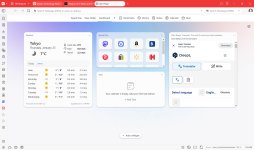
You may now add a weather widget to it. To do so, click on the add a widget button on the page and select weather. You may add any location in the world and get todays weather report and a weekly forecast directly whenever you open the page.

vivaldi-weather-widgets.jpg

Also new here is the option to pick a custom background for each widget individually. You may select it to be transparent, semi-transparent, solid, or pick a custom color if you prefer that.

Speed dials continue to be supported and can still be displayed on their own or as a widget. Vivaldi says that it has improved the adding of new Speed Dials. A click on the new button displays options to enter a site name and title manually, use folders, or pick a site from frequently visited websites.
New Default search engines​

Vivaldi says that it has changed some of the default search engines. In other words: the default search engine may have changed. On my test system, search changed from Bing to Startpage.

It is interesting to note that Vivaldi Technology lists the search engines that it has struck deals with. No Google or Bing on the list, but the following search engines only: Startpage, Ecosia, DuckDuckGo, and Qwant.

To change the search engine, go to Menu > Settings > Search. There you find the option to pick the default regular search engine, private window search engine, and image search engine separately.

Other noteworthy changes in Vivaldi 7.1​

Other than that, Vivaldi 7.1 makes a number of important under the hood changes. Here is an overview:
  • On macOS, Delta updates are now supported, which should speed up the download and installation of new updates.
  • New option to import open tabs from other browsers when switching to Vivaldi as part of the onboarding workflow.
  • Instant sharing of open tabs to other devices with Vivaldi installed.
  • Option to create unique file names automatically when downloading files in Vivaldi.
  • Fixed a cause of crash loops.
You can check out the full changelog and more images of the new features on Vivaldi's official website. There you also find downloads, in case you want to give it a try.
 
I'll have to try it again, because the last time I tried it was a long time ago, and I even thought the project had gone under...
Vivaldi is highly customizable and has a refreshing appearance. It stands out from Chrome clones and offers options like accent colors, square tabs, address bar choices, and a dark theme for websites. It also supports WebRTC prevention, and all my extensions work well with it. I have Vivaldi on Windows 11, Android, and iPad, and I have customized it to my liking. The ad blocker is effective on all platforms, and I use default filters (disabling Vivaldi's partner), English (Peter Lowe's List), Remove annoyances (Fanboy's Annoyance List), and Remove cookie warnings (Easlylist Cookie List). Vivaldi's extensive customizations may seem overwhelming at first, but they are what make it unique, and you'll come to appreciate them later.
 
Last edited:
What i like in vivaldi is the android version of it that is highly customizable when other browsers are very limited in that. But I dont know if they have any plans to upgrade their adblocking capabilities further?

I would use it on desktop (and on android) If most antiviruses web protection would support the browser
 
What i like in vivaldi is the android version of it that is highly customizable when other browsers are very limited in that. But I dont know if they have any plans to upgrade their adblocking capabilities further?
The last report was published in December 2024, so looks like they trying further to improve "Ad and Tracker blocker"
 
Vivaldi 7.1 Build 3570.42
This update includes fixes from the Vivaldi team and the Chromium project.

The following improvements were made since the initial 7.1 stable release:
  • [Chromium] Update to 132.0.6834.168
  • [Crash] Dashboard crashes on additional windows (VB-113261)
  • [Crash] Occasionally on Right-click image > ‘Copy Image’ (VB-112504)
  • [Crash] Using Search (F3) when reaching last result (VB-112955)
  • [Dashboard][Weather][l10n] Send UI language when searching for cities (VB-113472)
  • [Downloads] Accidental double click protection delay should be longer (VB-113236)
  • [UI] Certain prompt, alert, confirm popups can display without displaying the domain origin (VB-112989)
 
Vivaldi 7.1 Build 3570.47
This update includes security fixes from Chromium upstream and various key fixes from the Vivaldi team.

Search engine selection​

To keep Vivaldi free and independent, we’ve made a small but important update: changing some of our default search engines. These adjustments are part of our efforts to support the ongoing development of the browser. Our partner search engines that generate revenue for us are: Startpage, Ecosia, DuckDuckGo and Qwant.

The following improvements were made since the first 7.1 minor update:
  • [Address bar] Blank address bar when it should not be (VB-113416)
  • [Bookmarks] Change the Amazon bookmarks for some regions (VB-113646)
  • [Calendar] Can’t add event participants (VB-113592)
  • [Chromium] Update to 132.0.6834.196
  • [Crash][Linux] On start on arm64 for some users (VB-113321)
  • [Dashboard][Weather][l10n] Display localized city names (VB-113496)
  • [Direct Match] Improved error handling (VB-112922)
  • [Favicons] Blurry icons for fractional scaling resolutions (VB-107829)
  • [macOS] Scrolling on Google sheets triggers history swipe (VB-113010)
  • [Search] Display a one off dialog to users on non-partner engines (VB-111805)
 
Vivaldi 7.1 Build 3570.48
This update includes various key fixes from the Vivaldi team.

The following improvements were made since the second 7.1 minor update:
  • [Crash][Linux] On start, on arm64 for some users: follow up (VB-113321)
  • [Session Recovery] Discard tabs option hangs for a while (VB-113884)
  • [Speed Dial] Some newly added entries lose icons after restart (VB-113495)
  • [Tabs] Don’t show “What’s New” page after minor updates (VB-113878)
  • [User Agent][Sec-Ch-Ua] Vivaldi reports as “Edge” to bing.com: this was done historically because MS blocked non-Edge from Copilot (VB-113889)
 
Vivaldi 7.1 Build 3570.50
This update includes security fixes from Chromium upstream and various key fixes from the Vivaldi team.

The following improvements were made since the third 7.1 minor update:
  • [Chromium] Update to 132.0.6834.208
  • [Crash] Frequent crash for some users (VB-113990)
  • [Speed Dial] Page scrolls down when clicking on item (VB-113633)
 
Vivaldi 7.1 Build 3570.54
This update includes security fixes from Chromium upstream and a few crash fixes.

The following improvements were made since the fourth 7.1 minor update:
  • [Chromium] Update to 132.0.6834.210
  • [Crash] [Dashboard] JS error (VB-113353)
  • [Crash] When two webviews with the same tab_id display (VB-113067)
 
Vivaldi 7.1 Build 3570.60
This update includes a backported security improvement from the Chromium project.

The following improvements were made since the sixth 7.1 minor update:
  • [Chromium] Backported Upstream 134+ security patch for “Out of bounds write in GPU” [Chr bug: 401059730, No CVE assigned yet]
 
Vivaldi 7.2 Build 3621.67
The following improvements were made since the initial 7.2 stable release:
  • [Bookmarks] The “»” on the Bookmark Bar does not work (VB-115044)
  • [Chromium] Update to 134.0.6998.117
  • [Crash] Seemingly random crash (VB-111080)
  • [Startup] Add a hint of colour to the launch screen (VB-115062)
 
Damn, they removed some address bar choices with the last two updates. I hope they fix it or bring those back.
 
Vivaldi 7.2 Build 3621.71
This update includes various key fixes from the Vivaldi team and a security fix from Chromium upstream to resolve “CVE-2025-2783: Incorrect handle provided in unspecified circumstances in Mojo on Windows”.

The following improvements were made since the first 7.2 minor update:
  • [Chromium] Update to 134.0.6998.182 (CVE-2025-2783)
  • [Crash] Sending Tab (VB-113521)
  • [Currency Widget] The currency widget convert Japanese Yen and Chinese Yuan wrong (VB-115291)
  • [Linux][Media] Not prompted to restart due to WidevineCdm symlink (VB-115304)
  • [Panels] First open of web panel after browser start is blank (VB-115359)
  • [Panels] Webpanels should lazy load on startup (VB-114447)
  • [Search engine] Qwant logo is flipped (VB-115352)
 
Vivaldi 7.3 Build 3635.4
This update includes a fix for an issue in private windows where Proton VPN appeared be working but it was not.

The following improvements were made since the initial 7.3 stable release:
  • [VPN][Private windows] Proton appears to be working despite not being pre-enabled for private windows (VB-115619)
  • [VPN][Extensions] Removing the Proton extension should remove the toolbar button
  • [VPN][Settings] Add a way to enable/disable Proton from the privacy section: translations in a later, minor update (VB-114983)
 
Vivaldi 7.3 Build 3635.7
This update includes various key fixes from the Vivaldi team and and back-ported security work from Chromium upstream.

The following improvements were made since the first 7.3 minor update:
  • [Chromium] Update to 134.0.6998.189: plus some 135 back-ported code related to security
  • [Bookmarks][Menu] Folder middle mouse button clicks do not open sites (VB-115114)
  • [Mail] Messages missing from list (VB-114984)
  • [Mail] Startup can take a long time (VB-115589)
  • [Panels] Opening a new window, triggers opening the side panel (VB-114687)
  • [Share Vivaldi] Button does not go away on second window (VB-115704)
  • [Startup] Changes are needed to the colors based on feedback (VB-115062)
  • [UI][Mail][RSS][Bookmarks] Problems with item list loading (VB-114720)
  • [VPN] Proton extension button appears when leaving chromeless mode (VB-115540)
  • [VPN][Toolbars] Disable Proton on removing the button from the UI (VB-115564)
 
Vivaldi 7.3 Build 3635.9
This update includes various key fixes from the Vivaldi team and a minor update to Chromium.

The following improvements were made since the second 7.3 minor update:
  • [Address bar] Outdated results shown for a brief moment (VB-115865)
  • [Address bar] Suggestions for “pedal” items like “manage settings” should not be suggested (VB-115613)
  • [Calendar] CalDav Calendar not showing events (VB-115638)
  • [Chromium] Update to 134.0.6998.199
  • [Crash] When saving passwords (VB-115846)
  • [Sync][Desktop] Temporarily hold back sync warnings, for the upcoming scheduled maintenance (VB-116035)
 

You may also like...