New Update Vivaldi Desktop Releases

Vivaldi 8.0 Build 4033.54

This update includes a minor upgrade to Chromium 148 (Extended Stable Release) from upstream, which in turn includes security fixes from Chromium 149.

The following improvements were made since the eigth 8.0 minor update:
  • [Ad Blocker] Blocks first-party request for third-party rules (VB-129201)
  • [Chromium] Update to 148.0.7778.282 ESR (includes security fixes from 149.0.7827.196/197)
  • [Scroll] Not possible when cursor at the edge of the window (VB-128008)
 
Vivaldi 8.0 Build 4033.57
This update includes a minor upgrade to Chromium 148 (Extended Stable Release) from upstream, which in turn includes backported security fixes from Chromium 150.

The following improvements were made since the nineth 8.0 minor update:
  • [Chromium] Update to 148.0.7778.289 ESR (includes a selection of security fixes backported from 150.0.7871.46/47)
 
Vivaldi 8.0 Build 4033.57

It seems the update is staged. I kept checking for updates, but nothing showed up, but visiting Vivaldi's website showed that my Vivaldi is out of date. Had to download the full installer from the official website to update to the latest version. I was on 4033.54
 
It seems the update is staged. I kept checking for updates, but nothing showed up, but visiting Vivaldi's website showed that my Vivaldi is out of date. Had to download the full installer from the official website to update to the latest version. I was on 4033.54
Here for my laptop, I got it as usual (y)
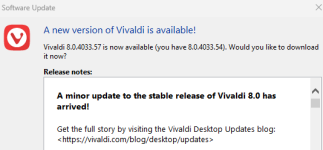
Just trying n my VM, this new update (...57) is available via notification and optional Check-for-Updates

vivaldi #1.png
 
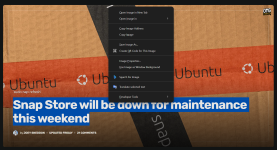
I have reported a bug that exists only in the Vivaldi browser, which is that you cannot copy selected text from the context menu if there is a background image behind it.

View attachment 298644

I can copy text on this picture, maybe it is the site that disallows it now?

Schermafbeelding 2026-07-05 180333.jpg


This is the site I used.

 
I can copy text on this picture, maybe it is the site that disallows it now?

View attachment 298645

This is the site I used.

Interesting, I will check other sites to see if the problem is limited to the OMG! Ubuntu site only, and to provide more information to Vivaldi support.
 
I just checked on the same page that you showed, and then I got the same thing as you... no copy text option.
I have encountered the same problem on several other websites, for example:
 
Vivaldi 8.1 Build 4087.46

What’s new in Vivaldi 8.1 on Desktop​

This release focuses on improvements and bug fixes. If you had given us feedback about tab behaviour issues lately, you will notice the difference, since that’s one of the aspects we’ve spent time refining. We’ve also polished our UI auto-hide feature, a game changer when you want to focus on the content and get as much screen real state as possible.
Take a look at our changelog for the full list of fixes included in this new version.
 
Vivaldi 8.1 Build 4087.48
This update includes a minor upgrade to the latest Chromium 150, with security fixes from upstream. Plus a fix for older Ubuntu and a further tab opening fix.

The following improvements were made since the initial 8.1 stable release:
  • [Chromium] Update to 150.0.7871.120
  • [Linux] Fails to start on Ubuntu 22.04 (VB-129829)
  • [Tabs][Bookmarks] New tab from bookmark opens as a pinned tab if a pinned tab stack is active (VB-129634)
 
Vivaldi 8.1 Build 4087.55
This update includes a minor upgrade to the latest Chromium 150 (which includes security fixes from upstream), along with additional key fixes from us.

The following improvements were made since the second 8.1 minor update:
  • [Chromium] Update to 150.0.7871.178
  • [Extensions] UI zoom breaks extension pop-out windows (VB-127962)
  • [Favicons] Fails to restore icons on session resume (VB-128542)
  • [Translate] Disable unnecessary API call (VB-130095)
 

You may also like...