
Solved vsdatant.sys causes BSOD

JB007

Level 26
Verified
Top Poster
Well-known
Forum Veteran
Describe the problem
BSOD
What have you tried?
I cannot delete vsdatant.sys
Hello,
A while ago I had some BSOD on my PC because I tried ZoneAlarm Extreme Security.Troubleshoot - BSOD | MalwareTips Community
Today again a BSOD and it is caused by vsdatant.sys ; I cannot delete it and it is a Zonealarm leftover.
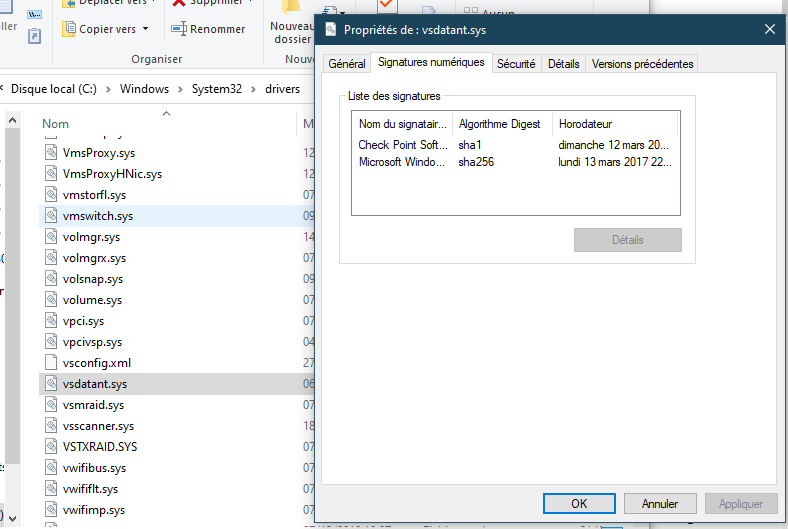
1.PNG
 

Attachments

Hello,
A while ago I had some BSOD on my PC because I tried ZoneAlarm Extreme Security.Troubleshoot - BSOD | MalwareTips Community
Today again a BSOD and it is caused by vsdatant.sys ; I cannot delete it and it is a Zonealarm leftover.

View attachment 251249
Use Autoruns to turn it off and see if you can delete it after a reboot.
 
Upvote 0
Use Autoruns to turn it off and see if you can delete it after a reboot.
I find it but don't know how I can turn it off ?
2.PNG


3.PNG
 
Upvote 0
Upvote 0
ZoneAlarm really doesn't provide a special tool to remove leftover files ? :unsure:

EDIT: I found a tool on Major Geeks:
ZoneAlarm Uninstall is a handy application that was created to help you quickly remove all traces of Zone Alarm products from your computer.
 
Last edited:
Upvote 1
After uninstalling ZA, you can check if its still registered to security center:
1. Open a command prompt window as an administrator
2. Run the command: WMIC /Node:localhost /Namespace:\\root\SecurityCenter2 Path FireWallProduct
3. If you see something Zonealarm related, run the command: wbemtest
4. Click Connect button
5. Then enter: root/securitycenter2
6. Click the "Connect" button
7. Click the "Query..." button
8. Enter: SELECT * from FireWallProduct
9.Select the Firewall product to delete
10. Click the "Delete" button
11. Reboot
 
Upvote 0
Upvote 0
After uninstalling ZA, you can check if its still registered to security center:
1. Open a command prompt window as an administrator
2. Run the command: WMIC /Node:localhost /Namespace:\\root\SecurityCenter2 Path FireWallProduct
3. If you see something Zonealarm related, run the command: wbemtest
4. Click Connect button
5. Then enter: root/securitycenter2
6. Click the "Connect" button
7. Click the "Query..." button
8. Enter: SELECT * from FireWallProduct
9.Select the Firewall product to delete
10. Click the "Delete" button
11. Reboot
It seems that ZA firewall was also deleted
11.PNG

12.PNG
 
Upvote 0

MalwareTips community

Join the discussion

Create a free account to reply to this thread, ask your own questions and get help from the community.

  • Reply and ask questions
  • Get alerts when someone answers
  • Free malware removal help

Join 75,675 members who help each other for free, since 2010.

Create free account
or continue with

Recently browsing

Members and guests who viewed this thread in the last 5 minutes

Back
Top