Advice Request WebRTC checker

Please provide comments and solutions that are helpful to the author of this topic.

amirr

Level 27
Thread author
Verified
Top Poster
Well-known
Jan 26, 2020
1,614
1
5,545
2,569
42
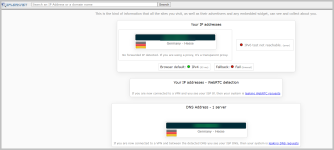
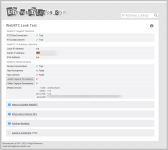
When connected to a VPN, I check WebRTC at BrowserLeaks - Web Browser Fingerprinting - Browsing Privacy and also IP/DNS Detect
Here are the results:
1653347421288.png

1653347467199.png

So according to them, I do not have any WebRTC leak, is that correct?


But my VPN provider's page, where it says WebRTC test, does say this:
Potential Leak

Is that by mistake, isn't it?

Thank you.
 
Which browser are you using? I remember Brave used to have some problems with it... specially if are using an extension and not the desktop app. Test on other browsers

Edit: i remember i've already checked Webrtc leaks that neither of those sites have found. Maybe someone here in the forum may know how to test that again
 
Last edited:
  • Like
Reactions: vtqhtr413 and amirr
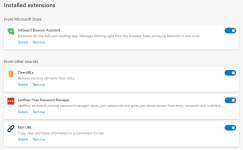
My extensions on Edge desktop are:
1653380271641.png
 
Update: I tested with firefox, without any addons, and it says:
WebRTC feature is disabled or not available.
1653392302725.png
 
  • Like
Reactions: silversurfer
But my VPN provider's page, where it says WebRTC test, does say this:
Potential Leak

Is that by mistake, isn't it?

Thank you.
Almost impossible to help you, we don't know your VPN provider nor it's a Desktop app or browser extension only?
From my personal experience, all this kind of "leak" testing websites are not always reliable, if you want to be really sure you have to contact support of your VPN provider, they should be able to guide what you have to do to avoid that your real IP might be visible in specific circumstances on major browsers like Edge, Chrome, Firefox.
 
Almost impossible to help you, we don't know your VPN provider nor it's a Desktop app or browser extension only?
From my personal experience, all this kind of "leak" testing websites are not always reliable, if you want to be really sure you have to contact support of your VPN provider, they should be able to guide what you have to do to avoid that your real IP might be visible in specific circumstances on major browsers like Edge, Chrome, Firefox.
WeVPN, desktop for Windows 11.
 
  • Thanks
Reactions: silversurfer