Troubleshoot Weird Icons In Windows 7

killpointik

Level 2
Thread author
Verified
Feb 7, 2016
79
84
67
80
NITRA
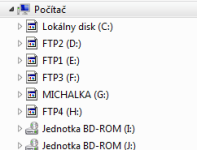
is this virus or? dont know what is it :( ...
thx for help
using KIS2016
 

Attachments

  • 2016-10-12 20_06_42-Počítač.png
    2016-10-12 20_06_42-Počítač.png
    5.3 KB · Views: 603
IconCache.db i cant see in folder...i have always uncheck hidden files
show-hidden-files.png


Can you give me the entire path of the folder where you are trying to see IconCache.db ? (you can hide you user name, for security) :)

You can also make a search with Windows Explorer (show hidden files,folders,and drives checked).

If this file is really not on your PC, can you verify your explore.exe is running ?

What is really strange : Windows must recreate this file, if it not existing, after you log off and log back on to (or restart) Windows.
 
Last edited:
Upvote 0
im using always SHOW HIDDENFILES........cant do screen for me......
but all your setup no work for me:
if you have TW i can show you


- Hold down Ctrl+Shift & Right ..... wtf is RIGHT? right cursor or what?
 
Last edited:
Upvote 0
right click.
=> or another method to kill your explorer.exe.

But if you don't see IconCache.db , even with the windows search tool / restart PC,
you have another problem on your PC.

Can you write the path where you searched for IconCache.db ?

All precedent advice were from members, for simple / easy solutions.

In your case, if you are sure IconCache.db is nowhere (after have verified all the paths
given in above posts and with windows search tool), you
should make a post here :
Malware Removal Assistance
 
Last edited:
  • Like
Reactions: askmark
Upvote 0