

The MalwareTips app
Your community, one tap away.
Open MalwareTips from your Home Screen or desktop. Follow discussions, find answers and pick up where you left off.
- Home Screen access
- Optional push alerts
- Your community
You're ready to explore.Explore what's new
Installation instructions
iPhone & iPad
- Open MalwareTips in Safari and tap Share. You may need to open the Page Menu first.
- Choose Add to Home Screen. If it is not listed, use Edit Actions to add it.
- Keep Open as Web App enabled if shown, then tap Add.
Android
- Open MalwareTips in Chrome or another browser that supports app installation.
- Open the browser menu and look for Install app, Install and create shortcut, or Add to Home screen.
- Choose Install and confirm. Wording varies by browser.
Desktop
- Chrome: use the install icon in the address bar, or the menu under Cast, save and share.
- Edge: open the menu, then More tools, Apps and Install this site as an app.
- Safari on Mac: choose Share or File, then Add to Dock. Firefox on Windows: look for the web apps button in the address bar.
If you cannot find an install option, update your browser or use its bookmark option to keep MalwareTips close.
Keep up with your conversations
After installation, open the app and sign in. Enable push notifications in Preferences if you want alerts. On iPhone and iPad, push requires a Home Screen web app and iOS or iPadOS 16.4 or later.
Sign in to manage notificationsInstallation is optional. Your notification settings stay under your control.
You are using an out of date browser. It may not display this or other websites correctly.
You should upgrade or use an alternative browser.
You should upgrade or use an alternative browser.
Comparison What is your favorite mobile browser in 2026?
- Thread starter Sampei.Nihira
- Start date
- Featured
Software Comparison
92 Replies
11,309 Views
Thread details
- Products to compare
- Mobile browsers
- Platform(s)
- Android
- iOS / iPadOS
- Android


Brave and Ulaa Browser 


The top three are Brave, Firefox, and Chrome.
I notice that no one uses Opera, my wife's favorite mobile browser.
I notice that no one uses Opera, my wife's favorite mobile browser.

Used before for mobile; sleek UI and built-in adblocker; not the fastest.I notice that no one uses Opera, my wife's favorite mobile browser.
Used before for mobile; sleek UI and built-in adblocker; not the fastest.
She really likes the layout, which can also be customized with a personal background image.
The translator is very fast.
My wife was born in Germany, but she’s been living in Italy for a long time and often needs to read the news in her native language.

The Google Safe Browsing block pop-up is borderline inappropriate :
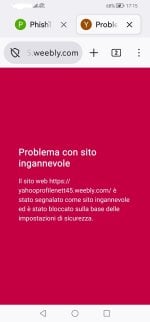
:
Attachments

I compared privacy and fingerprinting between Android Firefox and Android Brave, purely out of curiosity.
Android Brave certainly performs better than Android Firefox with the default lists and apparently requires no further configuration.
However, to limit privacy and fingerprinting risks, you need to add custom rules.
And you’ll likely need additional filter lists—beyond the defaults—to achieve the same level of protection as in Android Firefox.
A.Firefox requires more rules when compared to desktop Firefox,especially for cosmetic filtering and specifically for cookie alerts.
It's interesting to note that it's impossible to set the Insecure Cipher Suites limit to a value lower than 4, whereas in the desktop version of Firefox, you can set it as low as 1 and still maintain good compatibility with websites.
I assume that with careful configuration, both browsers are equivalent in the two aspects mentioned above.
Although in A.Brave some features can only be implemented at the block shields level, while in A.Firefox they can be configured via about:config.
P.S.
This difference is often critical to the usability of websites.
For example, if you block WebRTC using an adblocker, you need to set up exceptions.
This does not happen in Firefox when WebRTC is blocked via about:config.
Android Brave certainly performs better than Android Firefox with the default lists and apparently requires no further configuration.
However, to limit privacy and fingerprinting risks, you need to add custom rules.
And you’ll likely need additional filter lists—beyond the defaults—to achieve the same level of protection as in Android Firefox.
A.Firefox requires more rules when compared to desktop Firefox,especially for cosmetic filtering and specifically for cookie alerts.
It's interesting to note that it's impossible to set the Insecure Cipher Suites limit to a value lower than 4, whereas in the desktop version of Firefox, you can set it as low as 1 and still maintain good compatibility with websites.
I assume that with careful configuration, both browsers are equivalent in the two aspects mentioned above.
Although in A.Brave some features can only be implemented at the block shields level, while in A.Firefox they can be configured via about:config.
P.S.
This difference is often critical to the usability of websites.
For example, if you block WebRTC using an adblocker, you need to set up exceptions.
This does not happen in Firefox when WebRTC is blocked via about:config.
Last edited:

I guess the joke is on me, shortly after posting this, desktop has stopped syncing, maybe an update?I use Edge out of to necessity due to favorites sync

DNS is not blocking anything, mobile browser is syncing, reset does nothing, policies are OK, MS hates me.
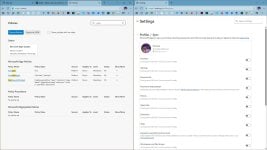
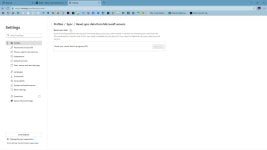
Attachments
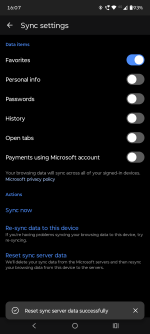
@TairikuOkami
When I upgraded to Windows 11, I decided to ditch Edge.
I’d had enough of its minor and major issues.
When I upgraded to Windows 11, I decided to ditch Edge.
I’d had enough of its minor and major issues.
Sync broken, cookies not removed for months, Bing/Copilot forced everywhere, I will probably do it as well. Sadly Librewolf has recently gone rogue too. Not many choices left.I’d had enough of its minor and major issues.
Sync broken, cookies not removed for months, Bing/Copilot forced everywhere, I will probably do it as well. Sadly Librewolf has recently gone rogue too. Not many choices left.
Good luck choosing your new desktop browser,it doesn't necessarily have to be the same as the one on your mobile device, as many forum members have pointed out in this thread.

Syncing is working fine for me. I sync everything, not just favorites. But the syncing issue has been faced by Edge users before. I faced it a couple of times in the past. Maybe it will be fixed soon, maybe it will not. There is no guarantee, really. Only Chrome has perfect syncing, in my experience. Everything else sometimes causes issues under specific circumstances.I guess the joke is on me, shortly after posting this, desktop has stopped syncing, maybe an update?
DNS is not blocking anything, mobile browser is syncing, reset does nothing, policies are OK, MS hates me.
View attachment 296631 View attachment 296632
Have a look at, edge://sync-internals/ and see if there is any error.
Have a look at, edge://sync-internals/ and see if there is any error.
Just removed my Quetta browser and installed Vivaldi and Brave browsers in my Oppo Find N6 fold phone
Quetta browser don't meet the needs in a fold phone
Can read my short review below
Quetta browser don't meet the needs in a fold phone
Can read my short review below
For ANDROID
I have replaced the Quetta browser, which no longer meets my needs, with Vivaldi and Brave browsers in my OPPO Find N6 fold phone
Let me just go through briefly why I chose Vivaldi (main) and Brave (backup)
Edge browser
CANNOT import favorites(bookmarks) from a html file. Needs to sync the favorites from the PC/laptop Edge browser. Not using the Android Edge since I'm not using the Windows Edge
Firefox browser
- Secure and privacy-oriented
- Can strengthen FF by accessing Preferences through its about:config
- Can install extensions
- Can import bookmarks from...
I have replaced the Quetta browser, which no longer meets my needs, with Vivaldi and Brave browsers in my OPPO Find N6 fold phone
Let me just go through briefly why I chose Vivaldi (main) and Brave (backup)
Edge browser
CANNOT import favorites(bookmarks) from a html file. Needs to sync the favorites from the PC/laptop Edge browser. Not using the Android Edge since I'm not using the Windows Edge
Firefox browser
- Secure and privacy-oriented
- Can strengthen FF by accessing Preferences through its about:config
- Can install extensions
- Can import bookmarks from...


Last edited:
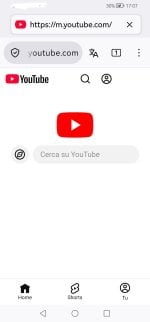
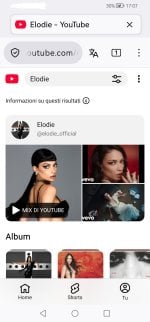
It’s interesting to note that in my Android Firefox + uBlock Origin, some filter lists aren’t effective at blocking mobile websites.
For example, the filter list:
effectively blocks the Google Consent Cookie on the desktop version of YouTube, but doesn’t block it on the mobile website "m.youtube.com".
I’ve written specific rules to address this issue:
This shortcoming can likely be extrapolated to other websites not covered by the filter list rules.
Recommendation:
Anyone seeking maximum privacy, ads blocking, tracker blocking, etc., should reconsider their choice of mobile browser.
For example, the filter list:
- uBlock filters – Cookie Notices
effectively blocks the Google Consent Cookie on the desktop version of YouTube, but doesn’t block it on the mobile website "m.youtube.com".
I’ve written specific rules to address this issue:
This shortcoming can likely be extrapolated to other websites not covered by the filter list rules.
Recommendation:
Anyone seeking maximum privacy, ads blocking, tracker blocking, etc., should reconsider their choice of mobile browser.
Last edited:

Nothing in the documentation mentions Android.Starting from Firefox 147, at least on Windows, Firefox has the sandboxing level equal to Chrome. I'm not sure that's the case on Android as well.
I convinced my wife to switch to:
I ran a week of tests, which were particularly interesting in terms of system-wide Private DNS.
In the end, we (including me) chose:
- Firefox + uBo (Easy Mode) + (DOH) NextDNS - HaGeZi Multi Pro.
I ran a week of tests, which were particularly interesting in terms of system-wide Private DNS.
- ControlD-DNS OISD Basic is too permissive
- ControlD DNS - ads & trackers is too restrictive
In the end, we (including me) chose:
- AdGuard-DNS.
Last edited:
Recently browsing
Members who viewed this thread in the last 5 minutes


