

M
What's in Your System Tray? - Icon Show Off
- Thread starter KaptainBug
- Start date
You are using an out of date browser. It may not display this or other websites correctly.
You should upgrade or use an alternative browser.
You should upgrade or use an alternative browser.
S
Sr. Normal

I see you are still using Cent browser and need to uninstall KB3035583.


A
AnoOtaku

Can you list the program names for the 2 buttom icons?
(They're not listed in my config.)
The second one is veracrypt.

I use it myself.

Can you list the program names for the 2 buttom icons?
(They're not listed in my config.)
Correct and for those that might not know, I highly suggest givint it a try to stop blue light from disturbing your sleeping patterns, at first the tint of orange might be odd but you can adjust and get used to it.The left one is the SunsetScreen and the other one I really don't know
Your eyes will thank you in the end.
Research information on blue light and sleep here : f.lux
F.lux or SunsetScreen, RedShift all do the same thing, just some have more options than others.
There's also similar apps for mobiles and tablets.
Good attempt and I could see how you thought so, very similar but not quite.The second one is veracrypt.
I use it myself.
It's actually KeepAliveHDD - an application designed to prevent your hard drive / external hard drives from entering sleep mode. This is done by automatically creating a tiny single text file every few minutes.
There's a number of reasons why to use such software even though one can change APM settings and other Windows Power options that prevent HDD/EXHDD from entering sleep mode / parking heads and stopping/starting too much thus causing an annoyance when you go to access said HDD/EXHDDs and have to wait each time.
A
AnoOtaku
Correct and for those that might not know, I highly suggest givint it a try to stop blue light from disturbing your sleeping patterns, at first the tint of orange might be odd but you can adjust and get used to it.
Your eyes will thank you in the end.
Research information on blue light and sleep here : f.lux
F.lux or SunsetScreen, RedShift all do the same thing, just some have more options than others.
There's also similar apps for mobiles and tablets.
Good attempt and I could see how you thought so, very similar but not quite.
It's actually KeepAliveHDD - an application designed to prevent your hard drive / external hard drives from entering sleep mode. This is done by automatically creating a tiny single text file every few minutes.
There's a number of reasons why to use such software even though one can change APM settings and other Windows Power options that prevent HDD/EXHDD from entering sleep mode / parking heads and stopping/starting too much thus causing an annoyance when you go to access said HDD/EXHDDs and have to wait each time.
Lol nice.
Had me fooled haha. Yeah I usually go into power options to adjust the time required for the hard drives to enter sleep mode. I actually thought the sleep function was impossible to change, but I learned how to change it a few months ago, very convenient.


This is my tray.........

From Left to right:
- Netspeed Monitor
- ShareX
- Easynet Monitor
- Windows 10 System Icon

From Top Left:
- Avira Free Antivirus
- Keyscrambler
- Windows Firewall Control
- Malwarebyte Anti Exploit
- Adguard
- Intel HD Graphics
- ASUS Smart Gesture
- NVIDIA Experience
- NVIDIA Activity Monitor
- EasyNet Monitor
- Portable APPS
- IDM
- Snarl
- Keepas
- OneDrive
From Left to right:
- Netspeed Monitor
- ShareX
- Easynet Monitor
- Windows 10 System Icon
From Top Left:
- Avira Free Antivirus
- Keyscrambler
- Windows Firewall Control
- Malwarebyte Anti Exploit
- Adguard
- Intel HD Graphics
- ASUS Smart Gesture
- NVIDIA Experience
- NVIDIA Activity Monitor
- EasyNet Monitor
- Portable APPS
- IDM
- Snarl
- Keepas
- OneDrive

....here is the sys tray from my laptop: "msi GE60-2PE" (GTX860,i7, Win7). I'm using it as desktop replacement so sometimes a lot of software is running in the system tray....

Not a lot since updating to Windows 10 and removing most third-party apps from Startup. It's all basic.

Avast and Nvidia GeForce Experience
Avast and Nvidia GeForce Experience

Windows 10 taskbar with BatteryBar Pro, Lenovo Access Connections, AVG Tuneup, Zemana, Defender, Peerblock

thanks, I am trying out sunsetscreen. Why did you choose that one, rather than the other apps that do the same?Correct and for those that might not know, I highly suggest givint it a try to stop blue light from disturbing your sleeping patterns, at first the tint of orange might be odd but you can adjust and get used to it.
Your eyes will thank you in the end.
Research information on blue light and sleep here : f.lux
F.lux or SunsetScreen, RedShift all do the same thing, just some have more options than others.

Here is my Work PC. Just OneNote, Snagit, VNC Server and CCleaner.
Taskbar shows Vipre Business Agent and Voodooshield.
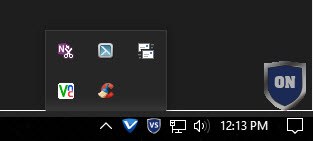
Taskbar shows Vipre Business Agent and Voodooshield.

My taskbar: Kaspersky Total Security 17, HitmanPro.Alert, VoodooShield, Adguard, STACK, Google Drive.

- Apr 18, 2016
- 3,676
- 28,872
- 4,599
1/ f.lux
2/ Avast
3/ Process Lasso
4/ Voodooshield
5/ HP CoolSense
6/ Unikey
7/ HP Beats Audio control


time for a battery change
Nope.time for a battery change
It's completely new. I use it only when I need to go somewhere and I want to take laptop with me. When I'm home, I don't use it.
You may also like...
-
 ¿Forums, Coffee and Sparks: What Fires Us Up… and What Burns Us Out?🥂
- Started by Halp2001
- Replies: 1
-
 Serious Discussion Wireshark: Your Essential Guide to Unraveling Network Traffic
- Started by Divergent
- Replies: 7
-
 Advice Request 40+ Passwords Found in Data Breach - Help Me Understand What Actually Happened
- Started by vaultedlogic
- Replies: 24
-
SOpera One R3 arrives with new AI, Google integrations, and more
- Started by Santiago Benavides García
- Replies: 0
