Do shortcuts work when Rainmeter is off? Which shortcuts do not work?Hello !
I put Rainmeter on, and the shortcuts don't work.
I installed Rainmeter and it works without issues (no blocks).
Last edited:
Do shortcuts work when Rainmeter is off? Which shortcuts do not work?Hello !
I put Rainmeter on, and the shortcuts don't work.
With Default Windows Settings all work fine. So I will use only ConfigureDefender and FirewallHardening.Do shortcuts work when Rainmeter is off? Which shortcuts do not work?
I installed Rainmeter and it works without issues (no blocks).
View attachment 289207
With Default Windows Settings all work fine. So I will use only ConfigureDefender and FirewallHardening.
Shortcut not from Rainmeter app but this is a skin personalized.I successfully installed Rainmeter (standard and portable installations) with maximal WHHLight restrictions, including WDAC = ON and an empty WDAC whitelist. There are no issues, and no need to whitelist anything. The standard installation creates a shortcut in the location "C:\ProgramData\Microsoft\Windows\Start Menu\Programs" which is by default whitelisted in WHHLight.
The shortcut is not created when using the portable version. If the user creates the shortcut manually in UserSpace, it will be blocked (can be whitelisted).
This skin are into OneDrive/Documents in a folder "Rainmeter"
Thanks, it works fine like this !!What file was exactly blocked? I cannot reproduce the block because after the installation, in this folder are only two PNG files and a few INI files (ignored by WHHLight).
Anyway, this folder is in UserSpace, so the block is intended (can be whitelisted).
If the shortcut file is blocked, the block can be seen via the SWH <Events>.
For whitelisting shortcuts, you should have to use the < Add Path*Wildcards> option. If not, the target executable would be whitelisted instead of the shortcut.
View attachment 289208
I noted this in the manual:
View attachment 289209
It is possible that it is not a blocked shortcut but the target executable (file path contained in the shortcut). If so, you can whitelist the target executable. If it is EXE / MSI file, the WDAC Whitelist must be used. The target EXE/MSI block can be seen via the WDAC <Events>.
Edit - Post corrected/updated.
@Andy Ful , please let me know if it's normal that I have so many problems since I applied “WHHLight” according to a FRST64 report?
View attachment 289231
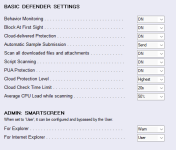
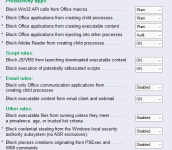
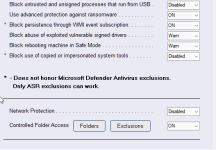
I configure it (WHHLight) with everything recommended.
simplewall Portable doesn't run with Windows 11.
Very well, thank you very much.Why do you think so? It runs without issues on my machine with even higher restrictions.
You use so many tools...It must be from other settings... Sorry for the confusion...
malwaretips.com
WHHLight package vs. FileFix attack
Similarly to ClickFix method, this attack can be mainly prevented by FirewallHardening.