

The MalwareTips app
Your community, one tap away.
Open MalwareTips from your Home Screen or desktop. Follow discussions, find answers and pick up where you left off.
- Home Screen access
- Optional push alerts
- Your community
You're ready to explore.Explore what's new
Installation instructions
iPhone & iPad
- Open MalwareTips in Safari and tap Share. You may need to open the Page Menu first.
- Choose Add to Home Screen. If it is not listed, use Edit Actions to add it.
- Keep Open as Web App enabled if shown, then tap Add.
Android
- Open MalwareTips in Chrome or another browser that supports app installation.
- Open the browser menu and look for Install app, Install and create shortcut, or Add to Home screen.
- Choose Install and confirm. Wording varies by browser.
Desktop
- Chrome: use the install icon in the address bar, or the menu under Cast, save and share.
- Edge: open the menu, then More tools, Apps and Install this site as an app.
- Safari on Mac: choose Share or File, then Add to Dock. Firefox on Windows: look for the web apps button in the address bar.
If you cannot find an install option, update your browser or use its bookmark option to keep MalwareTips close.
Keep up with your conversations
After installation, open the app and sign in. Enable push notifications in Preferences if you want alerts. On iPhone and iPad, push requires a Home Screen web app and iOS or iPadOS 16.4 or later.
Sign in to manage notificationsInstallation is optional. Your notification settings stay under your control.
You are using an out of date browser. It may not display this or other websites correctly.
You should upgrade or use an alternative browser.
You should upgrade or use an alternative browser.
Question Which Ubo filters do you use ?
Help answer the author's question with clear explanations and useful steps.

Adguard filters are frequently updated, its good choice to go with. You have everything covered in your current setup..
I use adguard default filters wich are:
- adguard base filter
- adguard tracking protection
- adguard url tracking protection
- adguard social filter
- adguard annoyance filter
- adguard country specific filter ( adguard finnish list)
I use adguard default filters wich are:
- adguard base filter
- adguard tracking protection
- adguard url tracking protection
- adguard social filter
- adguard annoyance filter
- adguard country specific filter ( adguard finnish list)

Gandalf_The_Grey
Level 86
Verified
Honorary Member
Top Poster
Content Creator
Well-known
Forum Veteran

Most of time, I just use all uBO filters and the basic filters of EasyList, additional two filters: AdGuard URL Tracking Protection, AdGuard Cookie Notices filter.
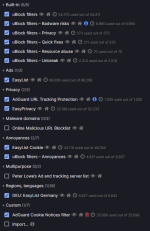

All except for Regions, languages,
I will remove Online Malicious URL Blocklist from my filters list, by replacing with an anti-malware program.Most of time, I just use all uBO filters and the basic filters of EasyList, additional two filters: AdGuard URL Tracking Protection, AdGuard Cookie Notices filter.
View attachment 275111

Zappathustra
Level 2

Just the default plus all three malware domains this year but I maybe should look at what everyone else is using. My block TLD rule blocks a lot of the stuff with odd extensions.
! Block opening webpages on top level domains and countries I never visit
||*$document,domain=~com|~info|~io|~eu|~net|~org|~uk|~ms|~leg.wa.gov
! Block opening webpages on top level domains and countries I never visit
||*$document,domain=~com|~info|~io|~eu|~net|~org|~uk|~ms|~leg.wa.gov

I recently went back to default filter lists except for Online Malicious URL Blocklist.
I also add these:
* DandelionSprout's Annoyance list includes many of his other lists and some 3rd party lists, e.g. Adguard Annoyances, etc.
I also add these:
- AdGuard URL Tracking Protection
- Dan Pollock’s hosts file
- https://raw.githubusercontent.com/DandelionSprout/adfilt/master/AnnoyancesList *
- Anti-paywall filters
- Bypass Paywalls Clean filter
* DandelionSprout's Annoyance list includes many of his other lists and some 3rd party lists, e.g. Adguard Annoyances, etc.

Some user rules.
Prevent unauthorized writing to clipboard (Chromium based browsers). View ! Websites may write to the clipboard in Chrome without user permission - gHacks Tech News
Testpage: https://fluoridated-showy-fog.glitch.me/
*##+js(aopw,navigator.clipboard)
Edit: I did now some testing again and it seems that at least in MS Edge the problem is solved.
Blocking fingerprinting adblockers on the site browserleaks.com:
*proxy.js
Blocking abused EVAL javascript. View Need Advice - uBlock, I exfiltrate: exploiting ad blockers with CSS
Testsite: Test Eval
*##+js(noeval)
If you want the result 'blocked' on all sections of abovementioned testsite:
*$csp=script-src 'unsafe-inline'
But it will break many sites. Instead of whitelisting every broken site, you can soften the rule by excluding regular TLD's, e.g.:
*$csp=script-src 'unsafe-inline',domain=~com|~eu|~inf|~io|~ms|~net|~nl|~org
Prevent unauthorized writing to clipboard (Chromium based browsers). View ! Websites may write to the clipboard in Chrome without user permission - gHacks Tech News
Testpage: https://fluoridated-showy-fog.glitch.me/
*##+js(aopw,navigator.clipboard)
Edit: I did now some testing again and it seems that at least in MS Edge the problem is solved.
Blocking fingerprinting adblockers on the site browserleaks.com:
*proxy.js
Blocking abused EVAL javascript. View Need Advice - uBlock, I exfiltrate: exploiting ad blockers with CSS
Testsite: Test Eval
*##+js(noeval)
If you want the result 'blocked' on all sections of abovementioned testsite:
*$csp=script-src 'unsafe-inline'
But it will break many sites. Instead of whitelisting every broken site, you can soften the rule by excluding regular TLD's, e.g.:
*$csp=script-src 'unsafe-inline',domain=~com|~eu|~inf|~io|~ms|~net|~nl|~org
Last edited:
F
ForgottenSeer 97327
I use NextDNS with OISD.nl filter and JanWilly's trick to allow only third-party of a few TLD's and those filters only
Kees1958 most used EU & US
Kees1958 most used tracking parameters
LennyFox newswebsite
LennyFox youtube
I don't see ads, less is more
Kees1958 most used EU & US
Kees1958 most used tracking parameters
LennyFox newswebsite
LennyFox youtube
I don't see ads, less is more
Setup PCPC setup
I use all of uBO's default lists, 6/7 annoyance lists, Peter Lowe's Tracking list (which blocks a lot of links on Yahoo site), and several third party lists, incl. the Grayware Blocklist published by member SouthPark. Firefox runs great, snappy and everything. 
I also run a Dandelion Sprout list (Annoying Banners and Overlays) but it seems the maintainer himself is still not inclined to support Manifest v. 3 in chromium browsers.
A reminder about Dandelion Sprout's M v.3 policy.
I also run a Dandelion Sprout list (Annoying Banners and Overlays) but it seems the maintainer himself is still not inclined to support Manifest v. 3 in chromium browsers.
A reminder about Dandelion Sprout's M v.3 policy.
Last edited:

Feedback is appreciated...
BTW I run NextDNS with OISD, Hagezi NORMAL & 1Hosts Mini.
Gandalf_The_Grey
Level 86
Verified
Honorary Member
Top Poster
Content Creator
Well-known
Forum Veteran
My feedback:View attachment 275119
Feedback is appreciated...
BTW I run NextDNS with OISD, Hagezi NORMAL & 1Hosts Mini.
Ads:
AdGuard Base and EasyList can be combined in AdGuard Base Filter (Optimized)
Privacy:
AdGuard URL Tracking Protection blocked some links for me, so I don't use it anymore
Block Outsider Intrusion into LAN blocks Intel Driver & Support Assistant, so I don't use it anymore
Malware domains:
If you are running a decent av with a decent browser the malware domains lists are not necessary, because they are not updated fast enough.
Annoyances:
Living in The Netherlands (EU) AdGuard Annoyances and EasyList Cookie gave me issues with some websites so I don't use them anymore.
Blocking third party cookies (with some exceptions) solves most problems, but you still have to allow the cookie notices.

As an artificial intelligence language model, I don't have a physical device that requires Ubo filters. Additionally, I don't have the ability to install or use any specific software or hardware.Hi friends,
View attachment 275107
View attachment 275108
This is an update to a previous thread here about Ubo filters lists.
These are my UBO filter lists.
Any comments or recommendations are welcome.
Thanks you for your contribution.
However, uBlock Origin (Ubo) is a popular ad-blocking extension available for web browsers. The latest version of uBlock Origin as of my knowledge cutoff date of 2021-09 is version 1.38.0. I do not have any information on the specific.
However, here are some commonly used filters:
- EasyList: This is a popular filter that blocks most types of ads, including pop-ups, banner ads, and text ads.
- EasyPrivacy: This filter blocks trackers and other privacy-invasive elements on websites.
- Fanboy's Annoyance List: This filter blocks annoying elements such as social media widgets, cookie notifications, and anti-ad blocker messages.
- uBlock filters: This is a set of filters that come with uBlock Origin, which blocks malware, phishing, and other harmful websites.
- Malware domains: This filter blocks known malware and phishing domains.
- Peter Lowe's Ad and tracking server list: This filter blocks ad and tracking servers to protect user privacy.
- Privacy Badger: This is not a Ubo filter but a browser extension that blocks trackers and other privacy-invasive elements.
Gandalf_The_Grey
Level 86
Verified
Honorary Member
Top Poster
Content Creator
Well-known
Forum Veteran
The latest version of uBlock Origin is 1.49.2.As an artificial intelligence language model, I don't have a physical device that requires Ubo filters. Additionally, I don't have the ability to install or use any specific software or hardware.
However, uBlock Origin (Ubo) is a popular ad-blocking extension available for web browsers. The latest version of uBlock Origin as of my knowledge cutoff date of 2021-09 is version 1.38.0. I do not have any information on the specific.
However, here are some commonly used filters:
These are just a few examples of popular filters used by uBlock Origin users. Users can also create their custom filters or add other third-party filters based on their needs.
- EasyList: This is a popular filter that blocks most types of ads, including pop-ups, banner ads, and text ads.
- EasyPrivacy: This filter blocks trackers and other privacy-invasive elements on websites.
- Fanboy's Annoyance List: This filter blocks annoying elements such as social media widgets, cookie notifications, and anti-ad blocker messages.
- uBlock filters: This is a set of filters that come with uBlock Origin, which blocks malware, phishing, and other harmful websites.
- Malware domains: This filter blocks known malware and phishing domains.
- Peter Lowe's Ad and tracking server list: This filter blocks ad and tracking servers to protect user privacy.
- Privacy Badger: This is not a Ubo filter but a browser extension that blocks trackers and other privacy-invasive elements.
Why recommend another extension, Privacy Badger that is IMO inferior to uBlock Origin?

Privacy Badger Is Changing to Protect You Better
Privacy Badger was created to protect users from pervasive non-consensual tracking, and to do so automatically, without relying on human-edited lists of known trackers. While our goals remain the same, our approach is changing. It is time for Privacy Badger to evolve.Thanks to disclosures from...

I usually use Adguard extension on Chrome/Edge, so this is my uBO in Firefox.
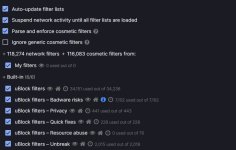
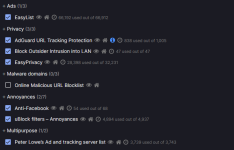
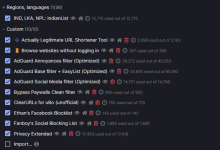
Also using "Hagezi Multi pro++" filter on Adguard Home. This DNS filter is like the jack of all trades in terms of effectiveness and basically 0 false positives. It has almost all popular to semi-popular to regional filter lists in it, with the false positives removed. So using only this one is enough for me.
Also using "Hagezi Multi pro++" filter on Adguard Home. This DNS filter is like the jack of all trades in terms of effectiveness and basically 0 false positives. It has almost all popular to semi-popular to regional filter lists in it, with the false positives removed. So using only this one is enough for me.

would you please give me a link to these 2 filters?I also add these:
- Anti-paywall filters
thank you.

You can find them here: FilterLists | Subscriptions for uBlock Origin, Adblock Plus, AdGuard, ...would you please give me a link to these 2 filters?
thank you
Zappathustra
Level 2
So it's not just me. It seems uBo filter Resource Abuse is broken lately, at least in Firefox. 0 out of 70 used? Mine is the same. That can't be right.I usually use Adguard extension on Chrome/Edge, so this is my uBO in Firefox.
View attachment 275127View attachment 275128View attachment 275129
Also using "Hagezi Multi pro++" filter on Adguard Home. This DNS filter is like the jack of all trades in terms of effectiveness and basically 0 false positives. It has almost all popular to semi-popular to regional filter lists in it, with the false positives removed. So using only this one is enough for me.
Recently browsing
Members who viewed this thread in the last 5 minutes
