


Because im addicted to test new software out. Was a big win7 fan, played abit with win10 when it came out to a stable release, never looked back to win7. Faster(on my laptop), Safer, more Functions, and for me personaly, it looks way better than win7. When i miss win7 and install it, it does not take 1 week and im back on win10. old oses are just so outdated in so much things its not worth using them.
Why Do You Use Windows 10?
- Thread starter Ink
- Start date
You are using an out of date browser. It may not display this or other websites correctly.
You should upgrade or use an alternative browser.
You should upgrade or use an alternative browser.
Today I currently have system 7 and 10 in different pcs, I am a Windows user.

I still use Windows 7 and don't plan on changing to 10. I'll migrate to Linux if required but not 10.
Already have Manjaro on one PC here in dual boot. Not sure how long I will fight the fight with W7, but that depends on how much support there is software-wise extending beyond 2019...

My beloved Windows 7 laptop died after 7 yr., so I replaced it with a new Windows 10 laptop from the same manufacturer but w/ slightly higher specs. I was surprised to find I like the appearance of 10 better. I also hadn't considered how outdated 7 was securitywise. I've deleted the small amount of bloatware from Acer and tightened the privacy settings, and so far, I can't complain 

I need Windows for games, and I also need security updates, so I use it if it's included with the machine.
I agree!
Its quite sad because like you said, when you look at the price of an SSD, (doesn't have to be an NVME, even though those came down in pricing) their very affordable, same with ram. Furthermore, these companies get discounts on pricing as they buy them in bulk. When SSD's first came out, yes I can see them not being in every laptop, but now, there's absolutely no excuse. I mean you can buy for a 2.5 512GB SSD for next to nothing now a days. Even the m.2 sata SSDs (not NVME) are just as cheap.
Personally I think it's all marketing. What I mean is, 1TB looks better than 512GB. 1TB SSD's are still a little more expensive, but those are coming down in price too, maybe I'm wrong though. Also all the crappy programs, apps and stuff that all OEMs install don't help either, but MS takes all the blame. Don't get me wrong, MS does create problems for themselves, but it's not always their fault. If you go to any of the OEM's websites and look for drivers, many of them haven't been updated in years. I've gone looking before and all the time I see drivers from 2016, or earlier, nothing newer and it's now 2019. So, I just go directly to the hardware vendor's site to get the most up to date version.
Even slowest SSD is like Ferrari compare to HDD. HDDs are fine for storage and this is it.
I never buy laptop with pre-installed Windows. You never know what you get with it. If im not mistaken, Lenovo installed keylogger on their laptops? Rather buy Windows license for 5 eur on ebay.
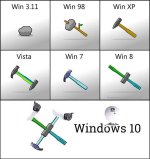


simply windows 10 is better
I've never had problems with updates
windows 7 ends in 2020 and linux ....
linux is for those who always want to be fixing something
If you are a computer engineer then Linux, if not, stay away.
I've never had problems with updates
windows 7 ends in 2020 and linux ....
linux is for those who always want to be fixing something
If you are a computer engineer then Linux, if not, stay away.

Also, you missed the humor in Spawn's post. It was a not a serious post, he was just listing some of the things that people like to complain about in regards to Windows 10, that aren't actually true.
So very true. @Spawn has been starting these kind of threads lately!
You can make the laptop run faster by doing a clean install of Windows 10 (or even just uninstalling anything you don't want) and as others have mentioned, replacing the hard drive with a SSD. Also upgrading to the maximum of 8GB of RAM would most likely help too. After doing that Windows 10 would be really fast on that computer as its CPU is quite fast. I'm running Windows 10 on some laptops from 2006 which have much slower CPUs and it runs very well.
This was exactly my case with my laptop. It was a W7 HDD 4GB RAM machine with Lenovo bloat, I upgraded to W10 and it was indeed a little slower. Once I got rid of the Lenovo bloat and cleaned up other unneeded junk and jumped to 8GB, it flew like a hummingbird. Then I dropped it and trashed it!
Now I'm on another W7 "mongrel" machine with 8GB RAM and a good SSD and it will run even better with W10 on it once it's set up!

I use windows for my pc gaming and leisure and sometimes to work in my studies

To the members who replied to me...If I open the laptop for an upgrade I void the warranty! I know how to get rid of bloatware on new computers (and I did on my son's laptop), I removed Mcafee and tweaked a ton of settings especially the privacy stuff and it still runs like crap compared to my Asus 4gb laptop that came with Windows 8, and guess what? It was so slow I couldn't do anything so I installed W7 and it runs just fine now! Actually, it responds faster than my son's brand new laptop with W10.
Bottom line... YES, W10 has some good features especially security wise, but I refuse to use it unless I have a high-end PC that can handle it. cause it does have a lot of bloat, crappy updates that do more harm than good and too many privacy issues.
Bottom line... YES, W10 has some good features especially security wise, but I refuse to use it unless I have a high-end PC that can handle it. cause it does have a lot of bloat, crappy updates that do more harm than good and too many privacy issues.
I want to play mmorpg's (Never got into the ps4 or xbox stuff). If they would offer an windows 11 without the telemetry, windows store, maps bloatware i would ditch
win 10 in a heartbeat. I want an opt-in not an "i have to delete all the bloat by myself approch"
win 10 in a heartbeat. I want an opt-in not an "i have to delete all the bloat by myself approch"
- Dec 4, 2014
- 3,504
- 1
- 19,047
- 4,479
- 52
You do not need a high end computer to run Windows 10. I've got some old laptops (which were released in 2006) which have processors which are about 4 times slower than your laptop and Windows 10 is fast on them. The processor in your laptop is 50% faster than the one in my main laptop and Windows 10 is really fast on it. Also I've upgraded tens of Windows 7 computers to Windows 10 and every time, except for one or two exceptions, Windows 10 ran just as well as Windows 7.Bottom line... YES, W10 has some good features especially security wise, but I refuse to use it unless I have a high-end PC that can handle it. cause it does have a lot of bloat, crappy updates that do more harm than good and too many privacy issues.
If you did a clean install of Windows 10, I'm absolutely certain that that it would at least as fast as Windows 7 does. As for updates, unless you have major issues with your Windows 10 install, or some security or privacy software is causing issues, they work fine.
L
Local Host
Considering Windows 10 as exaclty the same system requirements as Windows 7, not to mention is more stable and tends to be faster on the long run. I see no logic in using system specs as excuse to remain on Windows 7.To the members who replied to me...If I open the laptop for an upgrade I void the warranty! I know how to get rid of bloatware on new computers (and I did on my son's laptop), I removed Mcafee and tweaked a ton of settings especially the privacy stuff and it still runs like crap compared to my Asus 4gb laptop that came with Windows 8, and guess what? It was so slow I couldn't do anything so I installed W7 and it runs just fine now! Actually, it responds faster than my son's brand new laptop with W10.
Bottom line... YES, W10 has some good features especially security wise, but I refuse to use it unless I have a high-end PC that can handle it. cause it does have a lot of bloat, crappy updates that do more harm than good and too many privacy issues.
As for warranty, is a nice myth, but your warranty is not void for adding more RAM or changing to an SSD. In most cases laptops already include small opennings to change either, without having to remove the entire cover (exactly for this reason).

Simply because Windows 7 is running out of support and there is no other alternative to Windows 10 its kind a deal with it situation.
F
ForgottenSeer 72227
As for warranty, is a nice myth, but your warranty is not void for adding more RAM or changing to an SSD. In most cases laptops already include small opennings to change either, without having to remove the entire cover (exactly for this reason).
+1
Furthermore, most laptops/computer usually only come with a 1 year warranty anyways, unless you bought an extended warranty. I think the only exception to easy access to the ports are those ultra thin laptops like an Asus Zenbooks. Those don't have separate covers, you have to open the whole back to gain access, but even then, if all you did wan swap out the ram or the HDD/SSD, I'm pretty sure you don't void the warranty.
I've had a few days to get re-acquainted with W7 and though I'm enjoying it, it does not have some of the easy adjustability of features that W10 incorporates. For example, I have Windows Explorer opening on every start/restart. I have found no easy way to do this, with all kinds of conflicting and incorrect info on the web. No solution so far. In W10 this is an easy fix.
I will wait and see about opinions expressed here re: stability issues, etc. like high CPU usage on startup when I upgrade.I was going to wait until 1903 to upgrade but now I am on the fence and may do it sooner. Hum ... Any thoughts?
I will wait and see about opinions expressed here re: stability issues, etc. like high CPU usage on startup when I upgrade.I was going to wait until 1903 to upgrade but now I am on the fence and may do it sooner. Hum ...
Any thoughts?
I think that what is important is software that can be used. There were parts that were confused when compared to win7, but once you get used to it, there is no problem.
I still use the GIMP 2.6 because I like the UI. Is this dangerous?Only for photo editing. If I had Gimp or any strong photo editing software on my Chromebook, goodbye Windows 10. You gave me bugs, broken drivers and malware.

WHat? No. I love Gimp. I just can't use it on Chromebook because there is no Chromebook version. I could enable linux support but that compromises security on my Chromebook.I think that what is important is software that can be used. There were parts that were confused when compared to Windows 7, but once you get used to it, there is no problem.
I still use the GIMP 2.6 because I like the UI. Is this dangerous?
Sorry, I seemed to misread the text:notworthy:WHat? No. I love Gimp. I just can't use it on Chromebook because there is no Chromebook version. I could enable linux support but that compromises security on my Chromebook.
GIMP was the motivation for Windows adoption for me
You may also like...
-
 Security News It’s Change Your Password Day (again): Here is Why You Should Probably Do Nothing
- Started by Gandalf_The_Grey
- Replies: 4
-
 Poll Paid vs Free Antivirus in 2026: What are you using, and is it worth paying for?
- Started by Bot
- Replies: 96
-
Windows 11/10 is flagging "Winring0" on your PC monitoring, fan control apps, here's why
- Started by Gandalf_The_Grey
- Replies: 1
-

