


Windows 10 Taking too much RAM
- Thread starter rupeshkj
- Start date
You are using an out of date browser. It may not display this or other websites correctly.
You should upgrade or use an alternative browser.
You should upgrade or use an alternative browser.
- Status
- Not open for further replies.

Thanks for suggestions and i have tried these options not context menu disable but nothing worked and my only option left was to uninstall emsisoft amyou can keep EAM , but just tweak some of its options for low memory machines.
for example:
1- set File Guard as fast
2- be sure that memory optimization is checked.
3- disable context menu entries
etc..
 but i can wait till Microsoft releases the patch to fix this issue as i think it not the issue with emsisoft coz it was working fine in window 8.1
For every one here , We need to know , Is Win 10 use ram more than 7 & 8 , After stop several function not used ?
Any one agree with me press like .
Any one agree with me press like .

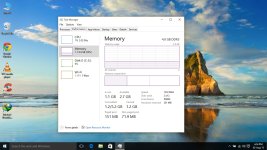
Is my memory usage too high?
this is what we call high
Attachment not working for me

@VirusAttak I can see yours and it's consuming RAM like crazy because of Chrome. Close it first and then see the difference.
Last edited:
I've some having tasks, one apache web server running 24*7 as well, So it is normal for me, even after consuming that much ram unlike windows 8 new windows 10 works like charm though I'm missing charm bar.
Yes I am also missing charms barI've some having tasks, one apache web server running 24*7 as well, So it is normal for me, even after consuming that much ram unlike windows 8 new windows 10 works like charm though I'm missing charm bar.
also coz i was very addicted to it now i blindly move my cursor to left side of screen and when charms bar not appears then i suddenly remember that i am using window 10 
D
Deleted member 178
Yes I am also missing charms bar
Lol me too, i really miss it.

Can some one give an alternate of Chrome ( I don't like firefox and Opera)
We should conclude that the purpose of multi-processes browser is to equally share the amount of memory consumption.
Why try Microsoft Edge? Or other derivatives of Firefox like Cyberfox which known to build for performance wise.

My system process is using up 200mb currently. I'm using 3.5gb/8gb of RAM. I have a bunch of tabs in Microsoft edge running, probably around 14 or so. Spotify playing, Skype in background along with defender and Malwarebytes pro on and Sandboxie and shadow defender just sitting there.
I was expecting it to eat more lol.
On Windows 8.1 I had all my RAM used up by Chrome and got a BSOD lol. I was amazed it used that much with only like 3 tabs open.
I was expecting it to eat more lol.
On Windows 8.1 I had all my RAM used up by Chrome and got a BSOD lol. I was amazed it used that much with only like 3 tabs open.

I can't see how you think ~240mb usage on one process is the reason your 4GB computer is slow. There are dozens of reasons why it could be slow but that's not one of them.
If you want to check for RAM bottlenecks, you look at paging.
If you want to check for RAM bottlenecks, you look at paging.

My system also seems to use more ram than Win8 in idle when all user programs are closed. I think it's 300MB more (5GB total) while system proccess (kernel) uses always some hundreds of MB's after some minutes of use.
System kernel for me hovers between 100-400mb. Last night it was up in the 300s now it's down to 102mb and all I did was out the computer to sleep so nothing new has been closed or opened. As long as it doesn't gobble over 1GB I'm fine with it.

so can someone tell me about how much memorey windows 10 eats without any other program (include WD)?
@nissimezra : According to my task manager it ranges from 30-40 MB which is very fine and tolerable for the performance, the disk percentage are zero including the CPU usage. Usually third party programs are the culprit to take the disk activity and memory high enough.
- Status
- Not open for further replies.
You may also like...
-

-
 Serious Discussion Mcafee does not play well with O&O Diskimage
- Started by Divine_Barakah
- Replies: 6
-
 Troubleshoot Dell PC CPU Fan Error. Spins for a few seconds and sometimes does not spin at all.
- Started by JakeXPMan
- Replies: 28
-
 Hot Take Google Chrome tests new feature that could slow your Windows 11/10 PC when you turn it on
- Started by Parkinsond
- Replies: 17
-
Hot Take Microsoft makes potential CPU, RAM, disk hogging feature default on Windows 11 25H2, 24H2
- Started by Parkinsond
- Replies: 9