New Update Windows 11 incorrectly warns Local Security Authority protection is off

vtqhtr413

Level 27
Thread author
Verified
Top Poster
Well-known
Forum Veteran
Aug 17, 2017
1,273
17,254
2,568
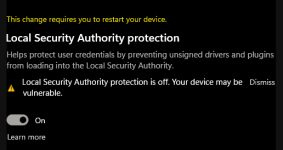
Some users have reported that the Windows Security app is showing “Local Security authority protection is off. Your device may be vulnerable” warnings when the feature is enabled. This bug is in Windows Defender (KB5007651), a mandatory security update shipped alongside Windows 11’s March 2023 Update. Local Security Authority protection is a feature that prevents code injection and reduces the possibility of compromising credentials. The Local Security Authority feature verifies Windows logins, and it is necessary for the OS to function normally.
 
Nah, nothing wrong with Microsoft products... but look out for TikTok, et al.
A missing registry key (trivial to fix) is not equivalent to a hypothetical threat of the CCP appropriating TikTok.

That's not the real TikTok threat. The real threat is that TikTok makes the world's children, teenagers and adults more stupid, mentally ill and addicted by the day.


I received this taskbar icon warning. In my case I think I read it was Core Isolation>Memory Integrity was off or it was on and I turned it off then back on and the warning on my taskbar icon went away. I toggled it on, rebooted numerous times since then, and still see the red "This change requires you to restart your device." notification while it's still on.
 
I received this taskbar icon warning. In my case I think I read it was Core Isolation>Memory Integrity was off or it was on and I turned it off then back on and the warning on my taskbar icon went away. I toggled it on, rebooted numerous times since then, and still see the red "This change requires you to restart your device." notification while it's still on.
Code:
Windows Registry Editor Version 5.00

[HKEY_LOCAL_MACHINE\SYSTEM\CurrentControlSet\Control\Lsa]
"RunAsPPL"=dword:00000002
"RunAsPPLBoot"=dword:00000002
 
I'm just gonna leave it b/c acc. to the Bleeping article posted here, if it's toggled to "on" it's "on" regardless of the warning. I toggled it and now I have this silly thing here in spoiler. This drive isn't running very often anyway, just to update software like VoodooShield.


"There is a technical glitch with this feature, if you have successfully turned on this feature and you are being prompted to restart, kindly note that the feature is ON irrespective of the message as this is a technical glitch that we are aware of and we are working to resolve that issue soonest," Microsoft Technical support representative reportedly told one of the affected users.

lsas notice.png

:):coffee:
 
Alternatively you can run it with UEFI locked, so RunAsPPLBoot does not matter, because it is secure boot protected:
Code:
reg add "HKLM\System\CurrentControlSet\Control\Lsa" /v "RunAsPPL" /t REG_DWORD /d "1" /f
I have mine set to "2" and I have an issue. When I initially applied the above fix in post #6 the LSASS setting was visible and the annoyance was fixed, however now that setting doesn't show in Device Security. Any ideas anyone? Or is this a new bug? :unsure:

Edit: Apparently this is also part of the bug.
 
Last edited:
  • Like
Reactions: JB007
I have mine set to "2" and I have an issue. When I initially applied the above fix in post #6 the LSASS setting was visible and the annoyance was fixed, however now that setting doesn't show in Device Security. Any ideas anyone? Or is this a new bug? :unsure:

Are there blue links called Core isolation details and Security processor details in your Device Security tab? If yes, click them and you’ll be taken to another settings page. Sometimes you’ll find LSA protection, Secure Boot, and other miscellaneous Device Security settings hiding inside the either of those blue links.

Another option is to X out of Windows Security and re-open from system tray icon.

This issue has affected me too, but not with LSA. For mine, Secure Boot would behind one of those blue links. Or the Security Processor would disappear and settings would report I had no TPM chip, even though I clearly do (enabled fTPM myself in BIOS) or W11 wouldn’t have installed. Doing what I outlined above usually helped. Try checking the details (blue links) option first, before the X-ing out option.
 
A missing registry key (trivial to fix) is not equivalent to a hypothetical threat of the CCP appropriating TikTok.

That's not the real TikTok threat. The real threat is that TikTok makes the world's children, teenagers and adults more stupid, mentally ill and addicted by the day.
I completely agree, but got no clue how to fight this trend other than by not using TikTok myself in the hopes that my kids will follow my example...
 
Anyone noticed the LSA (Local Security Authority Protection) in Windows Security Center became removed/replaced by Microsoft for a new feature called:
"Kernel-mode Hardware-enforced Stack Protection"

However, to use this feature, a Windows device must be using Intel Tiger Lake CPUs or AMD Zen3 CPUs and later. Therefore, Windows will only display this new setting if the device has the required hardware.

Like Memory Integrity, when enabling Kernel-mode Hardware-enforced Stack Protection, Windows will ensure that no incompatible drivers are loaded in Windows. If there are, the Stack Protection feature will not enable, and Windows will display a list of incompatible drivers.
 
Anyone noticed the LSA (Local Security Authority Protection) in Windows Security Center became removed/replaced by Microsoft for a new feature called:
"Kernel-mode Hardware-enforced Stack Protection"
Mine shows nether. My device doesn't qualify for the new feature.