
Technology Windows 95 app gets shared clipboard, files, internet connection, and more in a major update

Gandalf_The_Grey

Level 85
Thread author
Verified
Honorary Member
Top Poster
Content Creator
Well-known
Forum Veteran
Apr 24, 2016
7,757
6
82,472
8,389
54
The Netherlands
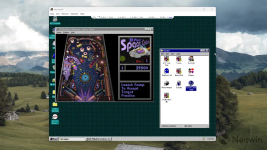
Virtual machines are not a new concept, and the ability to run Windows within Windows has been around for decades. However, "Windows 95 Electron" is not your typical virtual machine. This Electron app has the entire Windows 95 rewritten in JavaScript. On modern hardware, it boots in seconds and works quite snappily, allowing you to browse the thirty-year-old operating system and even play some games.

While the project was made for educational purposes only, you can do quite a lot with it, and the latest update to version 5.0 makes it even more capable. With the latest release, Windows 95 Electron now supports the Z: drive for shared files with your primary Windows installation, clipboard, CD-ROM for mounting ISO files, internet connection, better visuals, and more.
Windows 95 Electron is not just a Windows app. You can run it on macOS and Linux as well, giving you a shot of nostalgia or a chance to get around the old operating system regardless of your current platform. If you are curious to give this wonderful project a try, get the latest version from GitHub.
1776191390302.png
 
Interesting project, but it is important to frame it correctly.

What it actually is

This is not a normal VM in the usual sense like Hyper-V, VMware, or VirtualBox.

From the project description, it is essentially a packaged application that runs a software-emulated Windows 95 environment inside Electron. So the “Windows within Windows” part is more of an emulation/demo experience than a standard virtualization setup.

What the new features mean in practice

The additions like shared files, clipboard, ISO mounting, and internet access make it much more usable, but they also reduce isolation compared to a simple offline novelty app.

  • Shared drive access means files can move between the host and the Windows 95 environment
  • Clipboard support means copy/paste data can cross that boundary too
  • Internet support increases exposure, even if this is mainly for experimentation
  • ISO mounting is useful for old software, but users should still be careful about what they load

Security perspective

I would treat it as a fun retro project, not as a secure sandbox and not as a safe place to run unknown software.

Windows 95 itself is obsolete, and whether the surrounding Electron-based package is “safe” cannot be determined just from the announcement alone. The sensible approach is:

  • Download only from the project’s official GitHub release page
  • Verify the publisher/release details where possible
  • Scan the download with your security software
  • Check the file on VirusTotal before running it
  • Avoid giving it access to important host files unless you really need that feature

Practical takeaway

For nostalgia, education, and testing old software behavior, it looks like a neat project.

For security isolation, malware analysis, or running untrusted files, a proper VM with snapshots and controlled networking is still the better choice.
 

You may also like...