Kardo Kristal
From Crystal Security
Thread author
Verified
Top Poster
Developer
Well-known
Forum Veteran
- Jul 12, 2014
- 1,143
- 7,365
- 2,079
- 33
Here is a tutorial "How to update Windows Defender signatures" if you can't update it via inteface.
Finally I figured out workaround and it works for me very well.
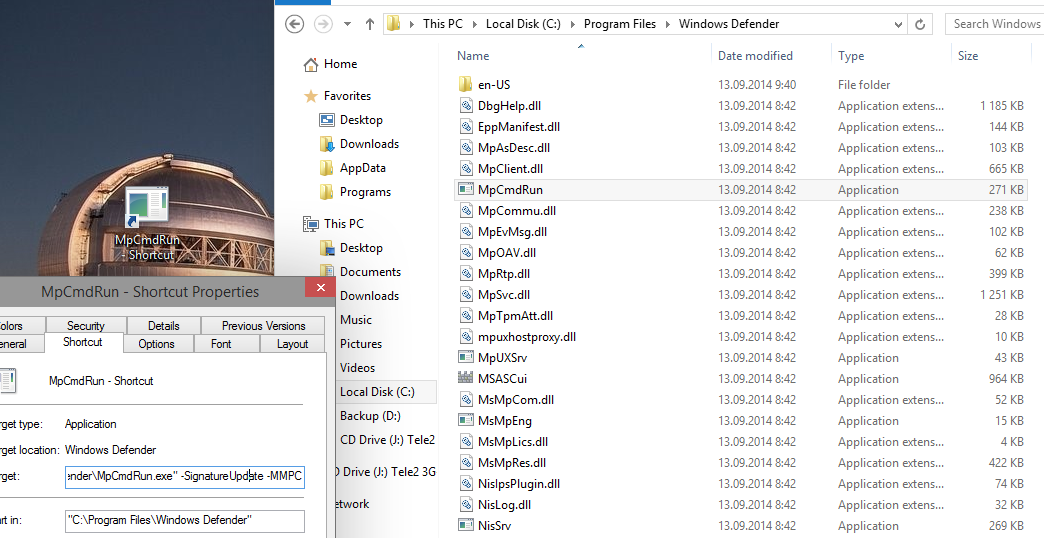
1. Navigate to Windows Defender directory: C:\Program Files\Windows Defender
2. Now search for the file called: MpCmdRun.exe and create shortcut of it to somewhere (e.g. Desktop)
3. Right-click on this shortcut and choose Properties. now click on Shortcut tab
4. Under Shortcut tab set Target to:
"C:\Program Files\Windows Defender\MpCmdRun.exe" -SignatureUpdate -MMPC
5. Click Apply and OK. After that launch shortcut, console window appears, wait until it disappears.

Windows Defender signatures should be now up-to-date (just check it via interface).
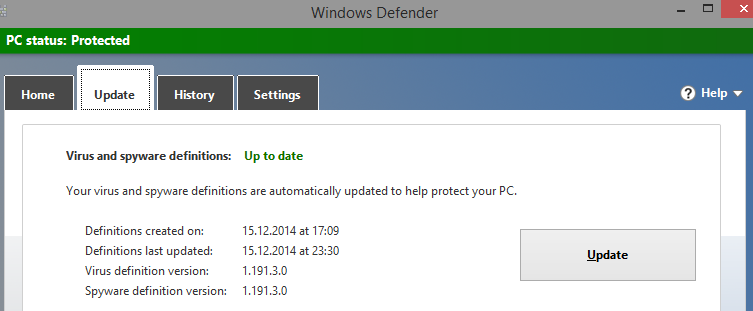
You can use this workaround manually or set up basic task under Task scheduler to automate it.
Regards,
Kardo
Finally I figured out workaround and it works for me very well.
1. Navigate to Windows Defender directory: C:\Program Files\Windows Defender
2. Now search for the file called: MpCmdRun.exe and create shortcut of it to somewhere (e.g. Desktop)
3. Right-click on this shortcut and choose Properties. now click on Shortcut tab
4. Under Shortcut tab set Target to:
"C:\Program Files\Windows Defender\MpCmdRun.exe" -SignatureUpdate -MMPC
5. Click Apply and OK. After that launch shortcut, console window appears, wait until it disappears.
Windows Defender signatures should be now up-to-date (just check it via interface).
You can use this workaround manually or set up basic task under Task scheduler to automate it.
Regards,
Kardo