
New Update Windows Maintenance Tool Updates Thread

lokamoka820

Level 41
Thread author
Verified
Top Poster
Well-known
Mar 1, 2024
3,072
3
9,860
3,969
Banana Republic
A powerful, all-in-one Windows maintenance toolkit built entirely in Batch & Powershell.
Designed for power users, sysadmins, and curious tinkerers – now smarter, safer, and fully offline-compatible.
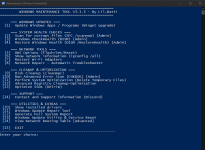
460259009-4ca6b995-750d-4ec8-817d-d79ee80e845d.png

✅ Features​

  • Run essential repair tools: SFC, DISM, CHKDSK
  • Optimize SSD drives (TRIM/defrag compatible)
  • Windows Update via winget (interactive selection)
  • View and upgrade individual packages (choose by ID)
  • Network diagnostics: ipconfig, routing table, DNS config, adapter reset
  • Clean temp files, logs, and browser cache
  • Save detailed reports to Desktop or custom folder:
    • System Info, Network Info, Driver List
  • Registry tools (new and improved!):
    • Safe cleanup, backup, and corruption scan
    • Fully menu-driven registry cleanup:
      • List "safe to delete" entries (matches: IE40, IE4Data, DirectDrawEx, DXM_Runtime, SchedulingAgent)
      • Bulk delete all safe entries (now 100% stable)
      • Easy backup & restore with versioned .reg files
      • PowerShell-based logic for precision and compatibility
  • All language/region support – no hardcoded adapter names
  • No third-party dependencies required

⚙️ Installation​

  1. Start Start_Windows_Maintenance_Tool.bat file.
  2. Follow the interactive menu.
⚠️ Script output may appear in your system language (e.g. English, Danish, etc). This is normal.
 
  • Like
Reactions: ProblematicPions

v3.1.3 - Fixed "Advanced Registry Cleanup & Optimization"​

What's new:
  • Major improvements to the Registry Cleanup menu:
  • Registry backup is now automatically created (or reused if a recent backup exists) before deleting "safe to delete" registry keys.
  • Checks for existing backups (within last 10 min) to avoid cluttering with too many backup files.
  • Clearer, more robust deletion with user feedback and error handling.
Why:
These fixes improve safety (with automatic backups), user clarity, and overall reliability of the advanced registry cleaning options.
 
v5.0.3

Hotfixes

  • Reworked package action result tracking with explicit per-item result events (SUCCESS, SKIPPED, FAILED, CANCELLED) to prevent false 0/x completion states.
  • Fixed update flow that could auto-rescan immediately after actions; auto-refresh now only runs when at least one package was actually updated successfully.
  • Added restart-risk confirmation for EA/Electronic Arts updates before running, so users can cancel if they do not want a potential reboot.
  • Improved retry handling: Not Applicable is now treated as SKIPPED, and known non-retry conditions no longer spawn unnecessary fallback windows.

Live Activity​

  • Added real-time progress UI for package actions in the Updates header (progress bar + live done/success/skipped/failed counters).
  • Added live per-package status (x/y, active package name, elapsed time) during update/install/uninstall actions.
  • Added live winget output streaming into Activity Log, including progress percentage updates and keep-alive status lines while commands run.

Provider Update UX​

  • Added visible console-window execution for pip updates so users can see real-time installer output.
  • Extended visible-window update behavior to Chocolatey and Python package updates for better transparency and fewer silent failures.

Credits​

Chaython - PR #85: Added Column Sorting for ListView Controls
  • Community testers/reporters - especially users reporting update-flow and Activity Log issues (including EA restart-risk and low-resolution/UI behavior).
 

You may also like...