L Lamo31 New Member Thread author Dec 20, 2017 2 0 1 US Dec 20, 2017 #1 Help me pls it has been more than a week and I am tired of having a slow pc, can't even play any games properly.SOLVED - Windows Process Manager (32-Bit) Virus system-log.txt
Help me pls it has been more than a week and I am tired of having a slow pc, can't even play any games properly.SOLVED - Windows Process Manager (32-Bit) Virus system-log.txt
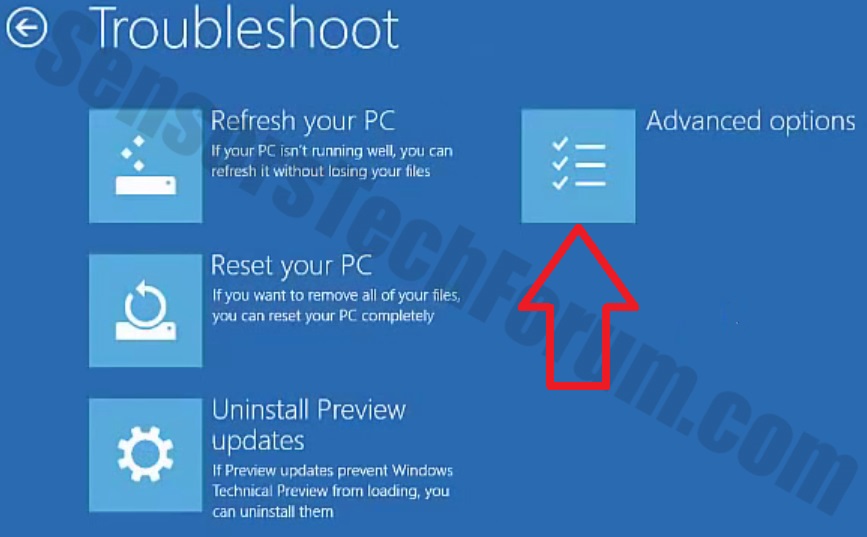
TwinHeadedEagle Level 41 Verified Mar 8, 2013 22,627 2,906 3,979 Dec 21, 2017 #2 Hello, Please download Farbar Recovery Scan Tool x64 and save it to a flash drive. Plug the flashdrive into the infected PC. Click Start and while holding Shift key on your keyboard click Power --> Restart. Note: It is important that you keep Shift key pressed while doing this or it won't work. Now you should get a window like this where you need to click Troubleshoot. In the next window, click Advanced options and select Command Prompt. Now you should log in into your account and after that Command Promptwindow. Access the notepad and identify your USB drive In the Command Prompt please type in: Code: notepad and press Enter. When the notepad opens, go to File menu. Select Open. Go to Computer and search there for your USB drive letter. Note down the letter and close the notepad. Scan with Farbar Recovery Scan Tool Once back in the command prompt window, please do the following: Type in e:\frst64.exe and press Enter. You need to replace e with the letter of your USB drive taken from notepad! FRST will start to run. Give him a minute or so to load itself. Click Yes to Disclaimer. In the main console, please click Scan and wait. When finished it will produce a logfile named FRST.txt in the root of your pendrive and display it. Close that logfile. Transfer it to your clean machine and include it in your next reply.
Hello, Please download Farbar Recovery Scan Tool x64 and save it to a flash drive. Plug the flashdrive into the infected PC. Click Start and while holding Shift key on your keyboard click Power --> Restart. Note: It is important that you keep Shift key pressed while doing this or it won't work. Now you should get a window like this where you need to click Troubleshoot. In the next window, click Advanced options and select Command Prompt. Now you should log in into your account and after that Command Promptwindow. Access the notepad and identify your USB drive In the Command Prompt please type in: Code: notepad and press Enter. When the notepad opens, go to File menu. Select Open. Go to Computer and search there for your USB drive letter. Note down the letter and close the notepad. Scan with Farbar Recovery Scan Tool Once back in the command prompt window, please do the following: Type in e:\frst64.exe and press Enter. You need to replace e with the letter of your USB drive taken from notepad! FRST will start to run. Give him a minute or so to load itself. Click Yes to Disclaimer. In the main console, please click Scan and wait. When finished it will produce a logfile named FRST.txt in the root of your pendrive and display it. Close that logfile. Transfer it to your clean machine and include it in your next reply.
L Lamo31 New Member Thread author Dec 20, 2017 2 0 1 US Dec 21, 2017 #3 Thank you for helping me but I don't have a USB or another pc to download it .
TwinHeadedEagle Level 41 Verified Mar 8, 2013 22,627 2,906 3,979 Dec 24, 2017 #4 Then I am afraid there is no solution.