Justin8897
New Member
There is something on my PC task manager called Windows Process Manager 32-bit. It eats up my CPU and makes FPS drops happen, and crashes my game. PLEASE HELP


Open MalwareTips from your Home Screen or desktop. Follow discussions, find answers and pick up where you left off.
If you cannot find an install option, update your browser or use its bookmark option to keep MalwareTips close.
After installation, open the app and sign in. Enable push notifications in Preferences if you want alerts. On iPhone and iPad, push requires a Home Screen web app and iOS or iPadOS 16.4 or later.
Sign in to manage notificationsInstallation is optional. Your notification settings stay under your control.


notepad
'd:/frst64.exe' is not recognized as an internal or external command,Hello,
Please download Farbar Recovery Scan Tool x64 and save it to a flash drive.
- Plug the flashdrive into the infected PC.
- Boot to windows recovery by using one of the methods on this link: Boot to Advanced Startup Options in Windows 10
- If you're unable to boot to recovery you will need to create a recovery drive. You can do it by following this guide: https://support.microsoft.com/en-us/help/4026852/windows-create-a-recovery-drive
Make sure to uncheck Back up system files to the recovery drive box, so that process goes faster.
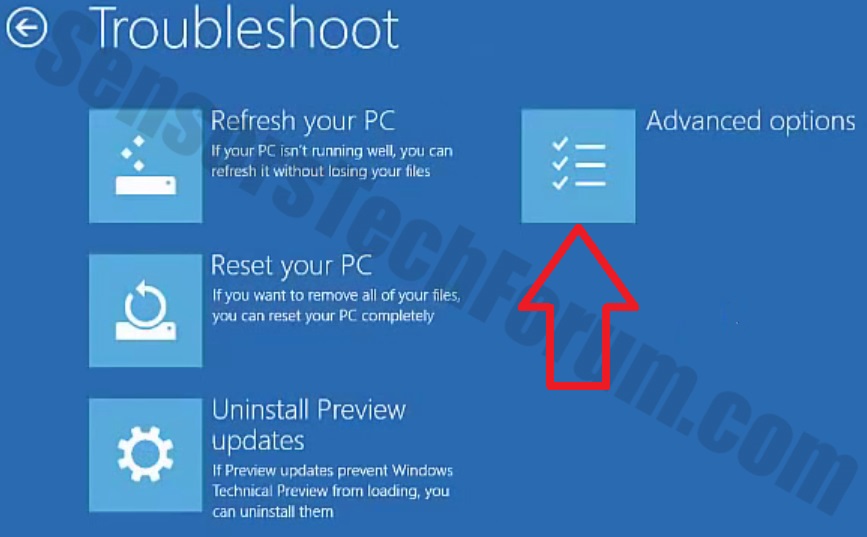
- Now you should get a window like this where you need to click Troubleshoot.
- In the next window, click Advanced options and select Command Prompt.
- Now you should log in into your account and after that Command Promptwindow.
Access the notepad and identify your USB drive
In the Command Prompt please type in:
and press Enter.Code:notepad
- When the notepad opens, go to File menu.
- Select Open.
- Go to Computer and search there for your USB drive letter.
- Note down the letter and close the notepad.
Scan with Farbar Recovery Scan Tool
Once back in the command prompt window, please do the following:
- Type in e:\frst64.exe and press Enter.
You need to replace e with the letter of your USB drive taken from notepad!- FRST will start to run. Give him a minute or so to load itself.
- Click Yes to Disclaimer.
- In the main console, please click Scan and wait.
- When finished it will produce a logfile named FRST.txt in the root of your pendrive and display it. Close that logfile.
Transfer it to your clean machine and include it in your next reply.
I have downloaded FRST on safe computer an plugged my usb into computer. I did the recovery drive but instruction are unclear on how to get to advanced setup from there.You need to download a FRST tool on a clean computer and to transfer it to USB. Then put the USB when you're in recovery mode, not after. Then follow the instructions to run a scan.
Members who viewed this thread in the last 5 minutes

