Windows Process Manager - Using almost 100% of my CPU

Roachyyy

New Member
Mainly just looking for help in trying to solve the problem. I have been looking around on multiple forums for almost a week, trying to find an answer, trying many different programs and practices to no avail, so I was making this thread in order to (hopefully) find someone who could help me out.
 

Attachments

Hello,


Please download Farbar Recovery Scan Tool x64 and save it to a flash drive.
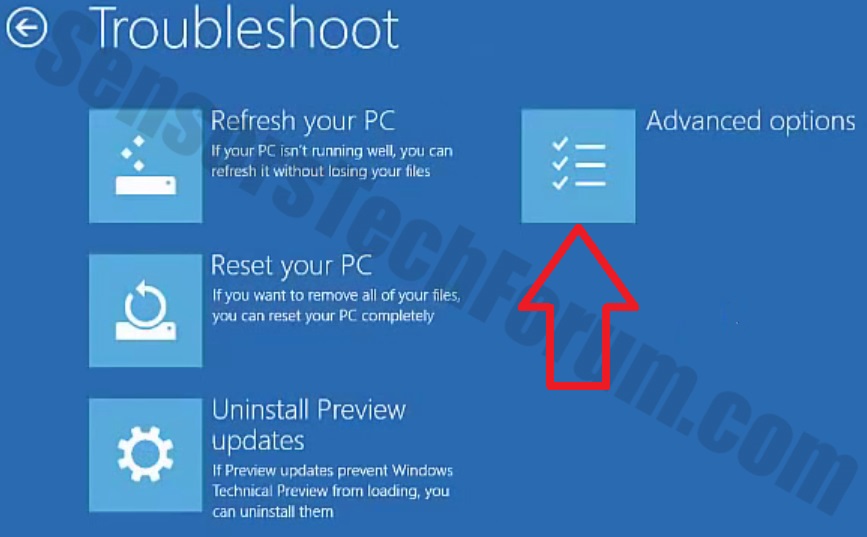
  • Now you should get a window like this where you need to click Troubleshoot.
Windows-10-2.jpg

  • In the next window, click Advanced options and select Command Prompt.
  • Now you should log in into your account and after that Command Promptwindow.
notepad.png
Access the notepad and identify your USB drive

In the Command Prompt please type in:
Code:
notepad
and press Enter.
  • When the notepad opens, go to File menu.
  • Select Open.
  • Go to Computer and search there for your USB drive letter.
  • Note down the letter and close the notepad.


FRST.gif
Scan with Farbar Recovery Scan Tool

Once back in the command prompt window, please do the following:
  • Type in e:\frst64.exe and press Enter.
    You need to replace e with the letter of your USB drive taken from notepad!
  • FRST will start to run. Give him a minute or so to load itself.
  • Click Yes to Disclaimer.
  • In the main console, please click Scan and wait.
  • When finished it will produce a logfile named FRST.txt in the root of your pendrive and display it. Close that logfile.

Transfer it to your clean machine and include it in your next reply.
 

Recently browsing

Members who viewed this thread in the last 5 minutes

Back
Top