

The MalwareTips app
Your community, one tap away.
Open MalwareTips from your Home Screen or desktop. Follow discussions, find answers and pick up where you left off.
- Home Screen access
- Optional push alerts
- Your community
You're ready to explore.Explore what's new
Installation instructions
iPhone & iPad
- Open MalwareTips in Safari and tap Share. You may need to open the Page Menu first.
- Choose Add to Home Screen. If it is not listed, use Edit Actions to add it.
- Keep Open as Web App enabled if shown, then tap Add.
Android
- Open MalwareTips in Chrome or another browser that supports app installation.
- Open the browser menu and look for Install app, Install and create shortcut, or Add to Home screen.
- Choose Install and confirm. Wording varies by browser.
Desktop
- Chrome: use the install icon in the address bar, or the menu under Cast, save and share.
- Edge: open the menu, then More tools, Apps and Install this site as an app.
- Safari on Mac: choose Share or File, then Add to Dock. Firefox on Windows: look for the web apps button in the address bar.
If you cannot find an install option, update your browser or use its bookmark option to keep MalwareTips close.
Keep up with your conversations
After installation, open the app and sign in. Enable push notifications in Preferences if you want alerts. On iPhone and iPad, push requires a Home Screen web app and iOS or iPadOS 16.4 or later.
Sign in to manage notificationsInstallation is optional. Your notification settings stay under your control.
You are using an out of date browser. It may not display this or other websites correctly.
You should upgrade or use an alternative browser.
You should upgrade or use an alternative browser.
Windows Security Center is shutting down - Suspicious .exe executed two days ago

Hi,
Please download AdwCleaner by Xplode and save to your Desktop.
Double click on AdwCleaner.exe to run the tool.
Press OK when asked to close all programs and follow the onscreen prompts.
Press OK again to allow AdwCleaner to restart the computer and complete the removal process.
Please download Farbar Recovery Scan Tool and save it to your desktop.
Note: You need to run the version compatibale with your system. If you are not sure which version applies to your system download both of them and try to run them.
Only one of them will run on your system, that will be the right version.
Please download AdwCleaner by Xplode and save to your Desktop.
Double click on AdwCleaner.exe to run the tool.
- Click on the Scan button.
- After the scan has finished click on the Clean button.
Press OK when asked to close all programs and follow the onscreen prompts.
Press OK again to allow AdwCleaner to restart the computer and complete the removal process.
- After rebooting, a logfile report (AdwCleaner[S0].txt) will open automatically.
- Post logfile will also be saved in the C:\AdwCleaner folder.
Please download Farbar Recovery Scan Tool and save it to your desktop.
Note: You need to run the version compatibale with your system. If you are not sure which version applies to your system download both of them and try to run them.
Only one of them will run on your system, that will be the right version.
- Double-click to run it. When the tool opens click Yes to disclaimer.
- Press Scan button.
- It will make a log (FRST.txt) in the same directory the tool is run. Please attach it to your reply.
- The first time the tool is run, it makes also another log (Addition.txt). Please attach it to your reply.
You have two Antivirus installed:
- AVG
- Microsoft Security Essentials
Please remove one of them, it is not good to keep two of them for many reason.
Please go to: VirusTotal
Download attached fixlist.txt on the same location as FRST (otherwise the fix won't work)
Open FRST, and click Fix. Attach me that report after it is finished.
- AVG
- Microsoft Security Essentials
Please remove one of them, it is not good to keep two of them for many reason.
Please go to: VirusTotal
- Click the Choose File button.
- Please copy/paste the following text into the 'File name:' box:
Code:C:\Windows\SysWOW64\msvfw325.dll - Click Open then click the Scan it! button just below.
- This will scan the file. Please be patient.
- If you get a message saying File already analyzed: click Reanalyse
- Once scanned, copy and paste the URL from your browser address bar in your next reply.
Download attached fixlist.txt on the same location as FRST (otherwise the fix won't work)
Open FRST, and click Fix. Attach me that report after it is finished.
Attachments
Yes execute FRST...
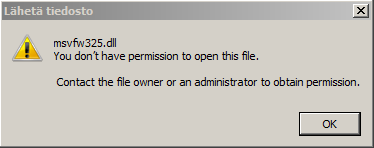
About this file, can you copy it to another location, and then try to upload it to Virustotal. If you fail to upload it, archive it, and upload here...
About this file, can you copy it to another location, and then try to upload it to Virustotal. If you fail to upload it, archive it, and upload here...
Hi!
I can't find a way to copy the file either. I've tried quite a lot of things to go around the problem, but I'm really stuck with this.
Do you think there is a way I could copy the file ignoring all the Windows permission stuff?
Attached the fixlog from FRST.
I can't find a way to copy the file either. I've tried quite a lot of things to go around the problem, but I'm really stuck with this.
Do you think there is a way I could copy the file ignoring all the Windows permission stuff?
Attached the fixlog from FRST.
Attachments
Yes, try Virustotal again...
No matter if it is successfull, attach fresh FRST report...
No matter if it is successfull, attach fresh FRST report...
Amazing!
After the latest fix and a reboot everything went back to normal again! Thank you so much!
Here's the latest log from FRST.
Btw, what security software you would prefer?
Now I have only the Windows Security Essentials, but should I override it with AVG or Avast for example?
After the latest fix and a reboot everything went back to normal again! Thank you so much!
Here's the latest log from FRST.
Btw, what security software you would prefer?
Now I have only the Windows Security Essentials, but should I override it with AVG or Avast for example?
Attachments
Great to hear it 
About MSE, read this and decide yourself --> http://www.pcpro.co.uk/news/security/384394/microsoft-security-essentials-is-designed-to-be-bottom-of-the-antivirus-rankings
Please download DelFix by "Xplode" to your Desktop.
Run the tool and check the following boxes below;
Now click on "Run" button. Wait for the programme completes his work.
All the tools we used should be gone.
Tool will create and open an log report (DelFix.txt)
Note: The report will also be stored on C:\DelFix.txt
> I don't need DelFix log report.
About MSE, read this and decide yourself --> http://www.pcpro.co.uk/news/security/384394/microsoft-security-essentials-is-designed-to-be-bottom-of-the-antivirus-rankings
Please download DelFix by "Xplode" to your Desktop.
Run the tool and check the following boxes below;
- Remove disinfection tools
- Create registry backup
- Purge System Restore
Now click on "Run" button. Wait for the programme completes his work.
All the tools we used should be gone.
Tool will create and open an log report (DelFix.txt)
Note: The report will also be stored on C:\DelFix.txt
> I don't need DelFix log report.
Recently browsing
Members who viewed this thread in the last 5 minutes
You may also like...
-
 MalwareTips News Windows update closes two zero-days used in active attacks
 -

-
-

-