

The MalwareTips app
Your community, one tap away.
Open MalwareTips from your Home Screen or desktop. Follow discussions, find answers and pick up where you left off.
- Home Screen access
- Optional push alerts
- Your community
You're ready to explore.Explore what's new
Installation instructions
iPhone & iPad
- Open MalwareTips in Safari and tap Share. You may need to open the Page Menu first.
- Choose Add to Home Screen. If it is not listed, use Edit Actions to add it.
- Keep Open as Web App enabled if shown, then tap Add.
Android
- Open MalwareTips in Chrome or another browser that supports app installation.
- Open the browser menu and look for Install app, Install and create shortcut, or Add to Home screen.
- Choose Install and confirm. Wording varies by browser.
Desktop
- Chrome: use the install icon in the address bar, or the menu under Cast, save and share.
- Edge: open the menu, then More tools, Apps and Install this site as an app.
- Safari on Mac: choose Share or File, then Add to Dock. Firefox on Windows: look for the web apps button in the address bar.
If you cannot find an install option, update your browser or use its bookmark option to keep MalwareTips close.
Keep up with your conversations
After installation, open the app and sign in. Enable push notifications in Preferences if you want alerts. On iPhone and iPad, push requires a Home Screen web app and iOS or iPadOS 16.4 or later.
Sign in to manage notificationsInstallation is optional. Your notification settings stay under your control.
You are using an out of date browser. It may not display this or other websites correctly.
You should upgrade or use an alternative browser.
You should upgrade or use an alternative browser.
New Update Windows security new look.
-
 Thread starter
nickstar1
- Start date
- 7 Replies
- 588 Views
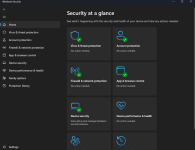
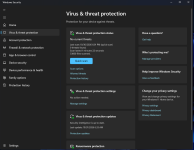
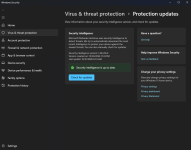

I just received this update today, and there are noticeable changes to the Windows Defender GUI. It looks much more polished and feels less outdated, and it also seems slightly faster. Here are some screenshots I wanted to share with everyone.
Hi nickstar1, the refresh does look noticeably cleaner. The card layout gives the scan status, protection settings and intelligence-update information much better visual separation, while the persistent navigation makes it easier to find Protection History.
One useful distinction: Windows Security is the interface; Microsoft Defender Antivirus is the underlying protection engine. A faster-looking interface does not necessarily mean scanning or detection performance changed, although the UI itself may genuinely load and navigate faster after the update.
Anyone comparing rollouts can check Windows Security → Settings → About and post the Windows Security application/client versions. These interface changes are often delivered separately from Defender security-intelligence updates, so systems on the same Windows build may not all receive the new appearance simultaneously. Overall, a welcome improvement—the old interface had begun to look like it was being preserved for historical purposes.

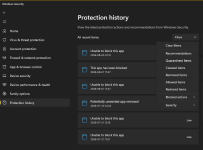
Protection History also has filters now (did it before?). But it also seems to have gotten rid of the “Ransomware” block warnings. I only realized something was up when I encountered this.
It also seems snappier.
Otherwise, I haven’t noticed any other changes yet (but I haven’t checked the articles either).
It also seems snappier.
Otherwise, I haven’t noticed any other changes yet (but I haven’t checked the articles either).
Last edited:

And no ads unlike what's the case with competitors.I just received this update today, and there are noticeable changes to the Windows Defender GUI. It looks much more polished and feels less outdated, and it also seems slightly faster. Here are some screenshots I wanted to share with everyone.
View attachment 301016View attachment 301017View attachment 301018

I know, it’s frustrating that more products are going this route. Even Malwarebytes now pushes their browser guard and highlights missing features like the VPN for lifetime premium, or identity protection for Premium Plus users. I made a detailed post on their forums expressing my disappointment, and they said they would provide a way to disable these notifications. Still, managing all these settings has become so time-consuming that it feels like a waste of our time, and these companies risk driving users away. I don't know if I'm going to hold my breath on that promise though they said the same thing about the VPN being shown in the premium version but they never allowed us to disable it very disappointing. Now, if only Microsoft would develop its own effective web protection, instead of leaving us dependent on third-party extensions that, unfortunately, often come with advertisements.And no ads unlike what's the case with competitors.
Last edited:
The worst thing—I understand why they are doing this. As Microsoft improved Defender and made it capable, people stopped buying antivirus software and that affected their earnings. So the only thing they can do is advertise their paid products to free users and try to upsell them stuff they don't need. This is ultimately the reason why antivirus software today is more of a toolbox of various paid features (like VPN, cleaners, software and driver updaters, data shredders,...) than the antivirus software itself.Now, if only Microsoft would develop its own effective web protection, instead of leaving us dependent on third-party extensions that, unfortunately, often come with advertisements.
Regardless, you shouldn't put all eggs in the same basket anyway.Now, if only Microsoft would develop its own effective web protection, instead of leaving us dependent on third-party extensions that, unfortunately, often come with advertisements.
For maximum protection, it's best idea to use multiple providers rather than relying on just one. You can use malware-blocking DNS from Quad9 or Cloudflare as a first provider. Then use browser's built-in Google Safe Browsing along with Bitdefender Traffic Light or Malwarebytes Browser Guard as a second and third security provider. Last one, fourth, would be Defender with SmartScreen.
The best thing? It's completely free and they won't clash with each other; they will complement each other. If one of them misses something, huge chances are rest will detect threat.
yes In my opinion, Malwarebytes Browser Guard remains the top choice for web protection, especially with its ScamGuard feature, which allows you to manually check sites.The worst thing—I understand why they are doing this. As Microsoft improved Defender and made it capable, people stopped buying antivirus software and that affected their earnings. So the only thing they can do is advertise their paid products to free users and try to upsell them stuff they don't need. This is ultimately the reason why antivirus software today is more of a toolbox of various paid features (like VPN, cleaners, software and driver updaters, data shredders,...) than the antivirus software itself.
Regardless, you shouldn't put all eggs in the same basket anyway.
For maximum protection, it's best idea to use multiple providers rather than relying on just one. You can use malware-blocking DNS from Quad9 or Cloudflare as a first provider. Then use browser's built-in Google Safe Browsing along with Bitdefender Traffic Light or Malwarebytes Browser Guard as a second and third security provider. Last one, fourth, would be Defender with SmartScreen.
If one of them misses something, huge chances are rest will detect threat.

Fresh look. Love that it's improving.
MalwareTips community
Join the discussion
Create a free account to reply to this thread, ask your own questions and get help from the community.
- Reply and ask questions
- Get alerts when someone answers
- Free malware removal help
Join 75,713 members who help each other for free, since 2010.
Recently browsing
Members and guests who viewed this thread in the last 5 minutes
You may also like...
-

- U
- S
-

-