Open MalwareTips in Safari and tap Share. You may need to open the Page Menu first.
Choose Add to Home Screen. If it is not listed, use Edit Actions to add it.
Keep Open as Web App enabled if shown, then tap Add.
Android
Open MalwareTips in Chrome or another browser that supports app installation.
Open the browser menu and look for Install app, Install and create shortcut, or Add to Home screen.
Choose Install and confirm. Wording varies by browser.
Desktop
Chrome: use the install icon in the address bar, or the menu under Cast, save and share.
Edge: open the menu, then More tools, Apps and Install this site as an app.
Safari on Mac: choose Share or File, then Add to Dock. Firefox on Windows: look for the web apps button in the address bar.
If you cannot find an install option, update your browser or use its bookmark option to keep MalwareTips close.
Keep up with your conversations
After installation, open the app and sign in. Enable push notifications in Preferences if you want alerts. On iPhone and iPad, push requires a Home Screen web app and iOS or iPadOS 16.4 or later.
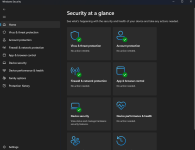
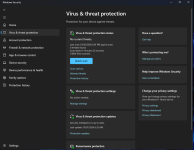
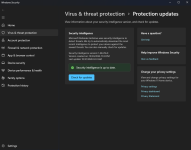
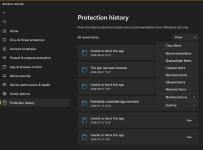
I just received this update today, and there are noticeable changes to the Windows Defender GUI. It looks much more polished and feels less outdated, and it also seems slightly faster. Here are some screenshots I wanted to share with everyone.
Hi nickstar1, the refresh does look noticeably cleaner. The card layout gives the scan status, protection settings and intelligence-update information much better visual separation, while the persistent navigation makes it easier to find Protection History.
One useful distinction: Windows Security is the interface; Microsoft Defender Antivirus is the underlying protection engine. A faster-looking interface does not necessarily mean scanning or detection performance changed, although the UI itself may genuinely load and navigate faster after the update.
Anyone comparing rollouts can check Windows Security → Settings → About and post the Windows Security application/client versions. These interface changes are often delivered separately from Defender security-intelligence updates, so systems on the same Windows build may not all receive the new appearance simultaneously. Overall, a welcome improvement—the old interface had begun to look like it was being preserved for historical purposes.
Protection History also has filters now (did it before?). But it also seems to have gotten rid of the “Ransomware” block warnings. I only realized something was up when I encountered this.
It also seems snappier.
Otherwise, I haven’t noticed any other changes yet (but I haven’t checked the articles either).
Last edited:
Recently browsing
Members who viewed this thread in the last 5 minutes