Solved Wing.exe file and process being created by hidden file in system32

Status
Not open for further replies.

kenaston

New Member
Currently losing my mind over this (adware? rootkit?) problem that occurred as of yesterday 4/28. Really not trying to do a full reset of my data.
 

Attachments

Hello,


Please download Farbar Recovery Scan Tool x64 and save it to a flash drive.
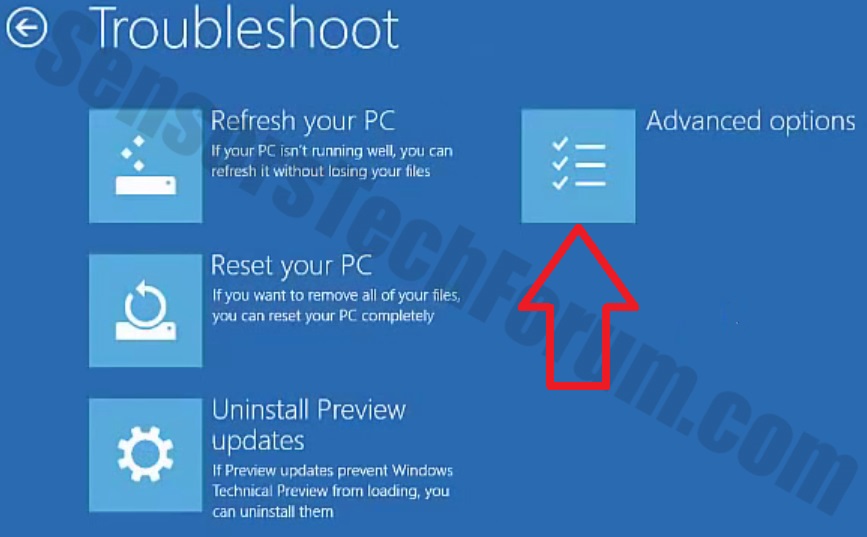
  • Now you should get a window like this where you need to click Troubleshoot.
Windows-10-2.jpg

  • In the next window, click Advanced options and select Command Prompt.
  • Now you should log in into your account and after that Command Promptwindow.
notepad.png
Access the notepad and identify your USB drive

In the Command Prompt please type in:
Code:
notepad
and press Enter.
  • When the notepad opens, go to File menu.
  • Select Open.
  • Go to Computer and search there for your USB drive letter.
  • Note down the letter and close the notepad.


FRST.gif
Scan with Farbar Recovery Scan Tool

Once back in the command prompt window, please do the following:
  • Type in e:\frst64.exe and press Enter.
    You need to replace e with the letter of your USB drive taken from notepad!
  • FRST will start to run. Give him a minute or so to load itself.
  • Click Yes to Disclaimer.
  • In the main console, please click Scan and wait.
  • When finished it will produce a logfile named FRST.txt in the root of your pendrive and display it. Close that logfile.

Transfer it to your clean machine and include it in your next reply.
 
Status
Not open for further replies.

Recently browsing

Members who viewed this thread in the last 5 minutes

Back
Top