

Solved winlogon.exe - No Disk

  • Thread starter Thread starter Vextor
  • Start date Start date
Status
Not open for further replies.
V

Vextor

Thread author
Everytime I shut down my PC, I get this error.
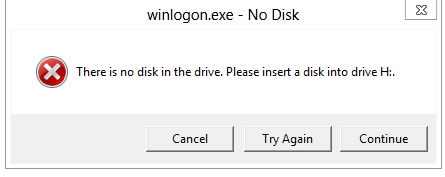
2f65fc811b31c6840c47f8efc67a997f.png


It prevents me from shutting down properly. Are there any fixes.

System: OS: Windows 8 Release Preview
Specs: On my System Thread
 
bbbbweb said:
Everytime I shut down my PC, I get this error.

2f65fc811b31c6840c47f8efc67a997f.png


It prevents me from shutting down properly. Are there any fixes.

System: OS: Windows 8 Release Preview
Specs: On my System Thread

Found this on the forum of MS: Here
 
Upvote 0
biozfear said:
Found this on the forum of MS: Here

Looked there and it seems to be a problem with my USB Hub and fast boot, requiring me to install the drivers in Windows 7 Compatability Mode. However, the issue is that my drivers were installed automatically by MS, and the Targus website doesn't have my device listed.


EDIT: Some looking online and the fix is found:

Step by step the 'fix' is:

1) From the Metro "Start" page type "Shutdown Settings"
2) Click the "Settings" Icon on the right of the screen.
3) Click "Change what the power buttons do" on the left of the screen.
4) Click "Change settings that are not currently available"
5) Scroll to bottom of Dialog box.
6) Uncheck the box titled "Turn on fast startup (recommended)."
7) Click "Save Changes" button.
8) Exit Power Options Dialog box.
 
Upvote 0
Status
Not open for further replies.