F
ForgottenSeer 69673
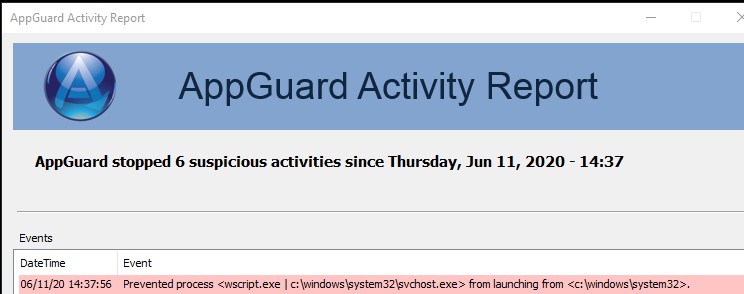
About a week ago i started getting blocks from Appguard for wscript. I have not installed any new software. I have only got a few insider updates. Any ideas? it appears to be trying to run svhost.exe


Open MalwareTips from your Home Screen or desktop. Follow discussions, find answers and pick up where you left off.
If you cannot find an install option, update your browser or use its bookmark option to keep MalwareTips close.
After installation, open the app and sign in. Enable push notifications in Preferences if you want alerts. On iPhone and iPad, push requires a Home Screen web app and iOS or iPadOS 16.4 or later.
Sign in to manage notificationsInstallation is optional. Your notification settings stay under your control.




 forums.malwarebytes.com
 ELETE_FIREWALL_RULES
Yeah, it is an update... and since it was checked with WLC and VT (among other checks) then auto allowed, I am certain it is safe, but you can manually drag and drop it to the VS desktop gadget just to be sure. That way the Intel haters cannot claim it is maliciousVC shows the file in whitelist as autoscript. If I am looking at the right file it is located in the programs, intel folder called installer.bat
View attachment 243279
.
A bat file will launch cmd.exe, otherwise known as the Windows command prompt. But your log from AppGuard is showing wscript. The code you posted does not look like it calls wscript.Would some of the script look something like this?
rem //-------------------------------------------------------------------------
rem // Revert system settings as required by payload.
rem //-------------------------------------------------------------------------
rem //-------------------------------------------------------------------------
rem // UPnP IL.
rem //-------------------------------------------------------------------------
if %SERVICE_MANAGE_UPNP_FIREWALL_RULES% == NO goto SERVICE_DELETE_UPNP_FIREWALL_RULES_SKIP
rem //-------------------------------------------------------------------------
rem // Check if rule #1 exist.
rem //-------------------------------------------------------------------------
set COMMAND=%WINDIR%\System32\netsh.exe advfirewall firewall show rule name=!SERVICE_FIREWALL_UPNP_RULE_1_NAME!
set /A COMMANDS_COUNT=COMMANDS_COUNT+1
echo COMMAND[%COMMANDS_COUNT%][%DATE% - %TIME%]=[%COMMAND%] >> "%INSTALLER_LOG_FILE_NAME%" 2>&1
if %DEBUG% == YES echo COMMAND[%COMMANDS_COUNT%]=[%COMMAND%]
if %EXECUTE% == YES (
%COMMAND% >> "%INSTALLER_LOG_FILE_NAME%" 2>&1
)
if %ERRORLEVEL% == 0 (
A bat file will launch cmd.exe, otherwise known as the Windows command prompt. But your log from AppGuard is showing wscript. The code you posted does not look like it calls wscript.
I would be surprised if a standard Intel update calls cscript. There a billions of computers running Intel, so we would have heard about this, if it was happening.
I see stuff like this all of the time.A bat file will launch cmd.exe, otherwise known as the Windows command prompt. But your log from AppGuard is showing wscript. The code you posted does not look like it calls wscript.
I would be surprised if a standard Intel update calls cscript. There a billions of computers running Intel, so we would have heard about this, if it was happening.
That is a great idea. Just a thought, you might want to delete the item from the VS whitelist first and see if it magically reappears later. That way we can determine whether or not this is a script that needs to run more than once. If you find that it only needs to run once, then obviously you should be able to delete it.At this point, I am not sure the bat file called the block I am getting from Appguard or not but it keeps trying to run after a certian period of time. I guess I could delete the batch file and see if the AG block stops.
Cool, thank you for letting me know. Shadow Defender, right? VS probably tried to write to the whitelist.db and it was blocked or something. Please let me know if it is Shadow Defender so I can install it and fix that bug. Do you notice any other bugs while running in shadow mode? I probably should debug VS in shadow mode for a while, it is something I have never done before and would be a great "double check" for bugs.
.
Interesting. Well, we are in a pickle if we do not know the path of the script. Did you check Autoruns to see if it can find anything, specifically the scheduled tasks? Does the batch file automatically reappear at some point after you delete it?
Members who viewed this thread in the last 5 minutes


