

The MalwareTips app
Your community, one tap away.
Open MalwareTips from your Home Screen or desktop. Follow discussions, find answers and pick up where you left off.
- Home Screen access
- Optional push alerts
- Your community
You're ready to explore.Explore what's new
Installation instructions
iPhone & iPad
- Open MalwareTips in Safari and tap Share. You may need to open the Page Menu first.
- Choose Add to Home Screen. If it is not listed, use Edit Actions to add it.
- Keep Open as Web App enabled if shown, then tap Add.
Android
- Open MalwareTips in Chrome or another browser that supports app installation.
- Open the browser menu and look for Install app, Install and create shortcut, or Add to Home screen.
- Choose Install and confirm. Wording varies by browser.
Desktop
- Chrome: use the install icon in the address bar, or the menu under Cast, save and share.
- Edge: open the menu, then More tools, Apps and Install this site as an app.
- Safari on Mac: choose Share or File, then Add to Dock. Firefox on Windows: look for the web apps button in the address bar.
If you cannot find an install option, update your browser or use its bookmark option to keep MalwareTips close.
Keep up with your conversations
After installation, open the app and sign in. Enable push notifications in Preferences if you want alerts. On iPhone and iPad, push requires a Home Screen web app and iOS or iPadOS 16.4 or later.
Sign in to manage notificationsInstallation is optional. Your notification settings stay under your control.
You are using an out of date browser. It may not display this or other websites correctly.
You should upgrade or use an alternative browser.
You should upgrade or use an alternative browser.
Solved Yahoo redirect
- Status
- Not open for further replies.

Hello, Welcome to MalwareTips..! 
Please follow the following instruction ..:
Download Farbar Recovery Scan Tool and save it to your desktop. --> IMPORTANT
If your antivirus software detects the tool as malicious, it’s safe to allow FRST to run. It is a false-positive detection.
If English is not your primary language, right click on FRST.exe/FRST64.exe and rename to FRSTEnglish.exe/FRST64English.exe
Note: You need to run the version compatible with your system. If you are not sure which version applies to your system download both of them and try to run them. Only one of them will run on your system, that will be the right version.
In your next reply, please include:
Please follow the following instruction ..:
Download Farbar Recovery Scan Tool and save it to your desktop. --> IMPORTANT
If your antivirus software detects the tool as malicious, it’s safe to allow FRST to run. It is a false-positive detection.
If English is not your primary language, right click on FRST.exe/FRST64.exe and rename to FRSTEnglish.exe/FRST64English.exe
Note: You need to run the version compatible with your system. If you are not sure which version applies to your system download both of them and try to run them. Only one of them will run on your system, that will be the right version.
- Double-click the FRST icon to run the tool. When the tool opens click Yes to disclaimer.
- Press Scan button and wait for a while.
- The scanner will produced two logs on your Desktop: FRST.txt and Addition.txt.
- Please attach the content of these two logs in your next reply.
In your next reply, please include:
- FRST.txt
- Addition.txt
Hello, Welcome to MalwareTips..!
Please follow the following instruction ..:
Download Farbar Recovery Scan Tool and save it to your desktop. --> IMPORTANT
If your antivirus software detects the tool as malicious, it’s safe to allow FRST to run. It is a false-positive detection.
If English is not your primary language, right click on FRST.exe/FRST64.exe and rename to FRSTEnglish.exe/FRST64English.exe
Note: You need to run the version compatible with your system. If you are not sure which version applies to your system download both of them and try to run them. Only one of them will run on your system, that will be the right version.
---------------------------------------------------
- Double-click the FRST icon to run the tool. When the tool opens click Yes to disclaimer.
- Press Scan button and wait for a while.
- The scanner will produced two logs on your Desktop: FRST.txt and Addition.txt.
- Please attach the content of these two logs in your next reply.
In your next reply, please include:
- FRST.txt
- Addition.txt
Attachments
While I check your logs my may read this article and try some of the suggested fixes.
 forums.malwarebytes.com
Resetting Google Chrome to clear unexpected issues
Resetting Google Chrome to clear unexpected issues General Precautions - Recommendations Before resetting Google Chrome please review the following links and export your bookmarks to a folder location outside of any Google folders such as My Documents How to Back Up and Restore Your Chrome Bookma...
forums.malwarebytes.com
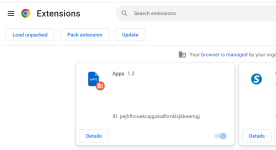
I think the problem is in my extentions files. I have an app that I cannot erase.
- Open Chrome.
- At the top right choose More (the three vertical dots) > More Tools > Extensions
- Find and remove it, clicking on Remove.
Code:
CHR Extension: (Apps) - C:\Users\scott\AppData\Local\Google\Chrome\User Data\Default\Extensions\pejhfhcoekcajgokallhmklcjkkeemgj- Confirm the action by clicking Remove once again.
This extension appear in both, the Default and the Guest Profile of your Chrome browser.

Boost Your Productivity: Remove Chrome Extensions in 5 Min
Learn how to delete Chrome extensions. Includes link to Google's Clean Up tool and command to temporarily disable all extensions.
 www.timeatlas.com
Yes, I have. Trying to get rid of this redirect problem.I see the remnants of quite a few antivirus programs on your system that have not been completely uninstalled.. This can lead to a number of problems. Tell me have you used McAfee and Avira products..?
I tried a lot of different things so far, with no luck yet.
- Download the Revo Uninstaller (Free Download) and save it on your Desktop.
- Double click on the exe file created on your Desktop to run the installer, and follow the instructions to install the program.
- Double click the program's icon to open it.
- Write in the search area, on the top left, the following program:
Code:
HitmanPro 3.8- Choose the Uninstall tab from the menu and let the program to create a Restore point.
- Choose Scan, and then the Advanced mode scan.
- Select all the Online Services items found, Delete and Next.
- Let the procedure be completed and click on Finish.
- Restart the computer.
Next ...;
Uninstall McAfee Safe Connect and McAfee Security Scan Plus using Method 2 on the following web page ...
https://service.mcafee.com/?articleId=TS101331&page=shell&shell=article-view
... do not activate your subscription before removing it, unless you want to be nagged forever more by McAfee to re-subscribe.
Do not try to uninstall it using the inbuilt uninstaller in Windows, because it doesn't do a very good job and will often leave orphans.
When finished uninstalling McAfee .... reboot your computer
Next ...:
Farbar Recovery Scan Tool - Fix
NOTICE: This script was written specifically for this user, for use on this particular machine. Running this on another machine may cause damage to your operating system that cannot be undone.
Please download the attached file to the same folder where the Farbar tool is running from.
The location is listed in the 3rd line of the FRST.txt log you have submitted.
Run FRST and click Fix only once and wait.
The Computer will restart when the fix is completed.
It will create a log (Fixlog.txt) please post it to your reply.
In your next reply, please include:
- Fixlog.txt
Next ...
- Double click Frst64.exe to launch it.
- FRSTwill start to run.
- When the tool opens click Yes to the disclaimer.
- Copy/Paste or Type the following line into the Search: box.
Code:
SearchAll: McAfee,Avira- Press the Search Files button.
- When finished searching a log will open on your Desktop ... Search.txt
- Please post it in your next reply.
Attachments
Last edited:
I'm glad your problem is solved..!
That's all I'm going to ask you to do...:
That's all I'm going to ask you to do...:
- Download KpRm and save it to your Desktop (see here if you must use Chrome)
- Note: If the file is detected as malware it is not and it is safe to download. The detection is a false positive.
- Right click on the icon and select Run as administrator
- Click Yes on the Disclaimer
- Place a check mark in Delete Tools, Create Restore Point, and Delete in 7 days
- Click Run
- Click OK on All operations are completed
- KpRm will delete itself from you Desktop and you can either save or remove the report that is generated
- You are free to remove any other tools/reports still remaining
- Please copy and paste its contents in your next reply.
DarrenHayes
New Member
- Download the Revo Uninstaller (Free Download) and save it on your Desktop.
- Double click on the exe file created on your Desktop to run the installer, and follow the instructions to install the program.
- Double click the program's icon to open it.
- Write in the search area, on the top left, the following program:
Code:HitmanPro 3.8
- Choose the Uninstall tab from the menu and let the program to create a Restore point.
- Choose Scan, and then the Advanced mode scan.
- Select all the Online Services items found, Delete and Next.
- Let the procedure be completed and click on Finish.
- Restart the computer.
Next ...;
Uninstall McAfee Safe Connect and McAfee Security Scan Plus using Method 2 on the following web page ...
https://service.mcafee.com/?articleId=TS101331&page=shell&shell=article-view
... do not activate your subscription before removing it, unless you want to be nagged forever more by McAfee to re-subscribe.
Do not try to uninstall it using the inbuilt uninstaller in Windows, because it doesn't do a very good job and will often leave orphans.
When finished uninstalling McAfee .... reboot your computer
Next ...:
Farbar Recovery Scan Tool - Fix
NOTICE: This script was written specifically for this user, for use on this particular machine. Running this on another machine may cause damage to your operating system that cannot be undone.
Please download the attached file to the same folder where the Farbar tool is running from.
The location is listed in the 3rd line of the FRST.txt log you have submitted.
Run FRST and click Fix only once and wait.
The Computer will restart when the fix is completed.
It will create a log (Fixlog.txt) please post it to your reply.
In your next reply, please include:
- Fixlog.txt
Next ...
- Double click Frst64.exe to launch it.
- FRSTwill start to run.
- When the tool opens click Yes to the disclaimer.
- Copy/Paste or Type the following line into the Search: cuphead
Your method is really good. I applied it the first time.Code:SearchAll: McAfee,Avira
- Press the Search Files button.
- When finished searching a log will open on your Desktop ... Search.txt
- Please post it in your next reply.
- Status
- Not open for further replies.
Recently browsing
Members who viewed this thread in the last 5 minutes


