

The MalwareTips app
Your community, one tap away.
Open MalwareTips from your Home Screen or desktop. Follow discussions, find answers and pick up where you left off.
- Home Screen access
- Optional push alerts
- Your community
You're ready to explore.Explore what's new
Installation instructions
iPhone & iPad
- Open MalwareTips in Safari and tap Share. You may need to open the Page Menu first.
- Choose Add to Home Screen. If it is not listed, use Edit Actions to add it.
- Keep Open as Web App enabled if shown, then tap Add.
Android
- Open MalwareTips in Chrome or another browser that supports app installation.
- Open the browser menu and look for Install app, Install and create shortcut, or Add to Home screen.
- Choose Install and confirm. Wording varies by browser.
Desktop
- Chrome: use the install icon in the address bar, or the menu under Cast, save and share.
- Edge: open the menu, then More tools, Apps and Install this site as an app.
- Safari on Mac: choose Share or File, then Add to Dock. Firefox on Windows: look for the web apps button in the address bar.
If you cannot find an install option, update your browser or use its bookmark option to keep MalwareTips close.
Keep up with your conversations
After installation, open the app and sign in. Enable push notifications in Preferences if you want alerts. On iPhone and iPad, push requires a Home Screen web app and iOS or iPadOS 16.4 or later.
Sign in to manage notificationsInstallation is optional. Your notification settings stay under your control.
You are using an out of date browser. It may not display this or other websites correctly.
You should upgrade or use an alternative browser.
You should upgrade or use an alternative browser.
Question Youtube blocked because of ad blocker
- Thread starter Kiss
- Start date
Chrome & Chromium
20 Replies
4,240 Views
Help answer the author's question with clear explanations and useful steps.

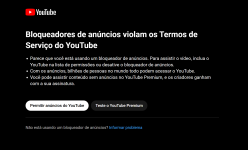


I'm logged into my YouTube account, so I don't know if that makes a difference for when I go back to it. With Brave and just using it's default ad blocker set to aggressively block, it's still working normally. Same with Chrome and uBlock Lite set on Complete Filtering Mode, no problem getting on YouTube. I'm accessing it from the US, using a VPN didn't make any difference either, still no problems.

The problem is caused by
If it still doesn't work, add following rule to user filter:
uBlock filters – Quick fixes filter and it should be fixed now. Update filters in uBlock Origin by clicking on balloon icon and then Update now button. Don't forget to delete site data (including cookies) for all YouTube domains as well.If it still doesn't work, add following rule to user filter:
Code:
www.youtube.com#@#+js(json-prune-fetch-response, playerAds adPlacements adSlots playerResponse.playerAds playerResponse.adPlacements playerResponse.adSlots [].playerResponse.adPlacements [].playerResponse.playerAds [].playerResponse.adSlots, '', propsToMatch, /\/(?:player|playlist|get_watch)\?/)
Last edited:

Yes, I could not use YT with Brave for several hours, but it seems that they have updated filters and fixed it, but it happens more and more often. Google is getting serious.
Never occurred to me once. Not even when they introduced that garbage. But I did saw VPN error message few times.Yes, I could not use YT with Brave for several hours, but it seems that they have updated filters and fixed it, but it happens more and more often. Google is getting serious.
Still... I'm not paying a single cent for YouTube.

I'm no longer paying for it either, but I do login and have an account to be able to save videos to my Playlists etc.Never occurred to me once. Not even when they introduced that garbage. But I did saw VPN error message few times.
Still... I'm not paying a single cent for YouTube.

I think they're A/B testing the feature. Windscribe is mixed bag for me, most of servers work normally.They block most VPN's now mullvad is the only one that they have a hard time with.
You were paying for it? No need to pay for YouTube Premium if you already pay for VPN. Just connect to Albanian server and voilà, you have ad-free YouTube.I'm no longer paying for it either, but I do login and have an account to be able to save videos to my Playlists etc.


No issues here with PIA, set to Bahamas and watch ad freeThey block most VPN's now mullvad is the only one that they have a hard time with.


The first time I got the popup was yesterday using Brave.
YouTube Premium is $14 (US) and includes Music Premium, which is not too bad of a deal itself. However, when you factor in all the subscriptions for streaming services that people pay for to watch just a few shows on, it makes less sense as it adds up quickly.
YouTube Premium is $14 (US) and includes Music Premium, which is not too bad of a deal itself. However, when you factor in all the subscriptions for streaming services that people pay for to watch just a few shows on, it makes less sense as it adds up quickly.

I don't have this on MS Edge with AdGuard or Firefox with uBlock Origin, both work flawlessly.

Today's world is becoming life by subscription. The greedy bastards will take everything they can.YouTube Premium is $14 (US) and includes Music Premium, which is not too bad of a deal itself. However, when you factor in all the subscriptions for streaming services that people pay for to watch just a few shows on, it makes less sense as it adds up quickly.
Yeah, it's crazy. It was all about "cut the cord" years ago. Now it's more of "Exclusive only on [Name Service]"Today's world is becoming life by subscription. The greedy bastards will take everything they can.
I really don't think people understand how much they truly spend on things in a 12-month period on a monthly basis. $7 here, $14 there, and just keeps on going and it adds up.

I rarely go to Youtube, maybe once a month, I am using UBO and have not seen any blockages.

BulletKnowledge
Level 1
No problem to go youtube but one friend can use any browser with any ad blocker(built-in or extension) for the same result the pop up to disable ad blocker show up.
I found this solution on Brave community, which works for users who tried it:

 community.brave.com
Follow this steps below. Do not miss out the steps.
- Logout from youtube.com.
- Close the youtube tab.
- Open a new tab and go to brave://components and click “check for updates” for all components. Make sure the components are all updated.
- In brave browser settings > “Privacy and security”
- Click on “Site and Shields Settings”
- Click on “View permissions and data stored across sites”
- Search for “google” and delete all cookies related to google
- Search for “youtube” and delete all cookies related to youtube
- Close and reopen your brave browser.
- Login to youtube again. You are good to go.
Ad block not working anymore on youtube
Follow this steps below. Do not miss out the steps. Logout from youtube.com. Close the youtube tab. Open a new tab and go to brave://components and click “check for updates” for all components. Make sure the components are all updated. In brave browser settings > “Privacy and security” Click...
community.brave.com
Recently browsing
Members who viewed this thread in the last 5 minutes


