New Update Zen Browser Updates

Release build - 1.19.13b (2026-05-14)

Security​

New Features​

  • Updated to Firefox 150.0.3

Fixes​

  • Fixed native popovers not working after using dropdowns (#13623)
  • Fixed unresponsive tabs when opening external links (#13620)
  • Fixed tab renaming input fields being too narrow (#13629)
  • Other minor bug fixes and performance improvements.
 
Release build - 1.20b (2026-05-21)
This release includes a major new feature called Boosts! Boosts allow you to customize the look and feel of any website to your liking. To start boosting, click the site's control icon in the urlbar and click the new 'Boost' button.

Security​


New Features​

  • Updated to Firefox 151.0 and 151.0.1
  • Boosts are now in Zen! This allows you to tint colors, customize fonts and styles, zap elements and enable automatic dark mode on any website!
  • Overflowing web extensions will now appear below the urlbar instead of being added back into the site control panel. This only happens in single-sidebar mode.
  • Zen now strengthens protection against fingerprinting in Standard Enhanced Tracking Protection, making it harder for websites to track you across sites by limiting the amount of information revealed about your device and browser. This reduces the number of users uniquely identifiable by common fingerprinting techniques by an average of ~14%, and by ~49% on macOS.
  • You can now merge multiple PDFs directly in Zen PDF. Combine separate PDF files into a single document without ever leaving Zen or relying on third-party tools.

Fixes​

  • Fixed a bug where the url would be cut off when the urlbar was too small. (#13719)
  • Fixed 'go back to original url' button on pinned tabs showing up even when the url was not modified. (#12949)
  • Added better support for cyclic workspace switching
  • Fixed video controls going under the screen when in fullscreen mode. (#10594)
  • Fixed closing a split view in one window selecting it on other windows. (#13761)

Changes​

  • Geolocation on Windows now respects the user's Windows location permission setting, instead of overriding it, when the user grants location permission to a page. Firefox will ask users to enable the Windows permission if it is needed.
 
Bummer that it can't be tested yet. Github has no assets for it other than the source code.
 
Has anyone been able to test version 1.20b? If so, where did you find the installer?

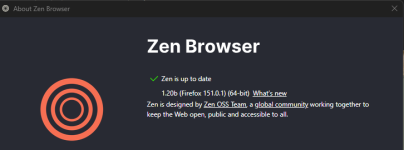
Just got the installer from there: https://github.com/zen-browser/desktop/releases/download/1.20b/zen.installer.exe

zen.png
 
Release build - 1.20.1b (2026-05-27)

New Features​

  • Updated to Firefox 151.0.2
  • You can now type New Boost in the urlbar to quickly create a new boost for the current site!

Fixes​

  • Fixed pressing u duplicating tabs. (#13851)
  • Fixed video controls going under the screen when in fullscreen mode. (#10594)
  • Fixed boosts not working for certain websites. (#13844)
  • Fixed an issue on macOS where smart cards and security keys could fail to load certificates automatically
  • Other minor bug fixes and performance improvements.
 
Release build - 1.20.2b (2026-06-03)

Security​

New Features​

  • Updated to Firefox 151.0.3
  • Boosts now support a dark mode UI based on your system dark mode setting.

Fixes​

  • Fixed auto focus for new windows not working. (#12112)
  • Fixed desktop shortcuts showing zen as 'Nightly'. (#13745)
  • Other minor bug fixes and performance improvements.
 

You may also like...