

The caller already sounds like a mobile technician. There is supposedly a SIM problem, a missed-delivery setting, or a network fault, and the fix will take less than a minute.
The instruction is simple: open the dialer, enter a code followed by a number, and press Call. No password is requested, so the step can feel harmless.
What changes after that keystroke is the reason the call forwarding code scam works.
Overview
The “fix” can reroute calls away from the victim
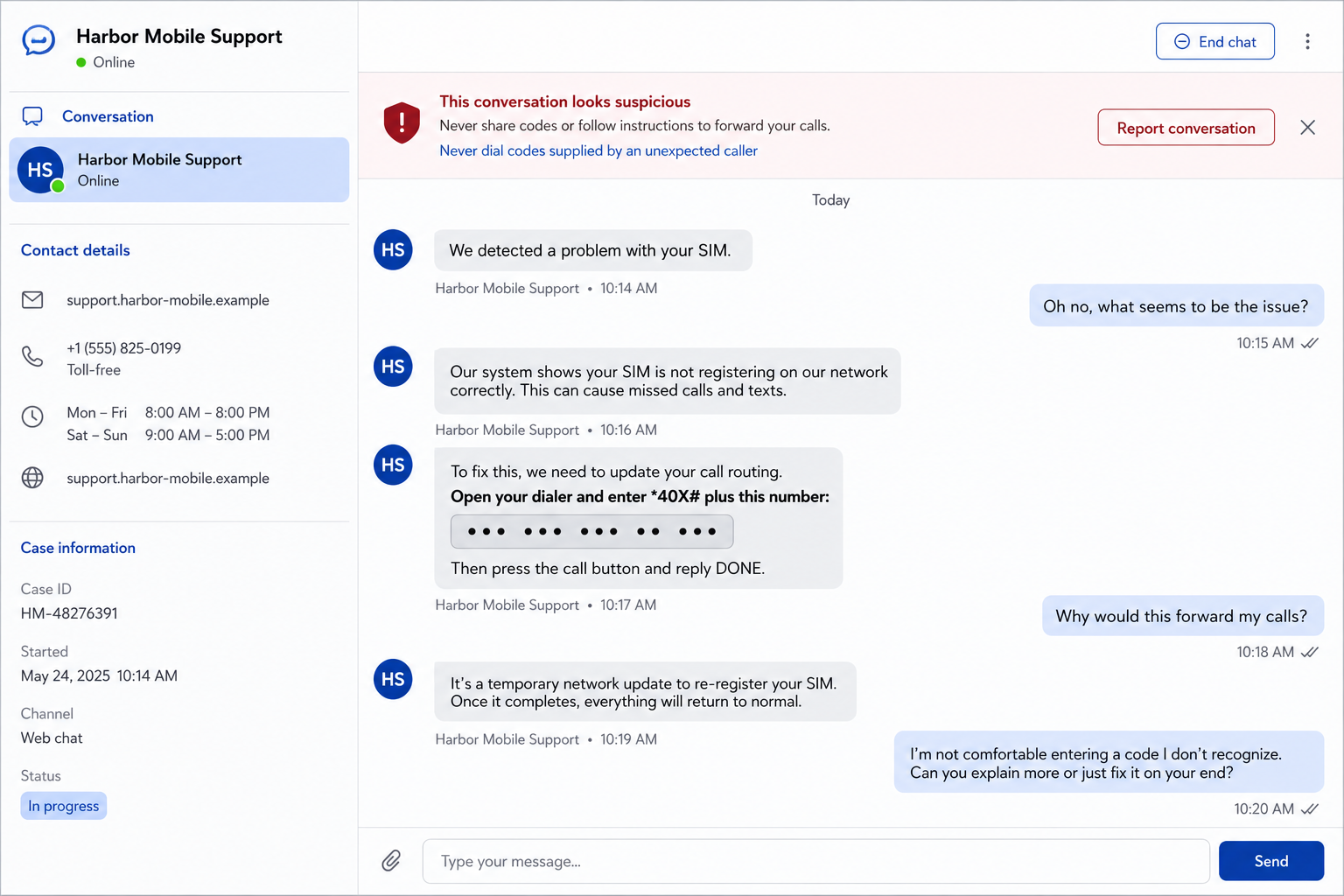
The call forwarding code scam begins with an impersonator claiming to represent a mobile carrier, delivery company, bank, or support department. The caller invents a service problem and asks the target to dial a carrier command that changes call-routing settings.
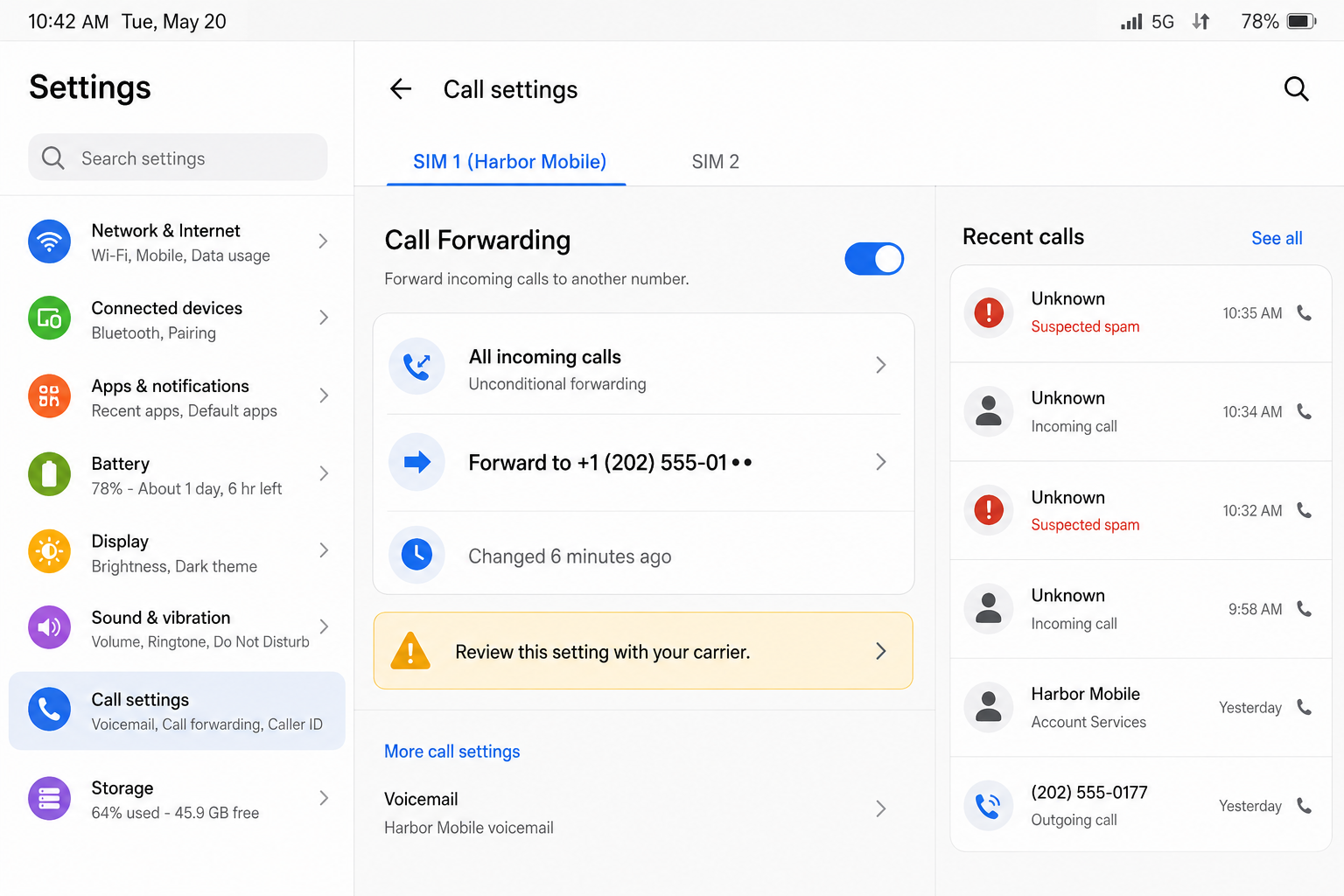
When the command activates unconditional forwarding, incoming calls can be sent to a number controlled by the criminal. The phone may still look normal, and outgoing calls can continue, so the victim may not immediately understand why expected calls never arrive.
India’s Department of Telecommunications issued a specific warning about callers using *401# followed by an unknown number. The agency says telecom providers do not ask subscribers to use that instruction during support calls.
The story changes, but the requested action does not
One caller may say the SIM needs to be re-registered. Another claims a package driver cannot reach the customer, voicemail is broken, 5G access is being upgraded, or a bank fraud team needs a secure return-call channel.
Those stories create a reason to manipulate a telephone setting without naming it. The operator may read the symbols slowly and describe them as a network reset. The unknown number at the end is presented as a reference, extension, or service identifier.
A real carrier can troubleshoot through official tools and documented settings. An unexpected caller should never dictate a forwarding destination. If support is necessary, end the call and contact the carrier through its app, website, or a known number.
Forwarded calls can support a second fraud
Call diversion is often the opening, not the entire theft. A criminal who receives calls intended for the victim may answer verification callbacks, intercept conversations, impersonate the account holder, or keep the real person from hearing an urgent bank or family call.
Capabilities vary by carrier and country. Call forwarding does not automatically mean every text message or authentication code is redirected. Avoid claiming a power the setting may not have. The confirmed risk is that incoming voice calls can be routed to the chosen number.
Warning signs include:
- An unexpected caller claims the SIM or network needs an urgent reset.
- The supposed technician asks the customer to open the dialer.
- The code ends with a phone number the customer does not recognize.
- The caller avoids saying that the command changes call forwarding.
- The customer is told not to restart the phone or contact the carrier.
- A package, bank alert, or account suspension is used as pressure.
- The caller asks the victim to read back a confirmation message.
- Incoming calls stop while outgoing calls still work.
- A forwarding number appears in settings without the owner’s approval.
- The same caller later asks for codes, transfers, or account details.
How the Call Forwarding Code Scam Works
Step 1: The impersonator chooses a believable service problem
The contact may begin by telephone, chat, text, or a fake support advertisement. The caller claims the mobile account has a technical issue that could interrupt service, block a delivery, disable voicemail, or prevent an important security call.
Generic account details may come from public records or a breach. Knowing a name, carrier, or recent order does not prove the caller works for that organization. It only makes the opening sound less random.
Step 2: The dialer is reframed as a support console
The criminal tells the victim to use the phone app because it supposedly sends a command directly to the network. That explanation contains a small truth: carriers do support service codes. The deception is about what the particular command does and who benefits.
Symbols and digits are dictated one at a time. The destination number may be called a ticket, tower, extension, engineer ID, or secure server. It remains another telephone number, even when the caller gives it a technical label.
Step 3: Forwarding is activated to the criminal’s number
Once the complete command is submitted, the network may enable unconditional forwarding. Calls to the victim are then routed elsewhere until the setting is disabled, the carrier changes it, or a different routing command replaces it.
The exact interface and code depend on the carrier. Do not experiment with instructions found in a suspicious message. Open call settings manually or ask the carrier to inspect routing from its side.
Step 4: The caller confirms that the route works
The scammer may place a test call or ask an associate to call the victim. Because the call is diverted, the device may not ring. The operator then describes the silence as proof that the “repair” is progressing.
A confirmation screen can also be misrepresented. Read what the phone says. Words such as “forwarding,” “divert,” “all calls,” or an unfamiliar destination are reasons to stop and contact the real carrier.
Step 5: A bank, platform, or contact is approached
The criminal can now attempt a separate impersonation. They may call a bank, payment service, workplace, or family member and hope that a verification callback reaches the forwarded line.
Forwarding alone may not satisfy modern security controls, but it can remove one obstacle. Combined with stolen identity details, a compromised email account, or social engineering, control of incoming calls can make a false story sound more credible.
Step 6: The victim is kept busy or isolated
The original caller may remain on the line, warn that disconnecting will cancel the repair, or transfer the victim to a fake supervisor. Continuous conversation prevents independent verification and explains why other calls are not arriving.
Some campaigns then request an authentication code, card data, remote-access application, or money movement. Those are separate danger points. End the call immediately rather than trying to determine how far the script will go.
Step 7: The route remains active after the conversation
Hanging up does not necessarily remove the setting. Calls may continue going to the unknown number until forwarding is disabled. The victim can mistake the silence for a network outage and call the same fake support contact again.
Review every forwarding category, including unconditional, busy, unanswered, and unreachable. If anything is unclear, have the carrier remove unauthorized routing and document when the change occurred.
What Criminals Can Do With Diverted Calls
A forwarded line can help an impersonator answer calls that were meant to verify the victim’s identity. The criminal may know enough background information to continue a conversation with a bank employee, delivery service, employer, or relative.
It can also hide warnings. A bank may call about a suspicious transfer while the customer’s phone remains quiet. A family member returning an urgent call may reach the scammer instead. The lack of ringing delays the moment when separate pieces of the fraud are compared.
Do not assume that controlling incoming calls equals complete control of the telephone account. Text delivery, voicemail, carrier apps, eSIM management, and authentication behave differently across networks. Treat each system as a separate security check.
If unknown forwarding appears without any other suspicious activity, remove it and contact the carrier. If there are password resets, account changes, lost service, or an unfamiliar SIM, ask specifically about SIM swapping and number porting as well.
How to Verify a Real Carrier Problem
End the incoming call. Open the carrier’s official app from the device, type the known website address, or use the number printed on a bill. Do not call a number supplied in the same conversation that created the concern.
Ask whether the account has an open support ticket and whether any forwarding setting changed. A genuine technician can document the issue without asking the customer to hide the conversation or route calls to a private mobile number.
Read any on-screen confirmation in full. A network command can produce a short message that names the service being activated. Do not let a caller translate that message for you while rushing to the next step.
For deliveries, use the retailer or carrier’s independently opened tracking page. A courier does not need control of every incoming call to deliver a parcel. For banking, call the number on the back of the card and ask whether any verification attempt occurred.
Add an account PIN and port protection through the carrier if available. Those controls do not replace forwarding checks, but they make separate number-takeover attempts harder.
Company, Address, and Fulfillment Checks
The company name must survive an independent callback
A caller ID and spoken department name can be spoofed. End the conversation and contact the organization through a number you already trust. Ask for the ticket by its reference without revealing extra information first.
The carrier should explain the setting plainly
Legitimate support can say whether a step enables forwarding, voicemail, or another service. A caller who hides the meaning of the command and insists on immediate submission is not providing transparent support.
The destination number must belong to the customer
Forwarding is useful when the account owner intentionally routes calls to another line they control. An unknown number supplied by an unsolicited caller has no legitimate place in that setting.
The mobile account needs its own review
Check recent account changes, authorized users, SIM and eSIM activity, port requests, PIN changes, and recovery contacts. Removing forwarding addresses one risk, but it does not undo another unauthorized account change.
What to Do if You Have Fallen Victim to This Scam
- End the call and stop following instructions. Do not enter another code, install an app, share a screen, or read back any security message.
- Open call-forwarding settings manually. Disable every unfamiliar destination. Because menus differ, contact the carrier if you cannot confirm that all forwarding categories are off.
- Call the real carrier from a trusted route. Use its official app, website, bill, or another phone. Ask support to remove unauthorized forwarding and review when it was enabled.
- Secure the carrier account. Change the password and account PIN, sign out unknown sessions, remove unfamiliar authorized users, and enable port protection or a number lock if offered.
- Review calls during the diversion window. Ask whether banks, employers, relatives, or service providers called while the route was active. Warn them that another person may have answered.
- Contact financial providers independently. If the caller mentioned a bank or payment service, use a verified number and inspect transactions, linked accounts, profile changes, and recent support contacts.
- Change exposed credentials. If a password or one-time code was shared, replace the password through the genuine service and revoke other sessions. Protect the connected email account first.
- Remove remote-access software. Disconnect the device from sensitive accounts if the caller installed anything. Run a full Malwarebytes scan before using it for banking.
- Add malicious-site blocking. AdGuard can block many known phishing and fake-support pages used around the phone call. It cannot remove carrier forwarding, so verify the network settings separately.
- Save and report the evidence. Preserve call logs, chat messages, the dictated number, screenshots of forwarding settings, and carrier case numbers. Report financial loss to the relevant police or cybercrime service.
- Reject follow-up recovery calls. A stranger who claims to reverse the forwarding or recover money for a fee may be using information from the first attempt.
Frequently Asked Questions
Can dialing a code really change call forwarding?
Yes. Carriers support service commands that can alter call routing. The exact command varies, so never test one supplied by an unexpected caller.
Does call forwarding send all of my text messages away?
Not automatically. Call and text routing differ by carrier. The confirmed effect of call forwarding is on voice calls, but every account setting should still be reviewed.
Why can I still make outgoing calls?
Forwarding can affect incoming calls while leaving outgoing service available. A phone that can call out but no longer rings deserves a forwarding check.
Would a real carrier ask me to dial a forwarding code?
A carrier may document legitimate service codes, but an unsolicited technician should not route your calls to an unknown number. Verify through official support first.
Is disabling the setting enough?
It stops that routing, but review the mobile account, email, financial accounts, and any information shared. The scammer may have attempted other changes.
How can I tell when forwarding was activated?
Some phones show the current destination but not a complete history. Ask the carrier whether its logs identify the change time and preserve the case number.
The Bottom Line
The call forwarding code scam disguises a routing command as a quick technical repair. The dangerous part is not the caller’s explanation. It is the unknown number being placed between the victim and every incoming call.
Never dial a service code dictated by an unexpected caller. End the conversation, inspect call settings, and let the real carrier explain any change through a channel you opened yourself.

Join the discussion
0 commentsShare your experience or ask a question about this article.
Discussion
Start the conversation
Have a question or something useful to share? Add the first comment.