

If you are looking for a website that sells various products such as bags, chairs, rockers, rollators and more at discounted prices, you might have come across Ansposl.com. But before you place an order from this website, you might want to know if it is a legit or a scam online store. In this blog post, we will review Ansposl.com and give you some tips on how to spot and avoid scam websites.
What is Ansposl.com?
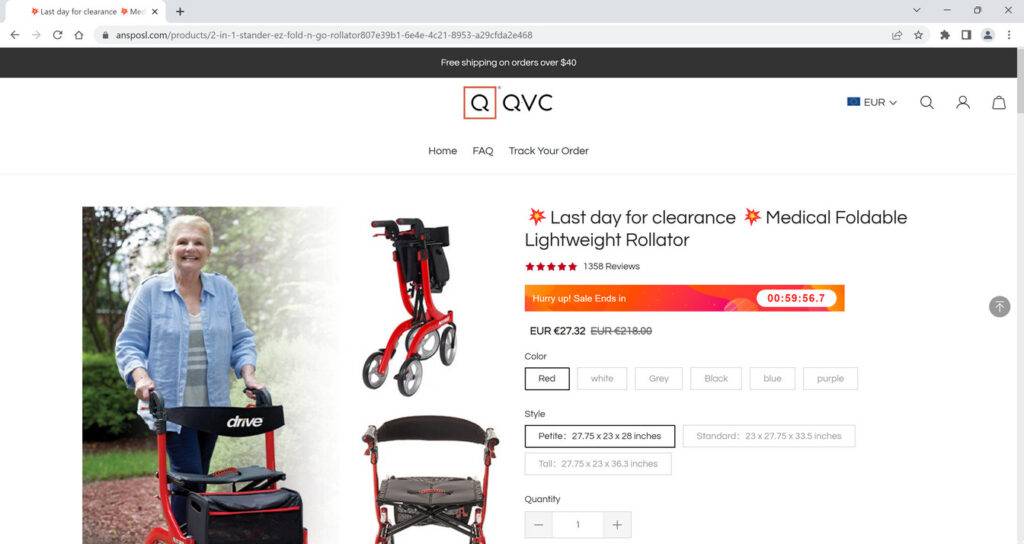
Ansposl.com is an online store that claims to offer products such as weekender bags, freestyle rockers, medical foldable lightweight rollators and more at low prices. The website was created in November 2022 and expires in November 2023, which means it is a very new and short-lived website. The website also has a poor design and does not provide much information about the company, its policies, its shipping and delivery methods or its customer service.
Is Ansposl.com a scam?
There are many red flags that indicate that Ansposl.com is not a trustworthy website. Here are some of them:
- The website offers unrealistic and outrageous discounts on its products, such as buy 2 get 2 free or buy 2 save 35%. These are usually signs of a scam website that tries to lure customers with low prices but delivers low-quality or counterfeit products or nothing at all.
- The website has a fake contact address that is associated with other scam websites. The address given on the website is Supic Company Limited, Address 85 TOTTENHAM COURT ROAD 85 TOTTENHAM COURT ROAD, United Kingdom. However, this address does not exist and has been used by other fraudulent websites in the past.
- The website does not have any social media presence or customer reviews. A legit website would have active social media accounts and positive feedback from satisfied customers. However, Ansposl.com does not have any social media links or ratings on its website or on other platforms.
- The website has stolen content and images from other websites. A legit website would have original and unique content and images that reflect its brand and products. However, Ansposl.com has copied most of its content and images from other websites without giving credit or permission.
How to avoid scam websites like Ansposl.com?
If you want to shop online safely and avoid falling victim to scam websites like Ansposl.com, here are some tips that you can follow:
- Always check the domain name of the website and make sure it matches the name of the company and the products it sells. Avoid websites that have misspelled words, random letters or numbers or extensions that are not common.
- Always research the website before you buy anything from it. Look for customer reviews, ratings, complaints, contact information, policies and terms and conditions. If you find any negative feedback or red flags, stay away from the website.
- Always use a secure payment method when you shop online, such as PayPal or a credit card. Avoid using direct bank transfers, wire transfers, gift cards or cryptocurrencies as these are not traceable or refundable in case of fraud.
- Always use antivirus software and firewall on your device when you browse the internet. This will help you detect and block any malicious websites or links that might harm your device or steal your information.
What should you do if you have shopped from Ansposl.com?
- Contact your bank or financial institution: If you have paid with your credit card or debit card, you should contact your bank or financial institution as soon as possible and request them to cancel the transaction and refund your money. You should also report the website as a fraudulent site and ask them to block any future charges from it.
- Change your passwords: If you have created an account on Ansposl.com or used the same password for other online accounts, you should change your passwords immediately. You should also enable two-factor authentication for your accounts if possible. This will prevent hackers from accessing your accounts and stealing your personal information.
- Beware of phishing emails: You might receive emails from Ansposl.com or other sources claiming to be related to your order or offering you discounts or refunds. These emails are likely to be phishing attempts that aim to trick you into clicking on malicious links or downloading attachments that can infect your device with malware or steal your information. You should delete these emails and do not open any links or attachments from them.
- Use a browser-based content blocker, like AdGuard : Content blockers help stop malicious ads, Trojans, phishing, and other undesirable content that an antivirus product alone may not stop.
- Scan your device for malware. If you suspect your device might be infected with malware, you can run a free scan with Malwarebytes Anti-Malware Free.
Ansposl.com Final Thoughts
Based on these red flags, we can conclude that Ansposl.com is not a legitimate store but a scam. We advise you to avoid shopping from this website and look for other reliable and trustworthy online stores instead. If you have already shopped from this website and have been scammed, you should report it to your bank or credit card company and try to get your money back.








