

Did you just get an email from Kroll Settlement Administration LLC about an AT&T data breach settlement? If so, you’re probably wondering whether it’s a legitimate notice or just another scam.
The truth: the email is real. Kroll is the official settlement administrator for this case, and if you received a message from them, it means your information may have been impacted by one of AT&T’s recent data breaches.
This guide explains exactly who Kroll is, why they contacted you, how the AT&T settlement works, what payout options are available, and how you can safely file your claim without falling for phishing attempts.
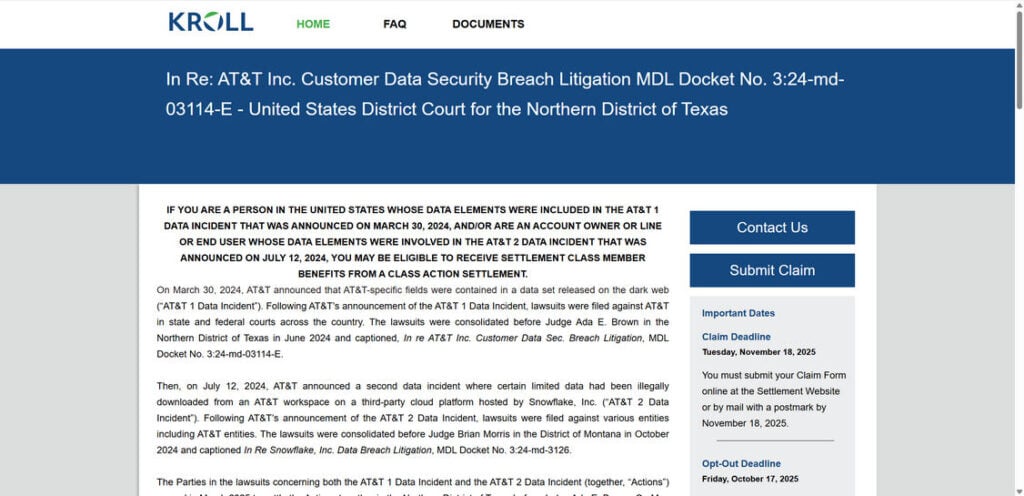
Who Is Kroll Settlement Administration LLC?
Kroll Settlement Administration LLC is not a random company. They are a court-appointed administrator that manages large class action settlements. Their responsibilities include:
- Sending official settlement notices via email and mail
- Running secure claim websites
- Processing claims submitted by eligible class members
- Distributing payments once the court approves the settlement
Kroll has handled dozens of major class actions, including settlements for companies like Equifax and T-Mobile. If you’ve ever been part of a big consumer lawsuit, there’s a good chance you’ve seen their name before.
So, when you see “Kroll Settlement Administration” in your inbox, it’s not a scam. It means you may be entitled to money as part of a court-approved settlement.
Why Is AT&T Sending Settlement Notices?
The settlement comes from two separate AT&T data breaches that exposed sensitive customer information:
AT&T 1 Breach (2019–2021)
- Personal details like names, addresses, phone numbers, and in some cases, Social Security numbers, were leaked.
- Hackers later put this data up for sale on the dark web.
AT&T 2 Breach (2024)
- Involved a third-party cloud platform (Snowflake) that stored call and text records.
- Exposed information included call logs, timestamps, and certain account details, though Social Security numbers were not included in this incident.
Because of these breaches, AT&T agreed to pay a combined $177 million settlement fund:
- $149 million for AT&T 1
- $28 million for AT&T 2
Is the Kroll Email Real or a Scam?
Many people were suspicious when they first saw the AT&T settlement email. After all, scammers often use fake legal notices to trick people into giving away personal data.
Here’s how you can tell the difference:
Legit Emails:
- Sent from attsettlement@e.emailksa.com
- Contain your Claim ID or Class Member ID
- Link to the official settlement site: www.telecomdatasettlement.com
Fake Emails:
- Sent from strange addresses not ending in “ksa.com”
- Ask for your Social Security number or banking login (the real site will never do this)
- Contain typos, poor formatting, or sketchy links
If you’re unsure, don’t click the link in the email. Instead, type telecomdatasettlement.com directly into your browser and enter your Claim ID there.
What Are the Payout Options?
When you file a claim, you’ll have two ways to get money:
1. Documented Loss Cash Payment
If you can prove financial losses related to the breaches, you may qualify for:
- Up to $5,000 for AT&T 1 losses (2019 or later)
- Up to $2,500 for AT&T 2 losses (April 14, 2024 or later)
- Up to $7,500 total if you were affected by both
Examples of losses include:
- Identity theft costs
- Unauthorized charges
- Bank fees or late fees caused by fraud
- Paid credit monitoring or identity protection services
2. Tiered Cash Payment (No Proof Needed)
If you don’t have receipts or proof of loss, you can still get money through a tiered payout system:
- Tier 1: AT&T 1 with Social Security number exposed (highest payout)
- Tier 2: AT&T 1 without SSN exposure
- Tier 3: AT&T 2
The exact amount you receive depends on how many people file claims. More claims = smaller payouts per person.
How Will You Get Paid?
Kroll offers multiple payment methods so you can choose what’s most convenient:
- Direct deposit into your bank account
- Paper check sent by mail
- Venmo
- Zelle
Many people prefer Venmo or Zelle if they don’t want to share banking details. Others stick with a mailed check for security.
How to File Your Claim
- Go to the official site: telecomdatasettlement.com
- Enter your Claim ID or Class Member ID (found in the email or mailed notice).
- Choose your payout option: Documented Loss or Tiered Payment.
- Select how you want to be paid.
- Submit your claim and save your confirmation number.
👉 Lost your Claim ID? No problem. Call Kroll’s hotline at (833) 890-4930 and they’ll help you retrieve it.
Important Deadlines
Mark these dates if you plan to file:
- Claim filing deadline: November 18, 2025
- Opt-out or object deadline: October 17, 2025
- Final approval hearing: December 3, 2025
Payments are expected to go out in early 2026, depending on whether the settlement faces appeals or delays.
Frequently Asked Questions
1. What if I delete the email?
No worries. You can still file a claim directly at the official website.
2. Can I file more than one claim?
Yes, if you were impacted by both AT&T 1 and AT&T 2, you may receive two different Claim IDs. File both.
3. How do I know if my data was exposed?
If you received a notice, your data was part of one of the breaches. AT&T provided the list of affected customers to Kroll.
4. Will filing a claim hurt my AT&T account?
No. This is a legal settlement. Filing has no impact on your service or account.
5. When will I actually get paid?
Most likely in 2026, after the court gives final approval and all claims are processed.
Final Thoughts
The Kroll Settlement Administration LLC email is real. It’s part of the official process to compensate AT&T customers affected by the two recent data breaches.
If you’re eligible, take a few minutes to file your claim. Even if you don’t have receipts for financial losses, you can still get a tiered cash payment.
Think of it this way: these settlements aren’t just about money. They’re also about accountability. Filing your claim is a way to make sure corporations are held responsible when they fail to protect customer data.
So, check your inbox (and spam folder), visit the official website, and submit your claim before the deadline.

Join the discussion
2 commentsShare your experience or ask a question about this article.
Community experiences
Did this happen to you?
Your experience could help someone recognize the same scam. Submit a private report for our team to review.
I experienced this tooReports are reviewed before publication. Sharing publicly is always your choice.
Discussion
I’m AT&T customer get into lawsuit too
In reply to peggy Calderon
Peggy, being an AT&T customer alone does not confirm eligibility. The court-authorized settlement website says the deadline to submit a claim was December 18, 2025, so the original claims window has closed. Please check https://www.telecomdatasettlement.com/ for current notices and contact the settlement administrator about your situation. We cannot enroll you through this comment section, and you should not post account numbers or other private details here.