


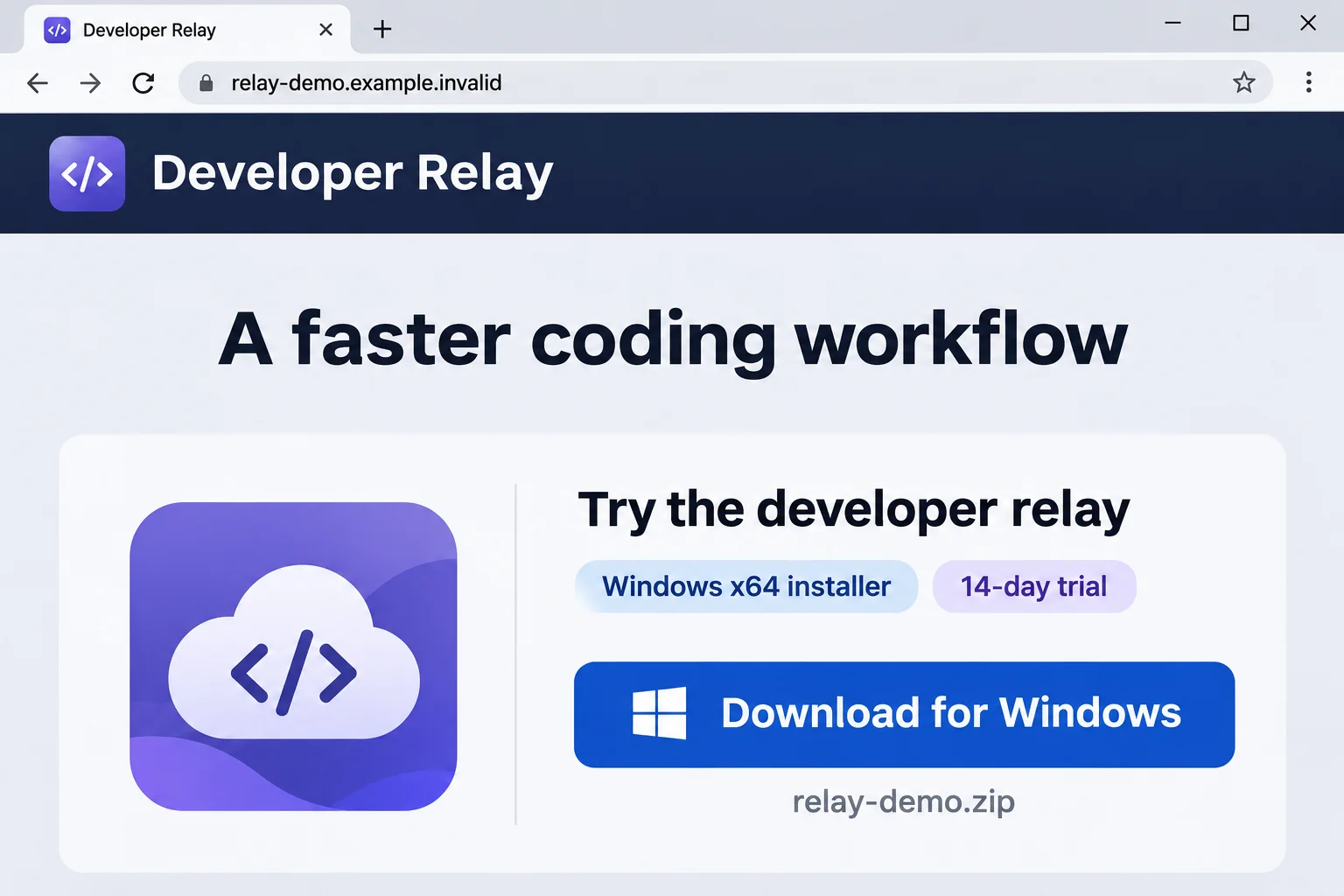
A download page promises a smoother Claude coding experience and a free trial. The Windows installer looks like another developer tool worth trying.
If that download led to a Beagle backdoor warning, start with what you opened. The difference between saving an archive and running its installer matters.
Overview
Beagle is a Windows backdoor, not an ordinary Claude component
Beagle allows remote commands and file operations on an infected computer. Sophos X-Ops documented it behind a fake Claude-themed download, with Donut acting as its loader.
The fraudulent offer called itself Claude-Pro Relay. It should not be confused with Anthropic’s legitimate Claude service or with the unrelated Bagle/Beagle worm from 2004.
Running the installer creates a different incident from visiting the page
The reported download placed an MSI installer inside a ZIP archive. Merely recognizing that filename in Downloads does not establish that the installer executed.
If you ran it, assume the computer needs containment and investigation. Do not keep using it for email, banking, source control, or administrator access while checking.
On a work-managed device, contact the security team before scanning, restarting, or changing files. Their investigation may depend on evidence that ordinary cleanup removes.
Removal and account recovery need separate attention
The illustrated Windows procedure below helps examine and clean a personal computer. It cannot determine everything an intruder may already have done.
- Disconnect a computer on which the suspect installer ran.
- Keep the download source, filenames, times, and security alerts available for responders.
- Use a trusted device for password and developer-credential changes.
- Review scan results instead of treating a completed progress bar as clearance.
- Consider professional rebuilding when the device’s integrity cannot be established.
How to Remove Beagle Backdoor from Windows
This procedure adapts the site’s illustrated ESET Online Scanner guide. It is for personal Windows systems after any required incident-response decisions.
The tutorial pictures show ESET’s controls, not a scan of your computer. Menu wording may vary; the linked vendor instructions explain the supported workflow.
Step 1: Contain the computer and record what happened
Disconnect Ethernet and turn off Wi-Fi if you ran the suspicious installer. Stop opening the download, and do not test whether it works after a restart.
Write down the approximate execution time, download address, archive name, installer name, and any security notification. Use another device for contacting support.
For a business machine, leave shutdown, memory capture, file collection, and scanning decisions to incident responders. Do not reboot merely to begin this guide.
For a personal machine, preserve the download without opening or sharing it casually. A technician can collect evidence without asking you to run the suspected program again.
ESET needs an internet connection for module updates. Do not reconnect an actively compromised computer simply to update a scanner; ask support to plan controlled access or offline inspection.
Step 2: Obtain and open the genuine ESET scanner
Once the containment plan allows it, obtain ESET Online Scanner through the verified route below. Avoid advertisements or a scanner recommended by the fake download page.
Download ESET Online ScannerContinue to ESET’s official download page.
The one-time scanner does not require buying a protection subscription. This site may earn a commission through qualifying affiliate links; your cleanup does not require a purchase.
After downloading the genuine file, find esetonlinescanner.exe in Downloads and open it. Do not confuse it with the suspect Claude installer.
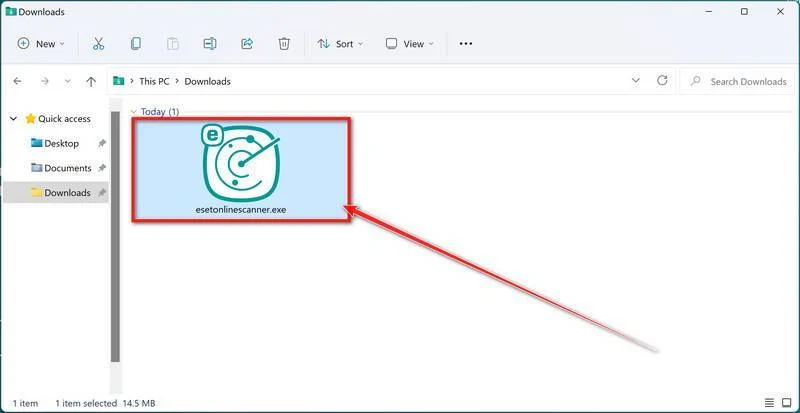
If Windows requests permission, confirm that the prompt belongs to the expected ESET program. Cancel unexpected prompts, and never disable existing protection to make a download run.
Step 3: Choose the language and read the terms
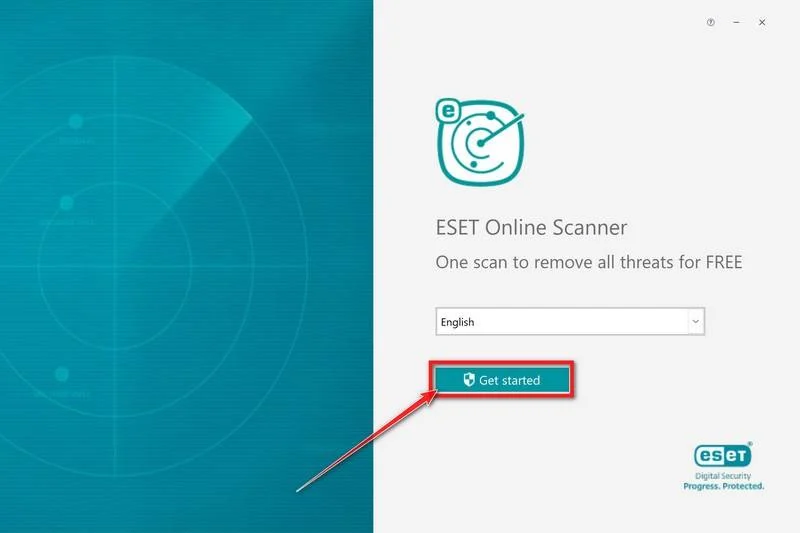
On the opening screen, select the language you want and choose Get started. Returning users may see the scanner’s welcome screen instead.
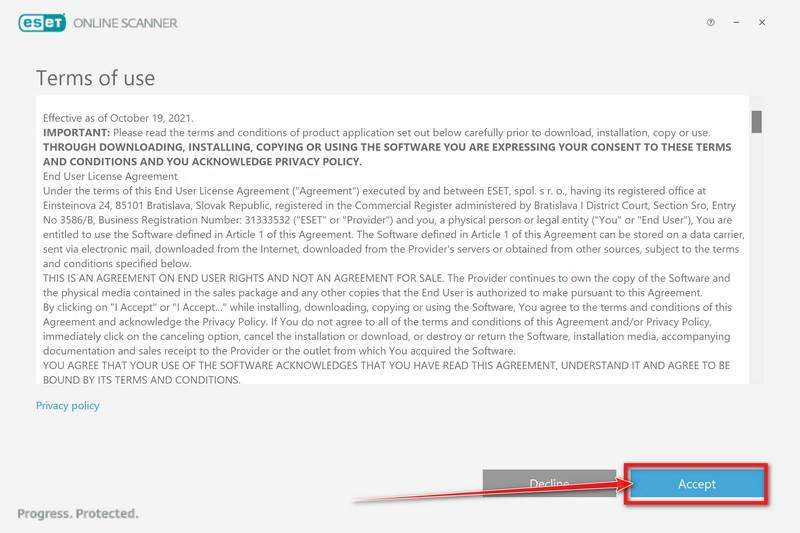
Read the terms displayed by the application. Choose Accept if you agree; if you do not, stop and ask support about an alternative.
Follow any additional Get Started prompt. ESET’s installation and scanning instructions describe both first-run setup and reopening an existing scanner.
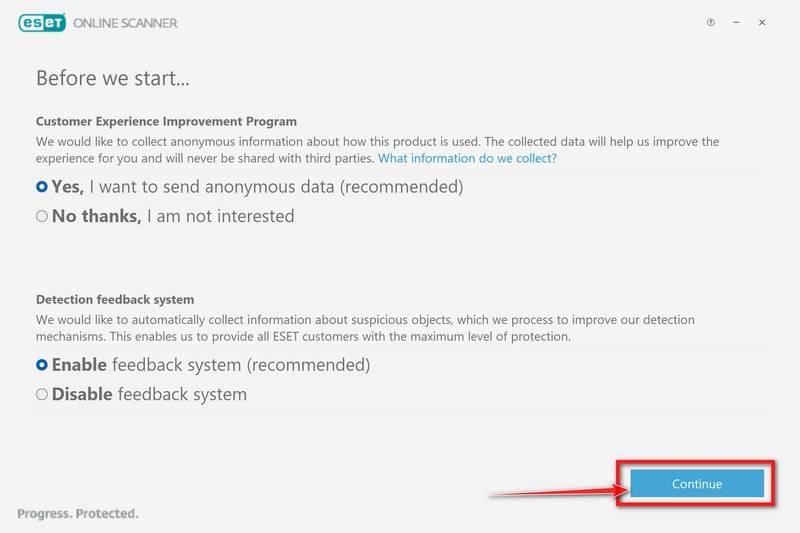
Step 4: Set the optional feedback preferences
The setup asks about the Customer Experience Improvement Program and Detection feedback system. Review what each shares and select your preferred options.
Participation is a choice, not evidence of whether your computer is infected. Select Continue after setting the options; do not mistake feedback for a paid plan.
Step 5: Choose a Full Scan
If the welcome screen appears, choose Computer scan. At the scan-type selection, choose Full Scan, rather than limiting this check to common locations.
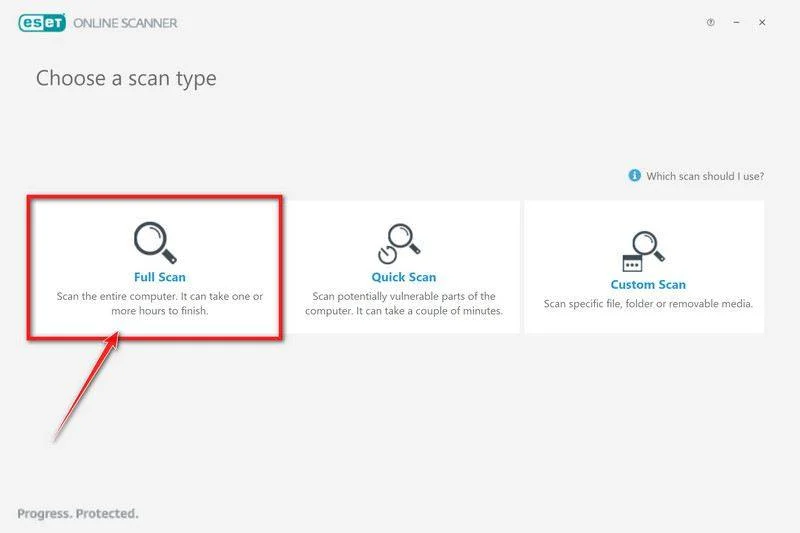
A full scan examines the supported system scope. Exclusions, inaccessible files, encrypted storage, and other limits can affect coverage, so keep any warnings in the report.
Do not use this step to connect other computers’ drives or shared folders indiscriminately. A responder should decide whether additional systems need examination.
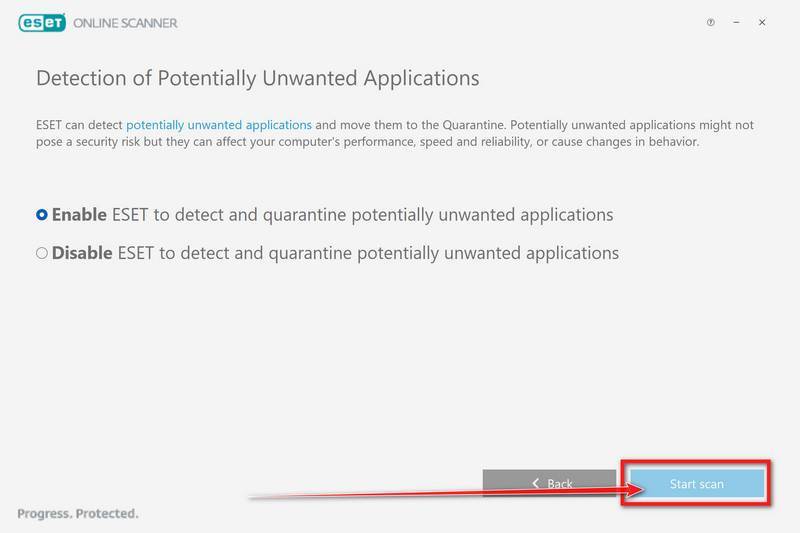
Step 6: Enable unwanted-application detection and let updates finish
Select Enable for detection of potentially unwanted applications, then choose Start scan. This adds relevant unwanted-software checks alongside malware detection.
The scanner downloads module updates before examining files. The preparation screen below shows an update in progress, not completed scanning or a removal result.
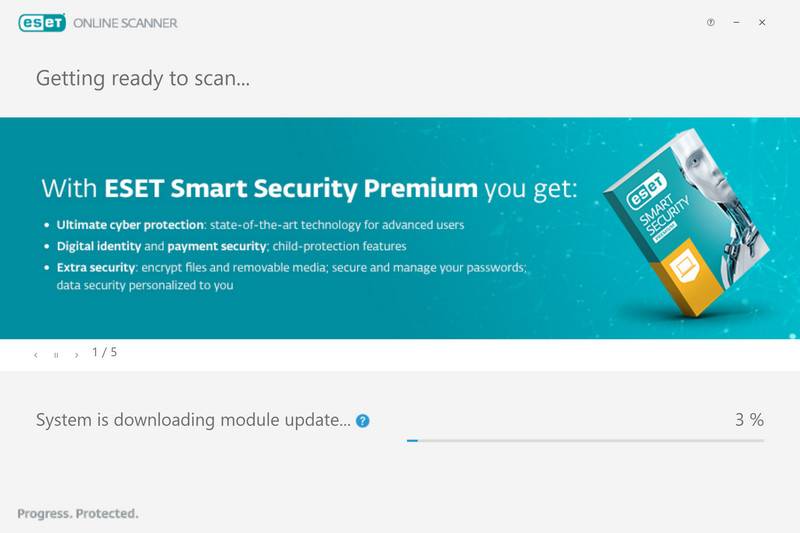
Allow the scan to finish. The time depends on the computer and storage; avoid launching applications or signing into sensitive services while it runs.
If updates fail or the scan stops unexpectedly, save the error and seek help. An interrupted examination must not be recorded as a clean result.
Step 7: Inspect detections and save the scan log
When scanning ends, open View detailed results. Check each detection’s location and recorded action rather than relying only on the summary banner.
ESET can clean and quarantine detections automatically. Any item left unresolved, or any action that failed, still needs attention from a qualified responder.
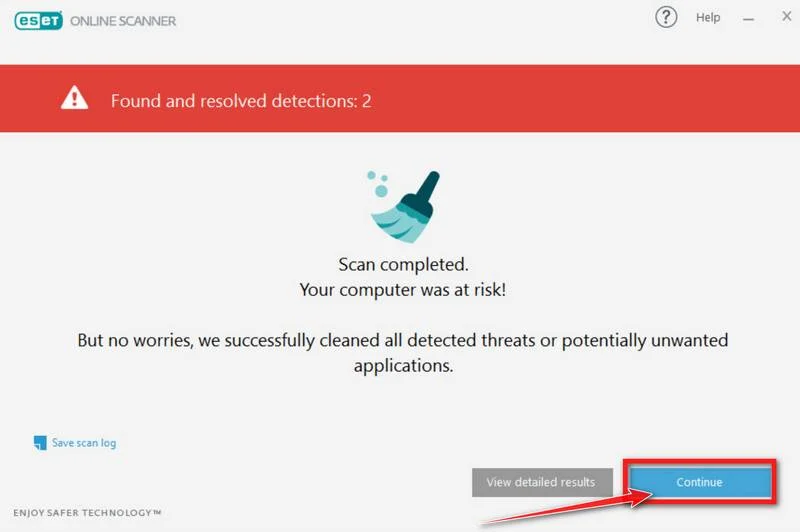
Choose Save scan log and keep the report. The pictured arrow points to Continue; review details and save the log before proceeding past this screen.
Do not restore a quarantined file merely because its name resembles a legitimate utility. Ask support to evaluate the file, its location, and the associated detection.
Step 8: Handle restart requests and unresolved findings
Restart only when the scanner requests it and your incident-response plan permits it. Save open work first, then follow the requested follow-up examination.
Reopen the report afterward and check whether the action completed. Keep the computer out of sensitive use while unresolved detections or unexplained startup activity remain.
Monthly periodic scanning and full-protection offers are optional. They are not required to complete the free one-time procedure or to read its findings.
A clean scan does not reconstruct past commands or prove every persistence mechanism is gone. Follow the account-response section below even when nothing is detected.
If the scan cannot finish, files reappear, or you cannot interpret the result, request Windows malware-removal help and provide the saved logs.
What the Fake Claude Installer Was Reported to Do
Sophos X-Ops’ original research describes a large archive named Claude-Pro-windows-x64.zip containing Claude.msi.
Its installer placed NOVupdate.exe, NOVupdate.exe.dat, and avk.dll in the user’s Startup folder. A signed G DATA updater was abused to load the malicious neighboring library.
This DLL-sideloading chain loaded Donut, then Beagle. A legitimate signature on the borrowed program does not authenticate the other files beside it.
The backdoor’s commands covered execution, transfers, and directory operations. Researchers documented encrypted communication using TCP port 443 and UDP port 8080, not simply ordinary HTTPS browsing.
Shared loader traits do not establish a PlugX infection or a common operator for every related sample. Donut is a loader name, not another name for Beagle.
For a responder, those distinctions prevent a false match. A filename alone is a lead; location, file identity, execution evidence, and the surrounding chain make it meaningful.
Do not search for these names and delete every match yourself. Legitimate applications can use similar names, and careless removal can destroy evidence or damage unrelated software.
What to Do About Accounts and Developer Credentials
A development computer can hold access to much more than its local files. Recovery should consider the accounts and systems available during the suspected compromise.
This is an exposure assessment, not a claim that Beagle contains a dedicated browser-password stealer or that every credential was taken.
-
Secure the account used to recover other accounts.
From a known-clean device, change an exposed email password and inspect recent security activity, recovery contacts, forwarding, and connected applications.
For Google accounts, use its compromised-account guidance. Follow the corresponding official process if your provider is different.
-
End suspicious sessions and strengthen authentication.
Use the real provider’s session controls, remove unfamiliar access, and enable stronger authentication. Do not assume changing one password revokes every existing session or token.
Tell your administrator if business sign-ins were available on the affected computer. They can assess organization-wide access without asking you to share authentication codes.
-
Inventory development secrets that the computer could access.
Consider repository tokens, SSH private keys, package-publishing credentials, cloud access keys, deployment secrets, and local environment files. Record the affected services without publishing the secret values.
A broad command-execution capability warrants this review even without a named credential-stealing module. The concern is what was accessible, not an invented list of stolen items.
-
Coordinate revocation and replacement with each service owner.
Replace potentially exposed credentials from a clean environment. Update dependent applications carefully so emergency changes do not leave services broken or silently using the old secret.
GitHub’s incident-response guidance covers credential containment and rotation. Choose actions matching the evidence rather than triggering disruptive bulk changes indiscriminately.
-
Review repository access and changes.
Check unfamiliar account activity, application permissions, deploy keys, workflow changes, and unexpected releases. Ask the repository owner to assess modifications made during the exposure window.
GitHub users can follow its SSH-key review instructions. Replacing a local private key also requires removing the old authorization wherever it was trusted.
-
Keep a short recovery record.
Track when the computer was isolated, which scans ran, which access was revoked, and what remains unresolved. Keep logs private and share them through trusted support channels.
That record helps distinguish a new suspicious event from an old alert arriving late. It also prevents a forgotten token or automation from undermining otherwise careful recovery.
When Rebuilding Windows Is the Better Choice
A confirmed backdoor can leave uncertainty about changes made after installation. Removing the originally identified files does not explain every command an operator might have run.
Professional rebuilding is especially worth discussing for development workstations with production access, repeated detections, unexplained persistence, or security controls that cannot be trusted.
Before wiping anything, preserve the evidence and documents you need. A rebuild removes applications and settings and can erase local data, so agree on a backup plan.
Use trusted installation media and fresh application downloads. Do not restore the suspicious installer, Startup contents, executable caches, or an unexamined system image into the rebuilt installation.
Have important backups checked before restoration. Reintroducing ordinary documents is different from restoring the entire environment that was compromised.
Account recovery must continue separately. A fresh Windows installation does not revoke a repository token, cancel an active cloud session, or recover a file already copied elsewhere.
If you want ongoing prevention afterward, Malwarebytes Premium is an optional paid product. It is not a required purchase or a promise to undo this incident.
Avoid Repeating the Download
Reach Claude’s official service independently when checking available software. Do not use a trial button or contact address from the suspected relay page.
Search placement, familiar typography, and a Windows installer label do not verify a publisher. A promised speed improvement is not a reason to bypass a security warning.
If a colleague recommended the file, send a warning through a trusted channel without redistributing the archive. Their recommendation may have been made before the risk was known.
Keep any suspicious URL defanged in public discussions, and never upload workplace files or secrets merely to ask whether the download was malicious.
Frequently Asked Questions
Did the real Claude service install Beagle?
The reported campaign used an impersonating download site. The legitimate Claude service is separate; the warning concerns that site’s installer and its malicious loading chain.
Am I infected if I only saved the ZIP archive?
Saving an archive is not the same as executing its installer. Do not open it to check. Tell support exactly what actions you remember and preserve relevant alerts.
Can I delete the Startup files instead of scanning?
Do not remove files solely by name. A responder should verify their identity and assess related changes; deleting the visible components alone may leave the wider compromise unresolved.
Does a clean ESET result prove everything is safe?
No. It reports the outcome within the scan’s scope. Preserve logs, investigate unresolved symptoms, and complete the separate account and credential work.
Is this the old Beagle email worm?
No known connection is established to the Bagle/Beagle worm first seen in 2004. Use the fake Claude delivery context when discussing this newer backdoor with support.
Do I have to buy security software to follow this guide?
The illustrated ESET one-time scan is free. Paid prevention offers are optional; neither a purchase nor a completed scan substitutes for incident response or credential recovery.
The Bottom Line
For suspected Beagle backdoor, isolate Windows, preserve evidence, and follow the illustrated removal procedure with qualified help. Do not run that installer again.
Secure accessible accounts and development secrets from a trusted device. If the computer’s integrity remains uncertain, discuss rebuilding before returning it to production or sensitive personal work.

Join the discussion
0 commentsShare your experience or ask a question about this article.
Your progress
Did these steps help?
Let us know how the guide worked for you.
Describe what you see and the step you reached. Keep passwords and other private information out.
Discussion
Start the conversation
Have a question or something useful to share? Add the first comment.