


A video tutorial can be easy to trust when it appears on a channel you’ve watched before. What you do after the video matters more than how polished it looks.
If you’ve already closed the tab, leave the download alone. You can work out whether there’s a problem without trying the program again.
Overview
What GachiLoader is
GachiLoader is a Windows malware loader investigated by Check Point Research.
A loader’s role is to start or deliver other unwanted software, rather than necessarily being the final threat a victim sees.
The researchers documented it in part of a campaign tied to compromised YouTube accounts. Videos promoted game cheats or cracked software, while links led to downloads hosted away from YouTube.
In the samples in this campaign, researchers found Rhadamanthys as a final payload. One variant used an additional loader that the researchers named Kidkadi.
Maybe your security tool displayed one name but not the others. Save its exact alert. A single label does not independently prove which parts of a particular campaign ran.
Why a familiar channel isn’t a safety check
An account can have real subscribers, years of uploads, and a recognizable profile picture before somebody takes control of it. Those details don’t certify a new link.
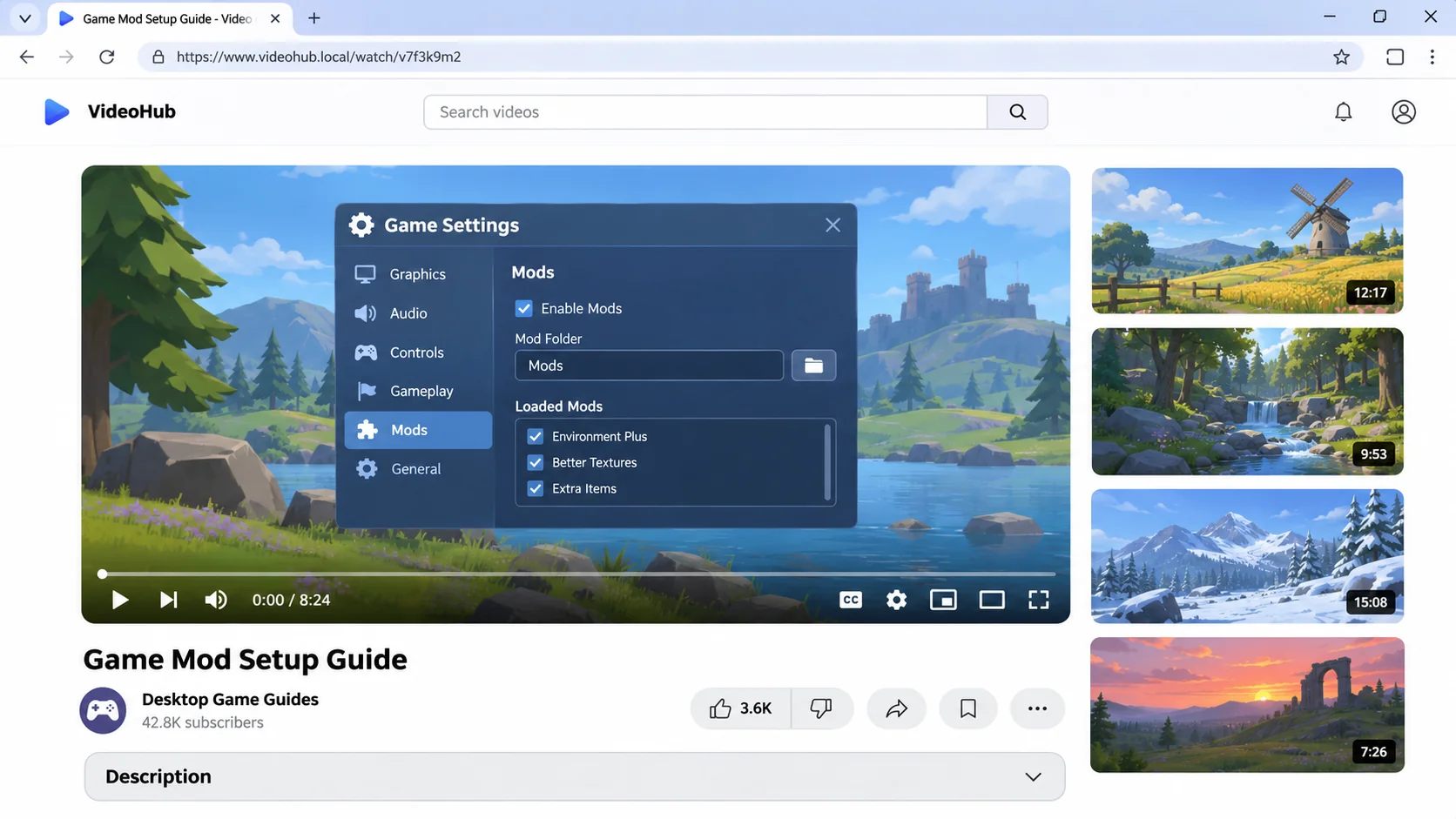
The video page shown here is a fictional reconstruction. It doesn’t depict a specific channel or identify its owner.
For the same reason, don’t assume the channel’s legitimate owner knowingly shared the file. Recognizing the channel and trusting the person who currently controls it are different questions.
If it was a creator whose work you know, check their independent website or established community channel for an announcement.
The same compromised account is not reliable confirmation of its own security.
The point where risk changes
- Watching a video is not the same as running an installer from its description.
- Clicking the link is different from extracting and launching a file that came from it.
- If you typed a password into an external page, check that account separately from the download.
- If Windows displayed a warning or an administrator prompt, record your answer rather than trying to reproduce it.
- If the channel is yours, treat unexpected uploads as an account incident even if you never used the download.
Check Point’s report describes a specific observed campaign. It doesn’t prove that every download link on YouTube, every cheat, or every recently hacked channel used this particular loader.
If the stealer ran, account data in a browser can be at risk even when the original file never asked you to enter a password.
That possibility is more urgent when the computer was used for business email, a creator account, or a payment dashboard. The impact depends on accounts actually used on the device.
Browser sessions are especially easy to overlook. A session is the access a service remembers after you sign in, and it can need separate attention from a password.
Start with the developer’s website and find the product from its home page. If the official route doesn’t match the archive, don’t use the comment section to resolve the difference.
Official products sometimes use third-party delivery networks, which is why a strange address alone isn’t a complete test. What matters is whether the developer independently points to that exact download.
Look for a real release date, supported Windows versions, and the publisher’s normal documentation. If the promised utility has no verified publisher, you don’t need it badly enough to guess.
Keep your original security settings in place during the comparison. A tutorial asking you to turn protections off is not a substitute for a support notice from the developer.
How the GachiLoader Infection Happens
Step 1: An established channel posts a tempting download
The video gives a person an apparent shortcut to a game modification or expensive software. The channel can look established because it didn’t have to be created for that video.
This is a useful clue for subscribers. If a channel that usually reviews cameras uploads an unrelated gaming utility overnight, check before you trust the recommendation.
The same advice applies when the topic fits. A matching subject can make a download less surprising, but it does not authenticate the file itself.
Step 2: The link takes the viewer to somewhere else
Researchers observed archives distributed through external file hosting. A page on YouTube may offer a link, but the video platform isn’t the publisher of whatever the third-party host supplies.
Look at the source chain before downloading software. If the route begins with a video and ends at an unrelated host, compare it with the legitimate developer’s downloads page.
A download file can also retain a reassuring name after being copied or reposted. Neither a filename nor a comment claiming it works establishes who packaged the contents.
Step 3: Running the downloaded item starts the software chain
The documented GachiLoader chain begins when the victim runs a downloaded item. Merely returning to the video to check its title isn’t that event.
Behind the scenes, the loader can bring in other software. You may not see a clear installer finish screen that accurately tells you what started.
If a prompt said the download needs extra permissions to work, that matters to the incident record.
Don’t approve the same prompt again just to tell support exactly how it looked.
Step 4: Follow-on software can put accounts at risk
In Check Point’s investigated campaign, the final payload was an information stealer. This helps explain why recovery isn’t finished when the initial archive is removed.
A banking site, a social account, and a creator account each have different controls for ending sessions. Use a trusted device and reach each service independently.
If you manage a channel and notice uploads you didn’t make, report that as its own problem. Don’t wait to see whether you can name the original piece of malware.
What to Do if You Downloaded or Ran a GachiLoader File
-
Establish the last thing you did. Did you watch, save an archive, open it, run something, or grant administrator access? Write that down without repeating the action.
If the file was only saved, don’t launch it to confirm what it is. If you think it ran, disconnect the affected computer from the network and switch devices.
-
Keep the useful parts of the trail. Save the channel name, video title, date, and any security warning you already have. Avoid including a live download link in public posts.
On a work computer, call your help desk before deleting the archive or clearing history. Tell them whether the suspect item was opened while work accounts were signed in.
-
Protect the accounts that let you recover other sign-ins. On a clean device, start with your primary email and password manager. Check recovery changes, unknown devices, and active sessions.
If you entered a password into a download site, change it through the service that issued the account. Change reused passwords elsewhere, using separate replacements.
-
Protect your channel and any associated business access. If you own a YouTube channel, use Google’s guidance for a hacked channel.
Recover the associated Google Account first. Then review channel roles and unexpected changes with other authorized managers, without circulating a shared password.
-
Verify money-related activity outside the computer. Check payments, payout settings, and recent activity in services you used on the affected Windows system.
If your bank or exchange shows an unfamiliar transaction, contact its verified fraud channel. Record what was reported and which devices had active access.
-
Warn the right people without forwarding the file. Use YouTube’s reporting controls for a suspicious video. Tell colleagues if you shared its download before realizing there was a problem.
A screenshot or exact video title is often more useful than an attached archive. If your team needs the sample, let its security staff collect it.
How to Remove GachiLoader From Windows
Step 1: Check Windows Security for a record of the detection
Open Windows Security > Virus & threat protection > Protection history and review entries around the time of the download. Microsoft’s Protection History guide explains the entries.
Note whether Windows says it blocked, quarantined, or still needs action on a file.
If you get a warning, don’t allow or restore the item to see whether the video works.
Retain a note of the path and detection name for support. Don’t remove an unrelated company security setting or switch off Defender just because a tutorial said it was necessary.
Step 2: Install a scanner from a known source
If your IT team is handling the device, use only its approved tools. For a personal Windows computer, the established Malwarebytes Windows installer is an option.
Obtain the installer through a trusted device if practical and confirm its publisher in the installation prompt. Don’t download a security tool from a comment under the same video.
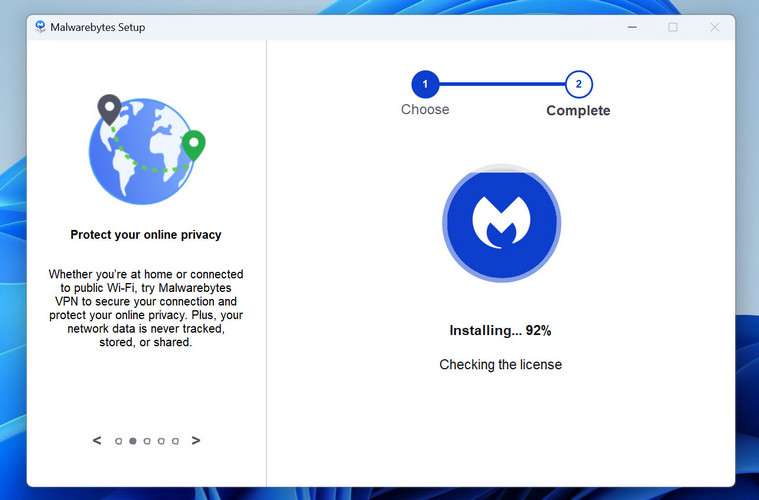
Open Malwarebytes and start a scan from the main interface. The existing installation and scan pictures may show different control placement from the release now on your computer.
Let the scan finish, review its findings, and quarantine confirmed threats. If it asks for a restart, save your work and then recheck the result after Windows comes back.
Delete the archived download from your own computer once it is no longer needed for evidence.
Don’t copy the archive into a backup or share it with someone for another opinion.
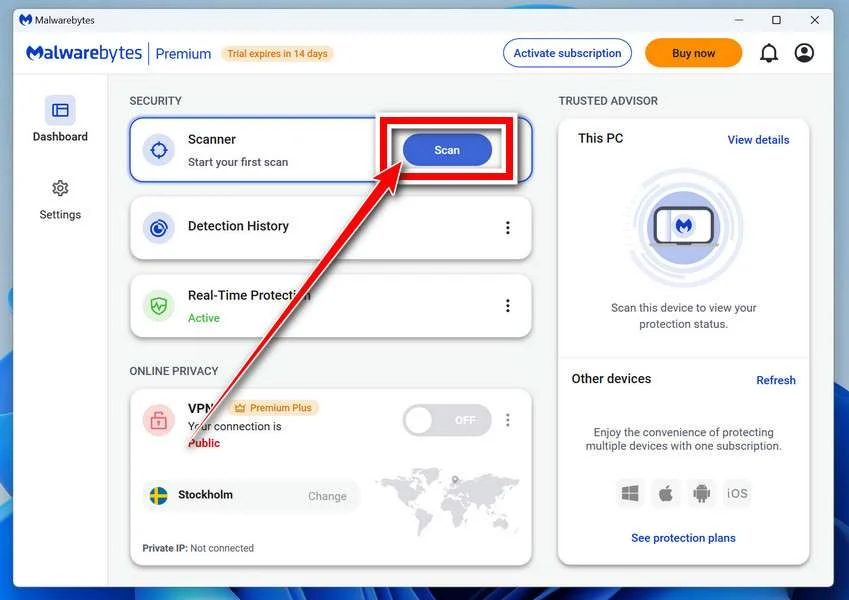
The Malwarebytes Premium option is an optional affiliate link. Device scanning is a separate task from reviewing provider activity and removing unrecognized access.
Step 3: Confirm that security settings and browser access make sense again
On a personal PC, look for unexpected protection settings or unknown apps added near the time of the download. Don’t guess which system items are safe to remove.
If the download asked you to weaken protection and you agreed, tell support exactly what you changed.
That detail helps them distinguish a normal setting from one introduced during the incident.
Apply official Windows and browser updates. If Windows keeps flagging the threat, seek the MalwareTips support forums or a technician instead of reusing the computer for logins.
Step 4: Check your channel before going back to a normal upload schedule
Once you can sign in safely, review who can manage the channel and who can change connected settings. Look at uploads, descriptions, and linked destinations you don’t recognize.
Have other authorized managers review their own Google Account security. Restoring one creator’s sign-in won’t necessarily secure access held by every other account on the team.
If YouTube imposed a restriction because of posts you didn’t create, follow its recovery and appeal process. Keep a record of unauthorized activity as you work through those steps.
Step 5: Trace where the downloaded file went
Sometimes the archive was saved to cloud-synced Downloads or forwarded to a group chat before anyone ran it.
That changes who should receive a warning, even if your copy is gone.
If you think colleagues obtained it, tell them the name and source through a known channel. Advise them not to open it and let their administrator handle inspection.
Don’t ask a friend with different antivirus software to test the file. It can be possible to investigate an alert without increasing the number of affected devices.
If you made a backup during the incident, review what’s in it before you restore. A folder full of ordinary game or work files could still contain the archive.
Step 6: Keep the account review proportional to your role
For a personal subscriber, the review may be limited to one machine and a couple of accounts. A channel owner might also need to look at payouts and ownership permissions.
For a team’s channel, make a short list of who can publish and who can manage access. If something changed, document the change before reverting it through an authorized account.
Once you have spoken to the service and checked the file exposure, save the support reference. It can help if an account change or upload is noticed days later.
Frequently Asked Questions
Can I get GachiLoader just by watching a YouTube video?
Watching alone isn’t the route described in this campaign. The documented threat involved a download promoted through videos and action on the resulting file on Windows.
Is Kidkadi another name for the same thing?
Check Point distinguishes Kidkadi as another stage in one variant, not the name of every GachiLoader sample. Keep the detection label you actually saw when asking for support.
Do comments and subscriber counts tell me the archive is safe?
No single channel statistic establishes file origin. A channel’s genuine reputation can continue to be visible if someone other than the legitimate creator has access to it.
What if my antivirus blocked the download?
Read the exact result and compare its time with the action you remember.
A blocked file is a different result from a warning after execution, and support can help interpret it.
Should I change passwords from the affected PC?
Move that work to a trusted device if you suspect the program ran. Review active sessions and recovery settings there before bringing the affected PC back into normal use.
Does removing the video secure my channel?
Removing unauthorized content doesn’t remove unauthorized account access. Use Google’s recovery path and review the permissions and accounts responsible for managing uploads.
The Bottom Line
GachiLoader turned a familiar video page into the starting point for an untrusted Windows download. Where you stopped determines whether this was simply a suspicious video or a device incident.
If something ran, protect the accounts as well as the computer. Channel owners should recover access and review unauthorized changes independently of the malware cleanup.

Join the discussion
0 commentsShare your experience or ask a question about this article.
Community experiences
Did this happen to you?
Your experience could help someone recognize the same scam. Submit a private report for our team to review.
I experienced this tooReports are reviewed before publication. Sharing publicly is always your choice.
Discussion
Start the conversation
Have a question or something useful to share? Add the first comment.