


A caller says your bank spotted a Walmart transaction. While you’re still on the line, a text arrives from the number you recognize for banking alerts.
The amount is $99.99, but the merchant is a gambling site. The caller has an explanation for why those two stories belong together.
Overview
The call began with Walmart, while the text showed a gambling charge
A customer reported taking a call from someone who claimed to be from their bank. The caller mentioned a Walmart fraud alert and proposed setting up new two-factor authentication.
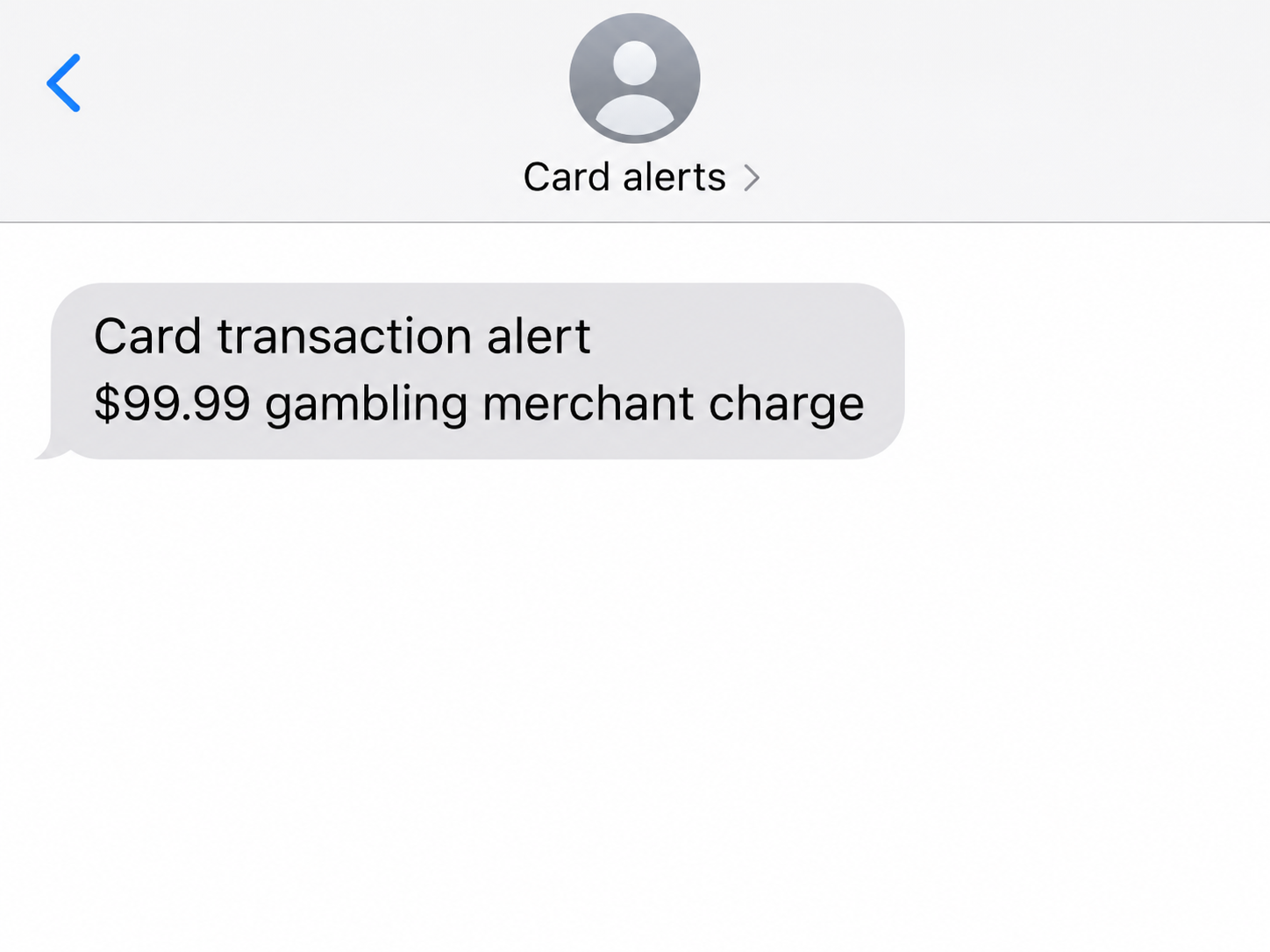
While the customer was listening, a bank text arrived about a $99.99 transaction at a gambling site. It appeared in the same place as their previous bank messages.
The customer described the text as real and said they validated the alert. The lead image recreates the amount and merchant type without showing a working approval control.
The information in the text was a warning in its own right
Walmart was the explanation offered over the phone. A gambling merchant and a specific amount were the details the customer saw on the screen.
The recipient said several more gambling charges followed, totaling in the thousands. They were working with the bank when they shared what happened, so the eventual dispute outcome is unknown.
The exact action behind the word “validated” is also unknown. The account does not establish whether the customer entered a code, replied to the text or used an approval prompt.
Keep the transaction and the caller separate
A bank can send a real notice during an impersonation call. Read the alert and check the merchant without relying on the person speaking.
- Compare the merchant, amount and action shown in the bank’s actual alert.
- Decline or leave untouched any transaction or sign-in you did not start.
- End the call and check the account through the issuer’s own app or number.
- If you approved something, tell the bank exactly what you saw and how you responded.
The FTC explains why scammers want verification codes. A genuine alert or code can be part of an unrelated transaction you did not intend to authorize.
The Merchant Name Was the Part Worth Reading Twice
The caller asked the customer to think about a Walmart alert. The text was about a gambling merchant, which gave the customer something concrete to check without trusting the caller.
If a bank sends a real transaction question, the merchant and amount are part of the question. They tell you what the bank wants you to review.
An unexpected merchant can be confusing because businesses sometimes bill under names that differ from their storefront. Ask the actual bank what it can see about the transaction.
A relative who shares a card might also recognize a purchase you do not. A quick check with them can help you avoid confirming a transaction on someone else’s account.
The caller was talking about Walmart while the message described gambling. Read the alert for the transaction it actually names.
How the Fake Bank Call and Gambling Alert Scam Works
Step 1: The caller introduces a fraud story
The person on the phone presented themselves as the customer’s bank and described a Walmart alert. The number looked local, which helped the call feel familiar.
Caller ID can display numbers that do not belong to the person speaking. Use the account or your card to get a number you can reach yourself.
Step 2: The caller recasts a separate alert as account security
The caller said they would set up new two-factor authentication. The customer then received a text naming a gambling merchant and a $99.99 charge.
It arrived where the customer usually saw bank messages. That made it seem to support the caller’s story, even though the two contacts described different merchants and actions.
Step 3: The customer responds to the alert on the call
According to the public account, the customer validated the alert. The report does not say which button or response the bank offered.
A transaction approval and an account sign-in can look like similar confirmation requests. Both can have consequences if you accept them while a stranger is supplying the interpretation.
Step 4: The bank considers the resulting activity
The customer reported more gambling transactions after the first alert. Those later charges made the bank investigation about actual activity instead of just a suspicious call.
The timing is useful evidence to preserve. Ask which charges were approved, which were merely attempted and what security actions the issuer can take during the dispute.
What the App or Text Can Tell You Before You Respond
Read the action the prompt is asking you to take
Look for the wording near the amount, such as a request to confirm a card transaction or approve a sign-in. A phone explanation should never override what the alert says.
If the alert asks whether you made a particular charge, use your own knowledge of the purchase. Leave a prompt untouched if you cannot tell what responding will do.
If you can already see a genuine bank alert in the app, contact the bank there. A record inside your account gives its staff a better place to start.
Ask the issuer directly if you cannot tell whether a particular reply would approve or decline the transaction.
Check the account’s activity on its own
Open the card app from its usual icon. Look for the original amount, any transactions at the same merchant and activity on cards linked to the account.
Check whether the app marks the charge pending, blocked or posted. Provide that detail when you call so the representative can distinguish the alert from what actually happened.
If more than one transaction appeared, record each separately. The same merchant name can show up with different times, amounts and states.
Ask whether the account also shows changes such as a new device or digital wallet. Report what you actually see instead of assuming a login was taken over.
Keep a fresh call separate from the one you answered
Use the number you already had, such as the one on the card. Explain that a caller described one merchant, then asked you to act on a different alert.
If another call or text appears while you wait, leave it alone. The bank representative can tell you through the channel you initiated whether the case requires a callback.
Where a trusted card app offers a temporary lock, ask the issuer if it is appropriate for the situation. A lock and a fraud claim serve different purposes.
If a Genuine Charge Followed a Fake Call
Tell the bank both parts of the story. Explain that you did not make the purchase and that someone claiming to be from the bank persuaded you to respond.
If you still have the text or a screenshot, record the exact wording without exposing any full card number or active code.
The bank can compare that prompt with its records.
Tell the representative whether you made a separate payment or supplied a code. Those details may point to activity beyond the first card alert.
Review other app notices from the same time period for changes you did not make. Ask the bank to check any account sign-ins or contact information connected to the incident.
The FTC’s payment recovery guide recommends prompt contact with the issuer for unauthorized transactions. Keep the reference number and follow the bank’s instructions for each payment or card involved.
Write Down What the App Showed and What the Caller Said
Pull the merchant names out of the conversation
Write down the store the caller originally named and the merchant the text showed. If they differ, tell the issuer exactly which one appeared in its own notification.
If the first amount you saw was $99.99, identify whether that charge appears in the account. Do the same for the later amounts separately.
An amount in a notification can help the bank find the right record. Save that notice even if the corresponding item later disappears from the pending list.
If a merchant attempts another charge after the account is locked, ask the issuer how it will show in the app. Note whether the new line is blocked or pending.
Tell the bank exactly how you responded
Some people type a code into a prompt, others read it aloud, and others approve a card alert. Let the bank know what you remember doing rather than guessing.
If the notification showed a reason for the confirmation, preserve those words in the report. The bank may be able to match them against what its system sent.
When the caller describes something as new security, note those words separately. They help explain why you understood the transaction prompt differently at the time.
If you cannot recall approving anything, say that clearly. Report the unfamiliar merchant activity and ask the bank to review which events were associated with your card.
Keep follow-up notices connected to the case you opened
Ask the issuer when it expects to follow up and how it usually contacts people about open disputes. Save that expectation with the new case number.
If a text mentions your case but asks you to secure a new device, call the bank again. A later message can reuse details supplied during the original call.
If another person on the account receives an alert, let them know which merchant and amount the bank is reviewing.
Ask them to report anything unfamiliar through the same verified route.
Make a copy of your records before changing cards or replacing a device. Once an account is closed or a message is deleted, finding the original alert can take longer.
Keep any new payment instructions from your bank in the app or statement where you received them. Avoid relying on numbers or instructions a caller offered during the incident.
An apparent refund can create another chance for impersonation. If the bank says it issued a provisional credit, ask when and where it will appear in your own account.
What to Do if You Have Fallen Victim to This Scam
-
Hang up and keep the first alert, any later messages, and a note of the merchant names the caller and the bank used.
-
Call the bank or card issuer through the number on your card or its own app, then ask what the $99.99 alert authorized.
-
Report each unfamiliar transaction and explain whether you confirmed a charge, supplied a code or approved access because of the call.
-
Ask the issuer what restrictions, replacements or changes it recommends for the card and account, and follow the steps it gives you directly.
-
Keep a record of the payments and any related changes to your banking account, including the time you reported the first problem.
-
Use FTC ReportFraud to report the impersonation in the United States and keep the reference with your issuer’s case details.
If your account shows no unfamiliar transaction, you can still report the call. Explain which genuine message arrived at the same time so the bank can identify it.
Someone who knows about the case may later claim to be helping you recover money. Use the bank’s verified contact route to confirm any new instructions before acting.
If a charge still shows as pending, write down when you saw it and ask the issuer how to handle it. Keep checking your account for newly posted transactions.
Give the issuer the amount and merchant name as they appear in your account, even if the caller described a different purchase. The two records may tell different stories.
Frequently Asked Questions
Could the gambling alert really have come from the bank?
The customer described it as appearing with their usual bank messages. A genuine notice still does not identify the person on the phone or make their instructions valid.
Why did the caller mention Walmart first?
The Walmart story gave the recipient a reason to expect a fraud alert. The reported text described a different merchant, which could be checked independently.
Does confirming a card alert always mean a payment succeeded?
The result depends on what the alert asks and how the issuer handles the transaction. Ask the bank which activity it recorded and whether anything was approved.
Should I tell the bank I responded to the alert?
Explain exactly what you did and what the caller told you. That helps the bank distinguish an unwanted transaction from a sign-in or other account change.
What if I only read the text and did not respond?
You can report the call and check your bank app directly. Reading the alert by itself is different from confirming the activity or sharing a code.
Can the bank recover money from gambling transactions I did not make?
Report the charges to your issuer quickly and follow its dispute instructions. The bank can explain which transactions it can investigate and what records it needs.
The Bottom Line
End an incoming bank call before acting on a transaction you did not make. Check the merchant and amount with the bank through a number or app you already use.
If you responded to the alert, tell the bank exactly what you approved. Report later charges separately and ask what the issuer needs to protect the account.

Join the discussion
0 commentsShare your experience or ask a question about this article.
Community experiences
Did this happen to you?
Your experience could help someone recognize the same scam. Submit a private report for our team to review.
I experienced this tooReports are reviewed before publication. Sharing publicly is always your choice.
Discussion
Start the conversation
Have a question or something useful to share? Add the first comment.