


An iPhone preorder ad promises a head start, and the next screen makes early access look just a few taps away.
Then the instructions leave the shopping page and send you into a messaging app. That change deserves your attention before you continue.
Overview
A phone reservation becomes a messaging account request
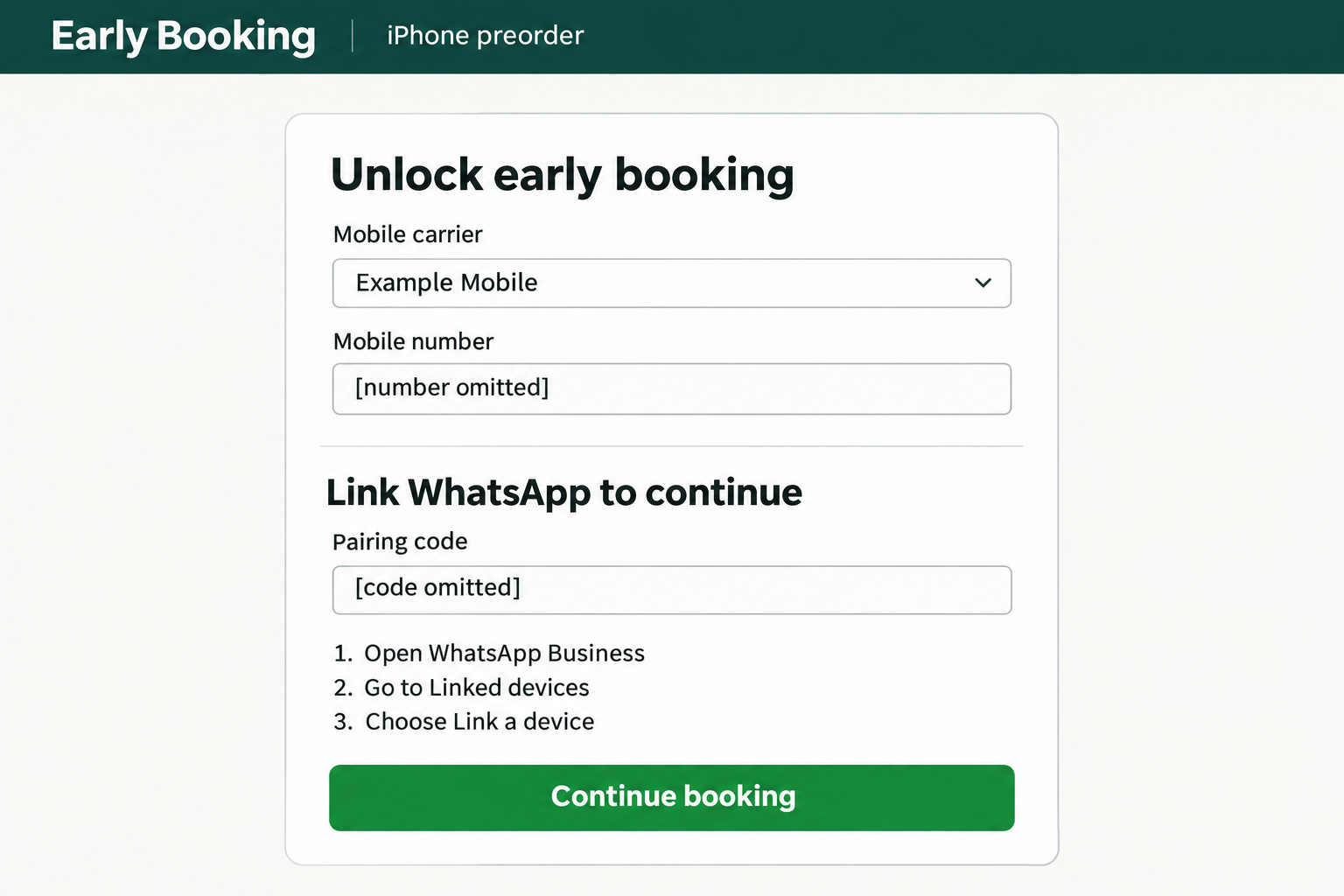
TrendLife described a Facebook promotion for iPhone Duo early booking. Visitors chose a carrier and entered a phone number.
The next screen directed them into WhatsApp Business’s Linked Devices settings, where the displayed code would authorize the attacker’s device.
Its captured window used an Authorized Unlock label and 3HK branding. Those labels belonged to the impersonation, not a verified carrier partnership.
The crucial question isn’t whether a retailer might contact customers through WhatsApp. It’s why that retailer wants another device connected to your account.
Device linking grants access, not a place in line
WhatsApp supports legitimate companion devices, including a computer you choose to use. Linking is an account permission, not a shopping verification service.
WhatsApp’s phone-number linking instructions describe an eight-character code displayed on the companion device and entered on the primary phone.
That direction matters: the code identifies a device waiting for approval. Possessing a code doesn’t prove the person supplying it deserves access.
- A phone number identifies the account involved; entering it alone is not the same as approving a linked device.
- A linking prompt should correspond to a device you deliberately chose and control.
- A preorder benefit cannot justify granting a stranger access to your conversations.
- If you already approved a connection, review Linked Devices rather than waiting for an order confirmation.
The fraudulent offer is separate from the real services
Apple, WhatsApp, and the carrier names displayed in the promotion are not evidence that those organizations authorized it.
The practical verdict concerns this fake iPhone preorder scam: do not complete its device-linking request or treat its code as a reservation requirement.
The attack address is obscured in the published evidence. There is no independently tested live checkout or account connection behind this article.
That limits claims about a current destination, not the meaning of a device-authorization screen. You can recognize that permission without testing a suspicious offer.
Why a Genuine App Screen Can Still Be Part of a Scam
People often look for a misspelled domain or a fake login box. This trick instead asks them to perform a real action for a false reason.
Imagine someone persuading you to add their computer to an account you own. The account service can process that approval correctly while the explanation remains dishonest.
The scammer doesn’t need to build a convincing replacement for every security screen. They need you to misunderstand the screen already on your phone.
A familiar app icon and a successful biometric check can make the process feel reassuring. Neither establishes that the requested connection serves your interests.
Your fingerprint confirms that you are approving an action. It does not certify a retailer, a product launch, or the person controlling the other device.
Read the permission as a sentence about access: you are connecting a device to your messaging account. The promise printed beside it cannot change that sentence.
Talking with a shop through WhatsApp and adding a device to your own WhatsApp account are different things. Customer service does not require that second relationship.
This also explains why refusing to share a password is not the entire defense. An attacker can seek permission instead of asking for a secret.
How the Fake iPhone Preorder Scam Works
Step 1: The product offer supplies a reason to hurry
A launch promotion gives the reader an attractive goal: finish the reservation before someone else gets the opportunity.
At that moment, ordinary-looking details can carry too much weight. A device picture, carrier selector, or launch date can distract from the permission requested later.
None of those details independently verifies the destination. A convincing product description and an unrelated account request should be evaluated separately.
Before proceeding, leave the advertisement and find the promotion through the retailer’s established website. An offer should survive that independent check.
Step 2: Familiar form fields make the handoff feel routine
A customer expecting a phone reservation may be unsurprised by questions about mobile service. That expectation can soften resistance to the next instruction.
But reasonable-looking opening questions don’t make everything afterward reasonable. Reassess whenever a process changes apps or begins requesting account permissions.
A useful stopping point is the transition itself. Ask what you are being asked to authorize, rather than whether the previous page looked professional.
If the requested action would make no sense without the promised reward, don’t approve it while relying on that reward’s existence.
Step 3: An authorization code is presented as a shopping task
In legitimate phone-number pairing, the companion device displays the code. The primary phone is where its owner approves that connection.
When someone else controls the waiting device, entering their code approves their connection, not yours. Copying the code accurately does not make the request safe.
Follow the meaning of the interface rather than a website’s preferred label. Link, pair, and authorize describe access decisions.
A genuine purchase confirmation should establish an order with the merchant. It should not establish a stranger’s ability to operate your messaging account.
Step 4: The primary phone can warn about the destination
WhatsApp’s documented process can show the device name and location, request identity confirmation, and offer a choice not to link an unrecognized device.
If you didn’t initiate the connection, refuse it. Don’t let an advertisement reinterpret that warning as an obstacle to securing a deal.
Pause even if the location seems plausible. Recognizing a city isn’t the same as recognizing and controlling the computer requesting access.
If a helper insists that the prompt is expected, their explanation is still not verification. End the interaction and consult support independently.
Step 5: A linked device creates a separate route into conversations
WhatsApp explains that linked devices connect independently. Your main phone doesn’t have to remain online for a linked device to work.
Consequently, closing the shopping tab or turning off that phone is not a reliable way to revoke a connection already granted.
This is an abuse of authorization, not evidence that WhatsApp’s encryption has been broken. The unwanted device has been allowed into the account.
That difference points to the right remedy: remove the connection through account controls, then consider what may have happened while it was present.
What an Unwanted Connection Could Expose
WhatsApp’s message-history guidance says a newly linked device receives an encrypted copy of recent history, which is stored on that device.
Not every conversation or old message necessarily syncs. Avoid both extremes: assuming nothing was visible, or assuming every message ever sent was copied.
Instead, consider the conversations that could matter most: customer arrangements, private family information, documents, and messages that could support a convincing impersonation.
For a business account, think about the people who trust instructions from that number. An apparent invoice correction or payment request could deserve an independent check.
Those are possible consequences to investigate, not confirmed transactions from this campaign. Ask contacts what they received before treating a suspected loss as established.
A conversation can reveal enough context to make a later request sound personal. Someone might refer to a real purchase or a real appointment.
For that reason, a warning to contacts should explain what to distrust, not just announce that something unusual happened.
Tell them to verify unexpected payment instructions, requests for codes, and new links through a separate channel. Don’t include the suspicious link in your warning.
Removing a device stops that connection; it cannot make another person forget information they already saw or undo a message they already sent.
Preserve relevant records and deal with specific exposure. For example, tell an affected customer directly if an unauthorized message concerned their payment.
Check the Permission Before Checking the Deal
Start with the task, not the discount. A request to add an outside device to your personal messaging account is already enough reason to stop.
Then verify any genuine shopping interest separately. Apple’s iPhone shopping page provides a direct starting point without returning through the advertisement.
For a carrier offer, use the carrier’s known website or app. Search for the promotion there instead of trusting a logo on the landing page.
If you contact support, obtain its contact route from that independent website. Don’t ask the suspicious page’s chat window to authenticate itself.
Describe the actual permission when asking for help. Saying a site requested device linking is more useful than saying its verification seemed unusual.
You don’t need to supply a phone number or generate another code to determine whether the offer is safe. Avoid rehearsing the dangerous step.
A code that expires does not make the request harmless. Expiration limits when an authorization can happen, not whether its recipient is trustworthy.
Likewise, a working HTTPS connection cannot tell you why a site wants this permission. Connection security and an honest business purpose are separate questions.
What to Do if You Have Fallen Victim to This Scam
Choose the actions that match what you actually did. Seeing an ad, sharing a number, and approving another device are different levels of exposure.
-
Stop the process without trying another code. Leave the page and end any conversation directing you through it.
If you only saw the ad, there is no device authorization to reverse from that fact alone. Don’t continue merely to find out what happens.
If you submitted a number but approved nothing, watch for follow-up approaches. Refuse unexpected linking notifications and don’t accept a supposed correction from the advertiser.
-
Review Linked Devices on your primary phone. On iPhone, open WhatsApp and its Settings tab, then Linked Devices.
On Android, open WhatsApp’s three-dot menu and choose Linked Devices. Inspect the connections against devices you knowingly use.
Don’t rely solely on whether an entry’s name sounds familiar. If you cannot confidently account for a session, remove it and reconnect your own device later.
-
Disconnect the unwanted device immediately. Tap its entry, then Log out. Repeat for any other connection you cannot account for.
WhatsApp’s unlinking instructions confirm that the primary phone can disconnect linked computers, companion phones, and tablets.
Don’t postpone removal to collect perfect evidence. If practical, record the unfamiliar entry first, but stopping access takes priority.
-
Warn people who might receive messages as you. Use a phone call, text, or another trusted account, particularly if access remains uncertain.
Explain that recent requests for money or codes need independent verification. Ask recipients not to follow links sent during the suspicious period.
For a business number, prioritize customers with pending invoices or active conversations. Ask for copies of suspicious requests without requesting unnecessary personal information.
-
If you lost access, follow official account recovery. Use WhatsApp’s compromised-account instructions, reached independently, rather than a recovery agent in your messages.
Follow the app’s registration and verification prompts for your own number. Keep any recovery code private and observe any waiting period the app displays.
After regaining access, check linked devices again. Don’t pay someone claiming they can bypass WhatsApp’s verification or remove a recovery delay.
-
Strengthen security after removing access. Review the email and other security options attached to your account, correcting anything you don’t recognize.
WhatsApp’s account security guidance describes two-step verification, passkeys, and other protections. Use the options available in your current app.
These features protect an account you control. Changing a password or enabling another protection is not a substitute for removing an intruder already present.
-
Address any separate payment or password exposure. If you also paid a supposed deposit, contact the bank, card issuer, or payment service promptly.
The FTC recommends asking the payment provider about reversing a scam payment. Describe exactly how you paid and preserve its reference.
If you entered another account’s password, change it through that service and wherever you reused it. Don’t assume device pairing necessarily exposed every password.
-
Keep evidence and report the impersonation. Save the advertisement’s identity, available address, approximate times, and relevant messages without reopening the destination.
Report the ad through Facebook’s reporting controls. In the United States, submit the case through ReportFraud.ftc.gov.
Keep public warnings free of private numbers, conversation contents, and usable authorization codes. A report should document the scam without spreading someone else’s sensitive information.
Frequently Asked Questions
Is WhatsApp linking required to reserve an iPhone?
No. Connecting another device to your messaging account grants account access; it does not establish a phone reservation.
A retailer may communicate with customers through messages. That does not require customers to authorize an outside device inside their own accounts.
Did entering my phone number automatically link a stranger?
A number alone is not the approval step described here. The important question is whether you completed a device-linking action inside WhatsApp.
If you are unsure what you approved, inspect Linked Devices. You don’t need to revisit the advertisement to perform that check.
Can my account still be exposed while my phone works normally?
Yes. Companion access can coexist with ordinary use on the primary phone. A functioning app is not proof that every linked device belongs to you.
Check the device list rather than waiting for a crash, logout, or obvious error message.
Does end-to-end encryption prevent this kind of access?
Encryption protects communication between authorized devices. It cannot make a device trustworthy after someone tricks you into approving it.
The problem is the unwanted permission, not a demonstrated failure of encryption. Removing that permission is the immediate account action.
Should I delete WhatsApp or reset my phone first?
Don’t start by deleting the app or erasing the phone. Use the account’s device controls or official recovery route to address access directly.
If you also installed something or granted other permissions, describe that separate exposure to a trusted support provider.
Can unlinking guarantee that nobody saw my messages?
No. Disconnection doesn’t establish what happened before removal. Treat potentially sensitive recent conversations as information that may need follow-up.
Ask affected contacts about unusual messages and act on concrete findings. Avoid promising that an empty device list erases previous exposure.
The Bottom Line
Do not authorize a WhatsApp device to unlock an iPhone preorder. A shopping reward is not a reason to give an unfamiliar device access to your account.
If you already approved it, remove unfamiliar linked devices now, warn relevant contacts, and use WhatsApp’s official recovery instructions if you cannot regain control.

Join the discussion
0 commentsShare your experience or ask a question about this article.
Discussion
Start the conversation
Have a question or something useful to share? Add the first comment.