


An email says you qualify for a first aid kit through MyChart. It gives you a day to confirm where the package should go.
The request sounds ordinary if you already get reminders from a patient portal. The part worth checking is who offered the kit in the first place.
Overview
A health initiative provided the reason for the email
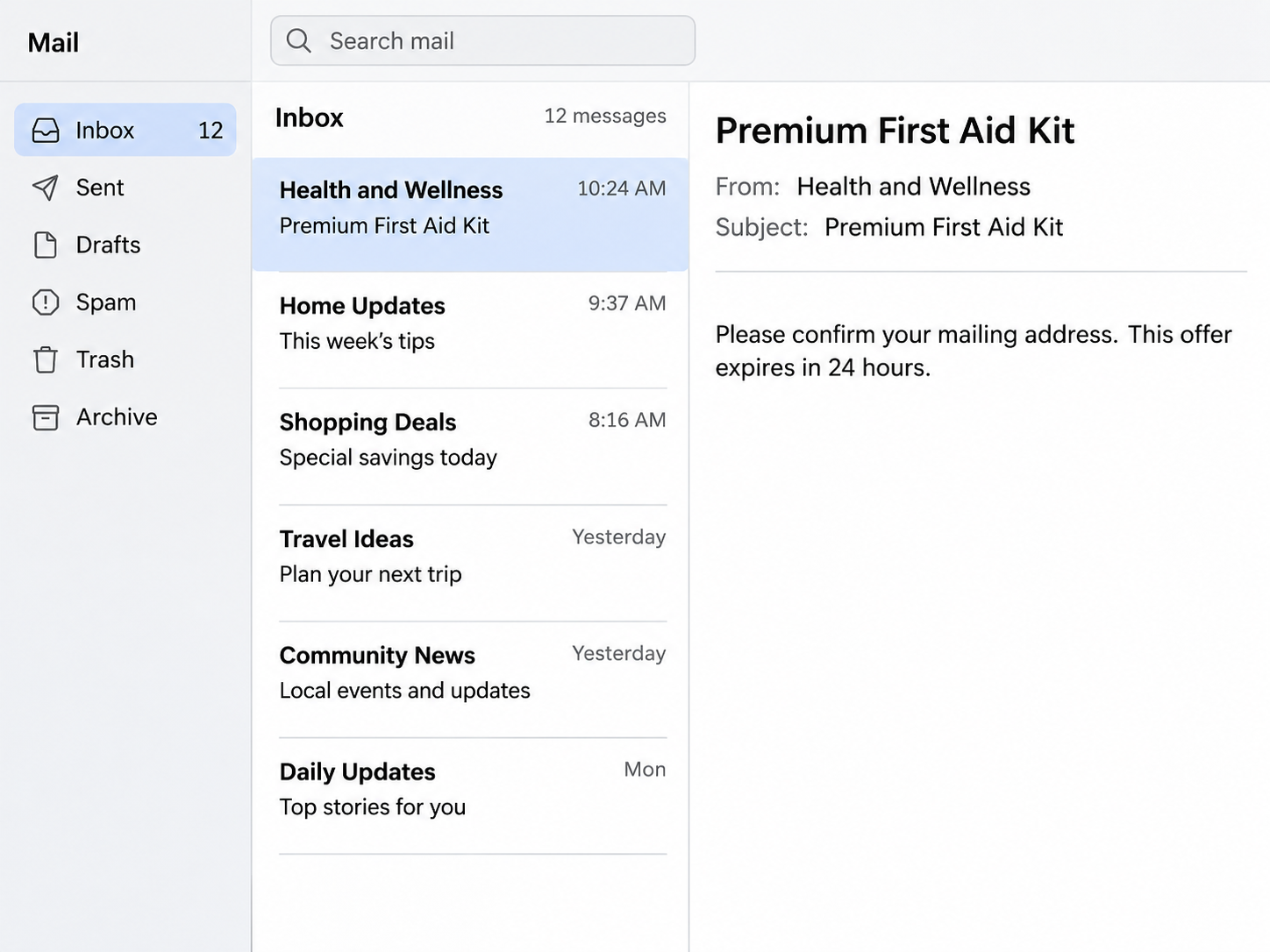
The email called the offer a MyChart Premium First Aid Kit under a “2026 Health and Wellness Initiative” and gave recipients 24 hours.
The next request was for the recipient to follow a link and confirm their mailing address.
An address sounds like the sort of detail a provider already asks you to maintain.
The example above reconstructs those two details in a generic mailbox. The report describes the offer and the link prompt, but gives no verified destination or completed submission.
Healthcare providers have warned about the same bait
Tower Health warns about fraudulent messages promising a “MyChart Medicare/Medicaid Kit.” That version also pairs a free package with a familiar portal.
Confluence Health has warned patients about emails and texts borrowing MyChart’s name and logo to ask for information. Its advice is to check with the healthcare organization directly.
Those warnings establish that the portal’s branding is used for phishing. They leave open which page this particular email opened and what it would have collected after the address prompt.
Your healthcare organization can answer the actual question
Open the app or website you already use for the provider involved. Check your messages, and call the office through its own website or a number you already have.
- Look for a matching notice in the patient portal before changing your address.
- Ask the provider whether it offers a kit under that name.
- Keep the original message if the provider needs to see what was sent.
- Report the email through your mailbox once you have preserved anything useful.
Give the provider the program name as it appeared in the email. That lets them check the specific offer without asking you to visit the claim page first.
Why the Address Request Makes Sense at First
A clinic can ask patients to update an address before sending paperwork, and a pharmacy can need it for delivery. A free kit gives the email another reason to ask.
The deadline changes how you approach that familiar task. Instead of opening the portal you normally use, you may be tempted to complete the small request where it arrived.
People often have more than one MyChart account because they see providers at different organizations.
A notice that only uses the platform name leaves you guessing which clinic supposedly sent it.
MyChart’s help guide lets you find the portal for a healthcare organization. It also explains how to find the help information on that organization’s sign-in page.
Start with a provider that actually treats you. If no organization is named in the message, there is no reason to use its link to determine which one it meant.
Some real health organizations distribute welcome materials or supplies.
Tower Health lists a legitimate pharmacy welcome kit on the same page where it warns about the unrelated Medicare or Medicaid kit pitch.
Ask your own provider what the benefit is called and where to claim it. The office can give you the instructions for an actual program.
Find the office that would actually send the kit
A hospital portal can contain messages from several departments.
Search your patient messages for the program name and check whether the same office contacted you about a real prescription or visit.
A clinic and an insurer may use different websites even when they handle the same care. Ask the clinic whether the benefit comes from it or from your health plan.
If the insurer offers an allowance, use its member materials to look up the benefit. An amount or eligibility condition on the real plan can help settle the claim.
Some providers use MyChart Central to link accounts through an Epic ID. Make sure you know which organization you opened before reporting a change or resetting a password.
If a family member forwards the offer, ask whether it arrived inside their account or only by email. They can check their own messages without forwarding private records to you.
How the Fake MyChart First Aid Kit Email Scam Works
Step 1: The message borrows a name patients already recognize
The email introduces MyChart before it explains any benefit. The name is enough to remind the recipient of appointment notices, test results and routine updates.
An actual clinic might contact you about a real visit or message. The free-kit email uses that expectation without naming a visit you can match to your own records.
Step 2: The first aid kit makes the request feel worthwhile
The kit is something a reader can picture using at home.
The supposed health initiative gives the offer a program name that sounds broad enough for a large organization to run.
That framing makes the address feel like a delivery detail. There is no need to take the initiative name at face value when the provider can confirm the offer independently.
Step 3: A short deadline sends you toward the email link
The reported email gave the recipient 24 hours. The request was to confirm where the package should be mailed, rather than contact the provider who supposedly made the offer.
If you expect a real message in your portal, open the portal on your own.
A short deadline in an unsolicited email gives you no reason to take a different route.
Step 4: A routine field can lead to a more sensitive request
The public example documents the address prompt. It does not show whether the page then requested a password, insurance number, card details or a verification code.
Healthcare providers’ warnings describe separate MyChart impersonations that ask for personal details or credentials. If a page adds a request you weren’t expecting, leave it and use the real portal.
Even a form that collects only an address can supply details for a follow-up message.
Treat any later contact about delivery, fees or a missing confirmation as a new request to verify.
Check the Offer Without Losing Track of Real Care
Use the portal tied to your last visit
A reminder about a medical appointment belongs with the appointment in your own records. Compare the time, location and provider before drawing conclusions from the message.
If the offer is for a mailed kit, use the office or pharmacy’s published number to ask whether they actually send one.
Name the initiative so they can check it precisely.
A patient portal can show whether your contact details need updating. If the address really has changed, correct it inside the account you opened independently.
For an address change concerning someone you care for, use your own authorized access to the account. An email arriving in your inbox may concern a different household member.
Find out what the provider wants reported
Use the help desk or security contact the provider lists. Some healthcare organizations ask for a copy of the original message rather than a forwarded link on its own.
Give them the date, subject and displayed sender. Avoid putting health information in a public screenshot or writing an insurance number in an ordinary email.
The provider can tell you whether one of its campaigns matches. It may also be able to warn other patients who receive the same message.
If the suspicious email came to a work address and you also use that address for appointment reminders, your work security team may have a separate reporting route.
Know what changes if you already entered information
An address and a MyChart password create different problems. Write down what you provided so the portal help desk can focus on the information that needs protection.
If a card was involved, tell the issuer about the exact request, such as postage or a delivery fee. Check for new transactions inside the bank app.
If you submitted an insurance or Medicare number, contact your insurer or Medicare through a known number. Ask what account activity or claims you should watch for.
Anyone who shared a one-time code should tell the provider how the request appeared. A code may have approved something different from the address correction described in the email.
When a Second Message Mentions Delivery
A later text might say the address is incomplete or a package is being held. The timing can make it seem like a continuation of the original offer.
Go back to the provider you contacted independently. Ask whether it actually sent anything, and use a delivery service’s own website if you have an independently obtained tracking number.
A message that repeats an address you submitted has information you just supplied. Its ability to repeat your own details gives you nothing new to verify the sender.
If the caller claims a payment already went through, look at your bank or card activity yourself. Save the new message so you can report it with the original one.
You can tell someone else in your household what the supposed offer was called. That gives them a way to spot a repeat without passing around the link.
Where a real verification code belongs
A legitimate portal can send a code when you deliberately sign in. If you receive one while reading a free kit email, check which action the code names.
Open the account on your own if the code was unexpected. Keep the code to yourself, including if someone calls about the kit.
A kit marketer has no reason to ask you to dictate a code that unlocks patient messages. Tell the provider if you already shared one and describe the timing.
If the account shows unfamiliar access, check whether recovery details changed and whether any new messages were sent from it. The help desk can tell you what it can verify.
What to Do if You Have Fallen Victim to This Scam
-
Close the page and keep the original email, including its date, subject and sender information, where you can retrieve it for a report.
-
Tell your healthcare organization what you entered and ask its MyChart help desk to check the account through the provider’s own channels.
-
Change any password you typed into the linked page, using the real portal, and change the same password wherever else you use it.
-
Contact your card issuer or insurer directly if you shared payment information or a policy number, and follow its instructions for checking activity.
-
Use your email provider’s phishing report option and report the impersonation to the organization whose portal was named in the message.
-
Keep your case references and bring up later requests for postage, codes or account details with the organizations you already contacted.
If the only action you took was opening the email, check the claim directly and report it.
There is no need to reopen the email’s claim page to find out more.
A portal help desk can guide you through resetting a compromised password. If you reused that password for the email address that receives password resets, secure the mailbox as well.
Check recent portal messages for anything you did not send. If you rely on someone else to book visits, let them know which notices came from the suspicious email.
Use IdentityTheft.gov for a recovery plan if identity information was misused. Preserve receipts and reports from the companies responsible for your account.
Frequently Asked Questions
Is the MyChart Premium First Aid Kit email genuine?
The offer described in the report should be treated as phishing. Confirm any real kit directly with the healthcare organization that supposedly offered it.
Does every first aid or pharmacy welcome kit come from a scammer?
Some pharmacies provide legitimate materials or supplies. A real program should be verifiable through the provider’s own office or website without using the link in an unexpected message.
Can I confirm my address safely somewhere else?
Open your provider’s real MyChart portal independently. If the address on file is wrong, use your account settings or call the provider directly for help changing it.
Does a recognizable MyChart logo prove the sender is authorized?
A logo is a picture anyone can copy. Look for a message inside the portal you already use and confirm the offer with the provider if you still have questions.
What if I only entered a mailing address?
Save the message and be alert for a follow-up that claims to know where you live. Check with the provider first if someone later asks for a shipping fee.
What if I gave the page my portal password?
Change it through your provider’s real portal and contact the portal help desk. Tell them if you also supplied a verification code or noticed changes you did not make.
The Bottom Line
Leave the kit link alone and check the offer with the healthcare organization that supposedly sent it. You can correct a real mailing address through the portal you already use.
If you entered information, tell the provider what you supplied. Change any exposed password and contact the issuer or insurer directly if you provided payment or coverage details.

Join the discussion
0 commentsShare your experience or ask a question about this article.
Community experiences
Did this happen to you?
Your experience could help someone recognize the same scam. Submit a private report for our team to review.
I experienced this tooReports are reviewed before publication. Sharing publicly is always your choice.
Discussion
Start the conversation
Have a question or something useful to share? Add the first comment.