


An email about settling an account is easy to set aside until someone asks why it hasn’t been reviewed. This one looks like it belongs on a bookkeeping checklist.
The sender invokes a company name, and the message gives the document a title that sounds like it came from a real payment file.
Overview
What the SecureDocs payment message claims
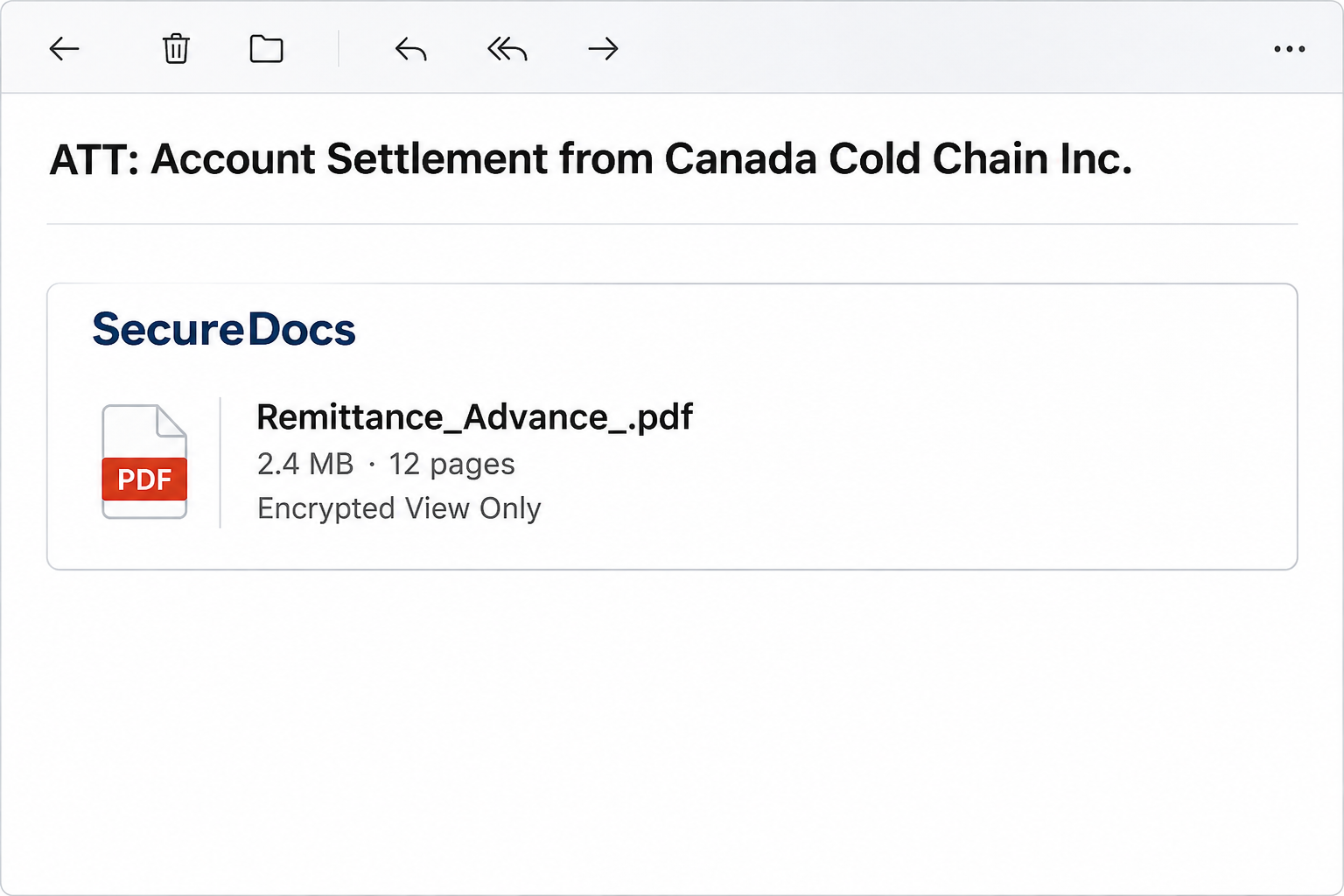
The SecureDocs document delivery scam is a phishing email built around an apparent account settlement from Canada Cold Chain Inc. The notice presents a document preview rather than an invoice.
The specimen names the PDF Remittance_Advance_.pdf. It displays a size of 2.4 MB and a length of 12 pages, details that make the file seem ready to open.
A label describes the document as encrypted and view only. The notice also claims that document access is logged, a detail that makes the process sound controlled.
The important part isn’t whether those security claims sound plausible. In this email, the document review link led to an imitation email login instead of a verified payment document.
What to look for in the message
The wording will be more useful than an image if you’re comparing a message on a small screen or searching a crowded inbox during an incident.
- The subject begins with “ATT: Account Settlement” and names Canada Cold Chain Inc.
- The message uses “SecureDocs” as the apparent delivery service.
- The preview gives the file name, page count, and size without proving a document is available.
- The review control in the specimen misspells the first word as “Reveiw.”
- The destination asks for mailbox credentials rather than establishing who sent the settlement.
Any one line can change in another copy of the email. A corrected spelling or a slightly different filename would not make an unsolicited sign-in safe.
Who is being impersonated and what is not established
Canada Cold Chain Inc. is the company name shown in the lure. Its appearance does not identify the author, prove a payment occurred, or implicate anyone at that company.
The email uses SecureDocs as a delivery label. It’s a mistake to treat the title of a mail card as proof that any particular document platform handled the message.
The observed page imitated an email service. The evidence doesn’t establish that every copy reaches the same page today, or that anyone who received it also opened it.
An inbox can show a preview with a file icon without exposing a true attachment. In this sample, the action that mattered was the review link inside the message.
How the SecureDocs Document Delivery Scam Works
Step 1: A payment reference lands in a normal work queue
A finance team may receive genuine remittance advice alongside invoices, statements, and requests to reconcile balances. Even an unfamiliar sender name isn’t automatically out of place there.
The subject takes advantage of that routine. It identifies a supposed settlement without giving the recipient useful payment details to match against a known record.
Someone covering a coworker’s inbox may be especially tempted to open it. They see enough to think it concerns work, without enough context to confirm who requested it.
An unexpected settlement doesn’t have to be routed through the address that announced it. Use the contact information attached to the relevant customer or vendor record.
Step 2: A PDF preview stands in for the missing payment details
The message presents a plausible filename under a document heading. The format, size, and page count look like information a file-sharing application would calculate automatically.
But those values appear in the body of the email. They don’t give you a bank reference, confirm an account balance, or show a match to an open item.
You don’t need to open the preview just to learn whether a transaction exists. Compare known references in your accounting system or open the bank portal you normally use.
Don’t reject a legitimate potential payment on this email’s account. Verify it separately and leave the suspicious message out of any reconciliation or approval workflow.
Step 3: “Encrypted View Only” makes the extra sign-in feel expected
Restricted documents aren’t unusual in finance, and a confidential file can require you to use an approved company account. That normal experience is the appeal here.
The notice’s claim that access is tracked can make even a cautious person hesitate to ask someone else to review the email. That isn’t a reason to continue alone.
Your organization should already have a way to accept restricted documents. If an unexpected delivery uses a different route, ask the actual contact to share it through one you recognize.
Keep your own side of the transaction private. You don’t need to send an existing statement or screenshot to the apparent sender to prove you’re the intended recipient.
Step 4: The supposed document gives way to an email login
The recorded route didn’t reveal the promised remittance PDF. It presented a page modeled on an email provider, with a prompt for the recipient’s sign-in details.
Seeing a familiar logo at this stage doesn’t mean your provider is asking. A request from a genuine organization should survive a check done independently of the email.
If a browser password manager normally offers your organization account but doesn’t recognize that page, don’t compensate by pasting the password manually. Open the service through your bookmark instead.
Your work password is a key to work systems, not a document-sharing token you should hand to a third-party site. The finance wording doesn’t change that distinction.
Step 5: A stolen inbox can affect a later real transaction
The immediate risk is the mailbox account used on the imitation sign-in. It doesn’t depend on whether the supposed settlement or attached document ever existed.
A compromised work mailbox may contain genuine counterparties, purchase records, and payment schedules. Someone reading it could misuse those details in a different message that looks much more familiar.
If coworkers receive a new bank instruction after the incident, they should use the vendor’s existing callback procedure. A reply inside an authentic thread isn’t enough to approve a change.
This is a possible consequence of mailbox compromise, not evidence that the operators of the SecureDocs message ever moved money from a particular business.
How to Verify an Unexpected Remittance Safely
Start with the record you were already working from. That could be an invoice, a receivables entry, or a known conversation with the person handling the account.
If the paperwork is genuine, the counterparty should be able to confirm the relevant invoice number or settlement amount through an established channel without asking you to log in.
When you call, use a number kept in your approved vendor or customer records. Don’t substitute one in a new signature just because the company name appears right.
For a new counterparty with no previous relationship, route the question to whoever onboards vendors. Don’t create a record with identity or bank details taken from the email.
A business name in the subject is also not a confirmation of who operates a document-sharing account. Treat the identity of the sender and the validity of the file separately.
If a teammate thinks the notice matches a settled balance, ask them to confirm it in the accounting system. Keep the review link out of that conversation.
For shared finance inboxes, find out whether anyone else received or handled the notice. Two people independently seeing the same email don’t make it two independent confirmations.
If a genuine contact needs to resend documents, tell them which secure channel your organization accepts. That keeps the original transaction moving without asking anyone to trust the disputed link.
Check an apparent advance separately from a remittance. If the email introduces a payment you weren’t expecting, don’t create a new bookkeeping entry based on the preview.
What to Do if You Have Fallen Victim to This Scam
-
If you only saw the notice, report it as phishing.
Don’t click the preview or reply to ask what invoice it concerns. Follow your employer’s reporting procedure so the mail team can look for related copies.
If there’s no internal team, your mail client’s phishing report is preferable to sending the suspicious link to friends or colleagues for their opinions.
-
If you clicked but shared nothing, close the page.
Tell your IT team when you clicked and which device or browser you used. Mention whether anything downloaded, rather than guessing from how the page looked.
An email sign-in page appearing on screen doesn’t prove your password was sent. Use your known account portal to look for alerts without reopening the message.
-
If you entered a work password, contact your security team promptly.
Report the time and identify the account used, but don’t include the password in the report. Your team may need to disable access temporarily or revoke existing sessions.
Use a trusted route for any password change. If that password was reused elsewhere, change the other accounts independently and give each one a unique password.
-
Check the mailbox for changes the attacker could use later.
Ask an administrator to review forwarding, filtering rules, delegated access, account activity, and recovery information. Check for unexpected sent items or changes to prior payment discussions.
Don’t delete suspicious rules or emails before the security team can inspect them if your organization needs to preserve evidence and understand the exposure.
-
Tell the finance team if the mailbox handles invoices or payment instructions.
Identify pending transactions that might be affected. Require an established callback or approval channel for new account details before sending a payment.
If a transfer already went out after a suspicious instruction, alert the financial institution right away. Keep the transaction record and share it through a verified channel.
-
Escalate a downloaded or opened file as a separate issue.
If you saved a file from the page, don’t open it to see whether it’s a PDF. If you ran a file, say so plainly when you report it.
Use the organization’s support procedure for a work device. Don’t send the file as an ordinary attachment or ask a coworker to try opening it instead.
-
Watch for follow-up messages that build on the same settlement.
A new request using the same name may claim the document didn’t open or ask where to send the payment. Don’t use it to resume the conversation.
For help reporting the message, see CISA’s phishing guidance. Use an existing contact rather than trusting the company identification inside the email.
If you aren’t sure which box applies to you, start with the action you remember. A clear account of what you clicked or typed is more useful than a guess.
Frequently Asked Questions
Is Remittance_Advance_.pdf proof that there’s an attached PDF?
No, the name and size can be text displayed inside the body of the email. The documented SecureDocs notice used a review link to reach a fake login.
A true attachment wouldn’t be proof of an actual settlement either. The account record and an independently verified sender are better starting points than a familiar file extension.
Does “Encrypted View Only” make this document safe to review?
No, it’s a label inside the mail card, not an independently verified property of the file or destination. The same applies to the notice’s claim that access is logged.
Even when a real document is encrypted, you still need to know who sent it and which service will ask you to authenticate before you continue.
Did Canada Cold Chain Inc. actually send this email?
The company name is part of what the message claims, not proof of authorship. Don’t use the displayed name as a substitute for checking an established business relationship.
If your company deals with the named business, ask your known contact about the matter without forwarding the email’s active link or providing any account credentials.
Should I change my password if I never entered it?
Merely receiving the email doesn’t expose your password. If you visited the page without typing, autofilling, signing in, or approving access, that is different from submitting credentials.
Tell your security team if the account is work-managed, especially if you can’t remember how the login fields behaved. Use the real portal to check for unexpected activity.
Can I trust a review notice if the spelling has been fixed?
Correct spelling only removes one clue. The stronger test is whether your known counterparty confirms the document and whether it is accessible from a service you reached yourself.
Don’t make a decision based on how much a branded email resembles earlier messages. You can confirm the underlying invoice or payment without using the disputed notice.
What if the mailbox password was protected by two-factor authentication?
Tell your administrator if you also received a prompt, typed a code, or approved an unfamiliar sign-in. They can review whether any attempt actually became an active session.
Two-factor authentication can reduce the risk, but it doesn’t justify leaving an exposed password unchanged. Check sign-in methods and recovery details in addition to changing the password.
The Bottom Line
Ignore this SecureDocs document delivery notice and leave the remittance link unopened. A real settlement can be checked through your normal accounting records or a known contact.
If you used your mailbox password on the page, act on the mailbox exposure now. Then check any payment discussions that account might have put at risk.

Join the discussion
0 commentsShare your experience or ask a question about this article.
Community experiences
Did this happen to you?
Your experience could help someone recognize the same scam. Submit a private report for our team to review.
I experienced this tooReports are reviewed before publication. Sharing publicly is always your choice.
Discussion
Start the conversation
Have a question or something useful to share? Add the first comment.