


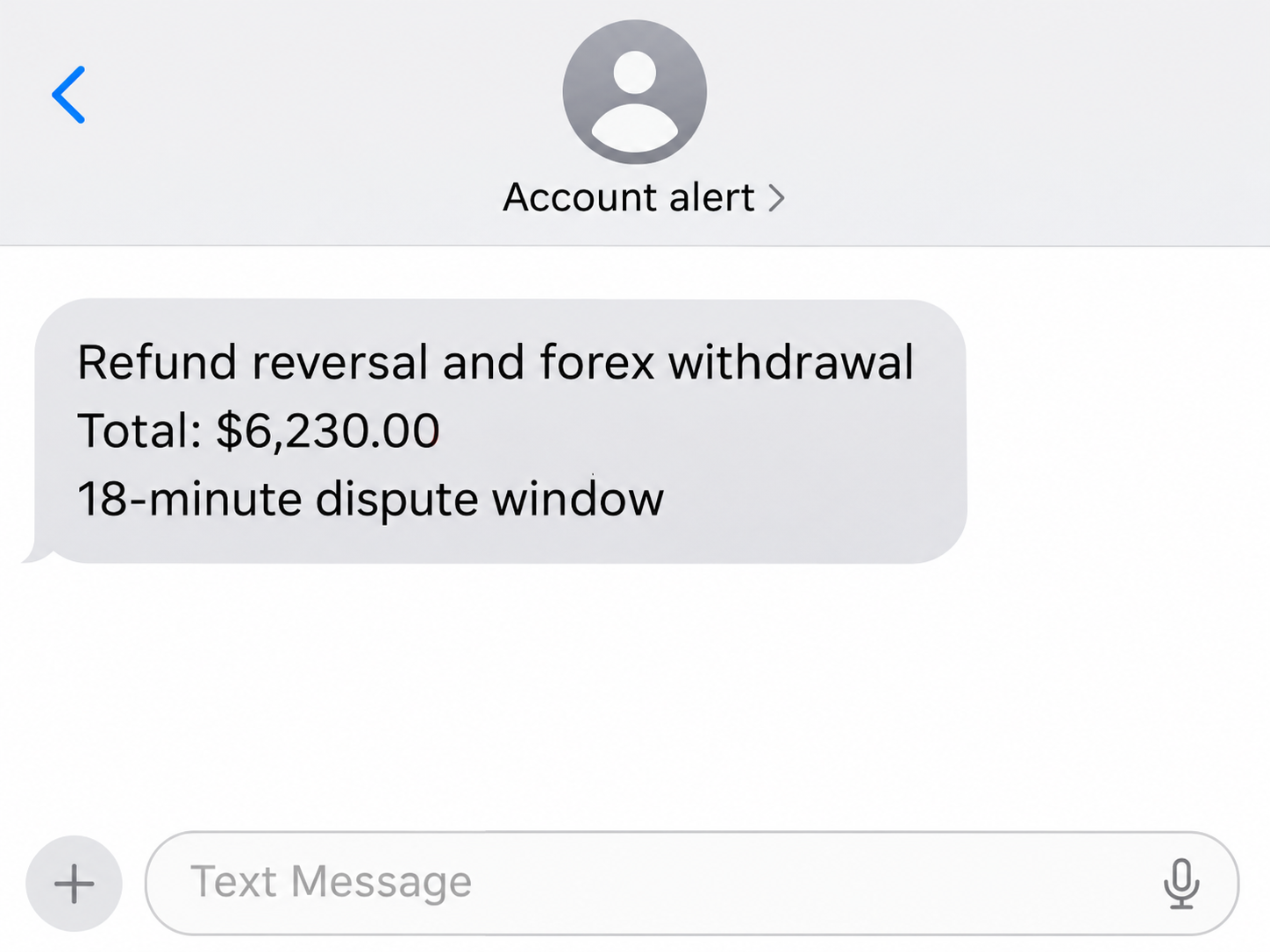
A text that looks like a PayPal fraud alert says two transactions have already taken money out of your account. It gives a total of $6,230.
Then it says you have 18 minutes to get through to the dispute team. The message puts a great deal of weight on one phone number.
Overview
The alert put two amounts into one emergency
The texts described a $1,890 refund reversal and a $4,340 debit tied to a foreign-exchange broker. Together, the sender claimed, they came to $6,230.
The text claimed the access came from Irving, Texas. It also supplied a callback number and threatened permanent loss and possible account closure.
The recipient checked PayPal and their bank themselves. They reported finding neither the suspicious transactions nor a corresponding PayPal message.
The callback was the part the sender wanted you to use
The text framed its number as the route to a dispute specialist.
Nothing in the public report shows that the recipient called it or that a person on the other end answered.
The reconstruction shows how the text put the amount and time limit together, with the number for the supposed dispute specialist left out.
PayPal’s guidance on fake messages directs people to open PayPal independently to confirm activity. Its warning applies to texts that try to lead you into a phone call.
Check PayPal and the funding source separately
A text can make two events sound connected without giving you records of either. Look for the refund and the broker debit separately in the accounts you already use.
- Open the PayPal app yourself and review activity and account notifications.
- Check the linked bank or card independently for the amounts named in the text.
- Use official PayPal support if you see an unfamiliar transaction or account change.
- Save and report the text without calling the number it provides.
A result in one account may need a second check with the provider that handled the payment. The text’s deadline does not determine how your actual provider responds.
Why the $6,230 Story Can Sound Like an Actual Fraud Alert
Specific amounts make the message look as if somebody saw your statement. A city name adds another detail that can feel personal even if you have never been there.
People who rarely use PayPal might focus on whether their old account is still linked to a card.
Frequent users may start looking for a recent refund the message could be referring to.
Start with the two amounts in PayPal’s own transaction history.
If you have a genuine refund, compare its merchant, original transaction and refund status with the number in your own account.
The foreign-exchange claim sounds like a separate event with a different explanation. Check your real activity for an unfamiliar debit rather than assuming you have an account with a broker.
The geographic label adds little to that check. The sender says where access occurred, but the recipient’s statement provides no independent record of such access.
A deadline measured in minutes discourages those checks. Once you put the message aside and open PayPal yourself, you can treat the two transactions as separate questions.
What you can learn from a real refund entry
PayPal’s refund help page explains how to open a refund from Activity. The entry can show where the money was sent and whether the refund is pending or completed.
If you recognize a purchase but the funds have yet to arrive, check the payment method used for that purchase. The card issuer might show it on a different date.
A genuine refund may go to a card or bank rather than sit in your PayPal balance.
Check the original payment and any connected transaction before treating a text as confirmation.
If you do not recognize the refund at all, use the actual financial records before opening a dispute. A report can include what you checked and which transactions were missing.
A seller or marketplace may have separate records of a purchase. If a refund concerns a real order, contact that seller through the channel tied to your order history.
How the Fake PayPal Refund Reversal Text Scam Works
Step 1: The text establishes an apparent loss
The sender describes a refund that was reversed and a separate amount associated with a brokerage deposit. Both are presented as completed losses the recipient needs to contain.
That is different from a notice asking whether you recognize a small purchase.
The amount in this case is large enough that some readers may react before looking at their balance.
Step 2: The message gives the recipient very little time
The purported deadline is 18 minutes. The text says the recipient could lose the money permanently and face account closure if they fail to call.
That threat ties two fears to one instruction. You can interrupt the process by checking account activity before you give anyone else information about the alleged transactions.
Step 3: The text funnels questions to its own specialist
The message gives a number for the recipient to call. It describes the person awaiting the call as a dispute specialist linked to the city in the alert.
That number is the only contact route the sender offered. The recipient found no matching transactions by checking their own accounts.
Step 4: A call could turn the text into a request for information
The public report ends before that call. PayPal’s own warnings describe impersonators who ask for passwords, codes, payment details or access to a device.
PayPal’s account protection guidance says it will never ask for passwords, validation codes or access to your computer. Use the official provider if someone asks for any of those.
If the person claims they have to cancel a transaction, ask yourself where the transaction appears. The place that actually handled it can confirm what is possible without the stranger.
What to Check Before Deciding There Is a Loss
Look at the refund in context
Open the original transaction if you recognize the refund amount. PayPal activity can help you find the merchant and the status recorded for your account.
A payment and its refund may show on different dates, especially when a funding source is involved. Record whichever actual entries you can find before talking to the bank.
If there was no order for that amount, write that down too. There is no reason to approve a new transaction in order to fix one you cannot find.
If you use different PayPal addresses for personal and business activity, check the relevant account. Make sure the profile you open matches the one connected to the card you checked.
Check for the second debit through the bank
Open the issuer’s app or use the number printed on the card. Look at pending authorizations and posted transactions, and review any linked account you actually use with PayPal.
A pending item can need attention before it appears in a statement. Tell the issuer which merchant and amount you see and ask what it recommends while it is pending.
If the name on your statement says PayPal but the account shows no purchase, give that information to the issuer.
The absence of a visible entry does not replace a report.
If the text lists an amount for which you find no matching records, the impersonation still deserves reporting. You can continue to check your accounts without interacting with the sender.
Address an actual account concern through the right service
Use PayPal’s official fraud reporting instructions if the activity appears in your PayPal account. Report unfamiliar card or bank activity directly to the financial institution where it appears.
If you were led into a payment on a call, tell the provider that you made it because of an impersonation.
Your description can help identify the transaction you need reviewed.
Keep the messages and note when any changes appeared in your account. A provider may need to know whether you received the alert before a purchase appeared or only afterward.
When the Call Turns Into a Request for a Code
A person on the phone might claim a code will stop a payment. Read the message that delivered the code to see what action the service says it is for.
If the code was generated for a login, handing it over could give someone the ability to finish that login.
If it relates to a transaction, find out which one independently.
A stranger who asks you to share your screen can also see account details as you navigate. End the conversation and get help through the verified service before continuing.
If you only dialed the number and gave nothing away, save the call details.
You can block the sender and check your accounts without seeking a refund for an imaginary transaction.
When You Already Spoke to the Person on the Line
Note which parts of the story you supplied
Write down what the caller seemed to know before you identified an account. Add the details you volunteered later and any instructions that appeared in a separate message.
The difference can matter when you call your bank.
A person might repeat a detail you just told them, and the retelling can make it sound as though they found it.
If you told the caller what balances you could see, watch for later messages that use those amounts.
Tell your bank about the information you disclosed, even without a direct loss.
Check each affected service in the right order
If you shared a password, secure the account connected to that password and check for changes. If you submitted a payment, first tell the provider which transaction needs urgent attention.
If the caller claimed to be from PayPal but the code came from a bank, tell the bank too.
Read the code’s surrounding text without revealing the code to the caller.
Someone offering a refund may ask you to make another payment to prove you control the account. End that conversation and ask the payment provider what it shows.
If the caller sent an alleged receipt, compare it with your own account on a different device if necessary. Save the text itself alongside whatever activity you can actually verify.
What to Do if You Have Fallen Victim to This Scam
-
End the conversation and preserve the texts, including their timestamp and the number they supplied, so you can use them in a report.
-
Open PayPal independently and review activity, account information and notifications for anything you did not authorize or do not recognize.
-
Contact your card issuer or bank through its official channel if you find an unfamiliar transaction or gave the caller account details.
-
Change your PayPal password through the real service if you disclosed it, and change any other account where you used the same password.
-
Tell the affected provider if you approved a sign-in or payment, so it can check the exact action the prompt authorized.
-
Follow PayPal’s suspicious activity reporting instructions for the text and save any case reference for later contact.
If you paid from a linked funding source, retain that provider’s record as well as anything PayPal shows. The two may identify different parts of what happened.
A fraud claim can attract follow-up messages offering to recover the money. Call the provider on an independently verified number if you need an update on a genuine claim.
Frequently Asked Questions
Are there really only 18 minutes to block a PayPal charge?
The 18-minute deadline comes from the impersonating text. Check directly with PayPal or your financial institution for any steps that apply to a real transaction.
Did a $6,230 payment leave the recipient’s account?
The recipient reported finding no corresponding activity in PayPal or their bank. The $6,230 was the total claimed by the message, without an independently verified payment.
What does the reference to forex mean?
Forex is another term for foreign-exchange trading. The text used it to describe the second debit without evidence that the recipient had made a brokerage deposit.
Should I call the dispute specialist named in the message?
Use the verified contact information in your PayPal app or on its site. If you find a matching charge, report it through the account where it appears.
What can I do if I said my name but shared no code or password?
Save the message and call details, block the contact and verify account activity independently. Report any later login or reset prompt through the service that appears to have sent it.
What if I see a real charge after getting the fake text?
Report it to the provider where you see it and retain the text. The bank or PayPal can examine the payment without involving the sender of the suspicious message.
The Bottom Line
Leave the text’s callback number alone and look for the refund and debit in your own accounts. Use PayPal and your bank directly if anything needs a dispute.
If you gave the caller credentials or sent money, contact the relevant provider as soon as possible. Keep the original messages and explain precisely what you shared or approved.

Join the discussion
0 commentsShare your experience or ask a question about this article.
Community experiences
Did this happen to you?
Your experience could help someone recognize the same scam. Submit a private report for our team to review.
I experienced this tooReports are reviewed before publication. Sharing publicly is always your choice.
Discussion
Start the conversation
Have a question or something useful to share? Add the first comment.