


The Yomi drone box promises the two things a first-time buyer is likely to notice: a 4K camera and help avoiding obstacles.
Then you start comparing listings for the same drone. The pictures look familiar, but the numbers beside them tell different stories.
Overview
The same name doesn’t get you the same specifications
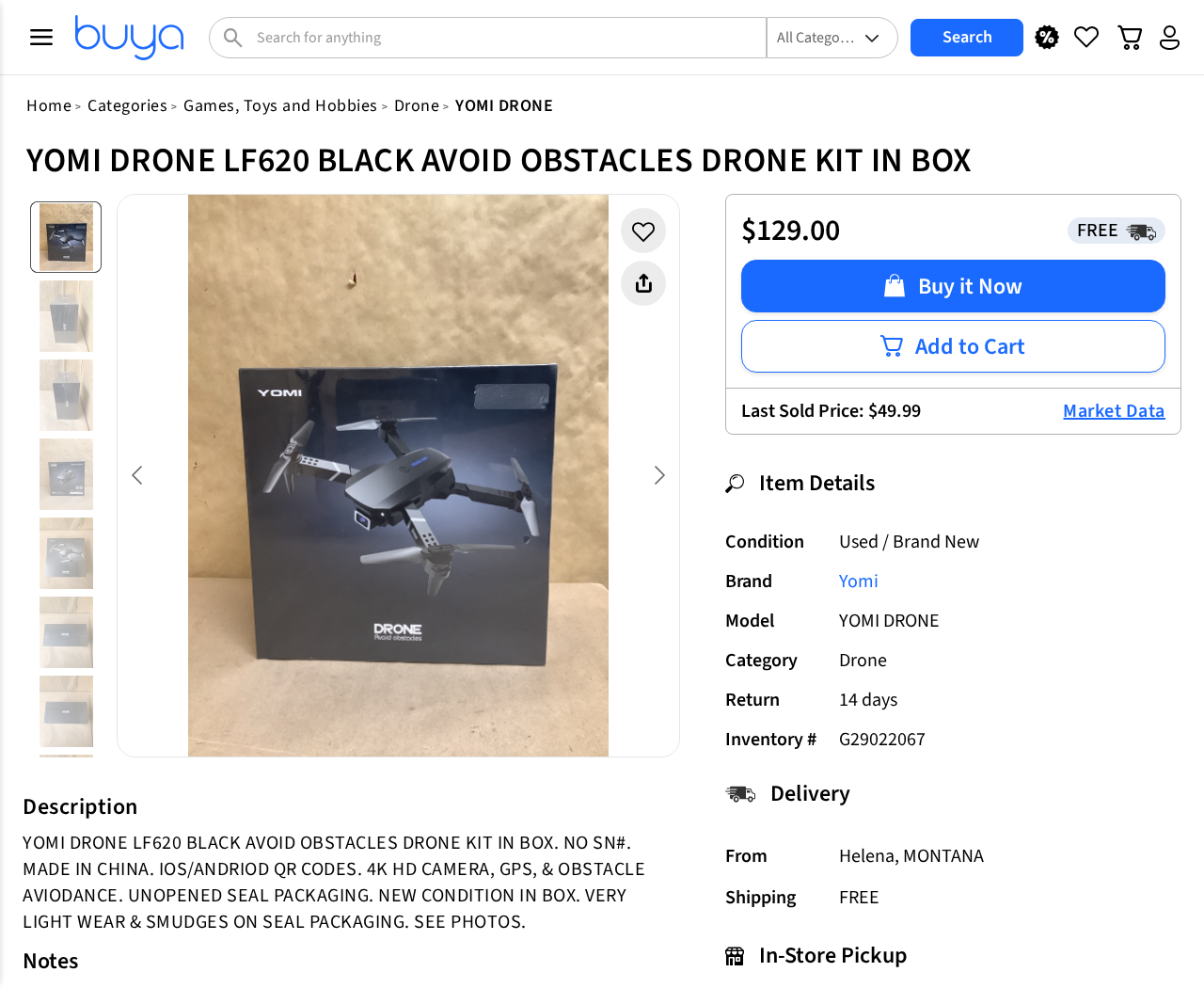
A Buya listing names a black Yomi LF620. It advertises a 4K HD camera, GPS and obstacle avoidance, and gives 30 to 34 minutes of flight time.
An eBay listing for the LF620 gives ten minutes. Another ended eBay listing for that model says seven minutes. These are seller figures, not measurements under the same conditions.
One shop could be adding up the time from multiple batteries, or sellers could be describing different packages. The listings do not give enough detail to reconcile the figures.
The camera and obstacle claims need different kinds of proof
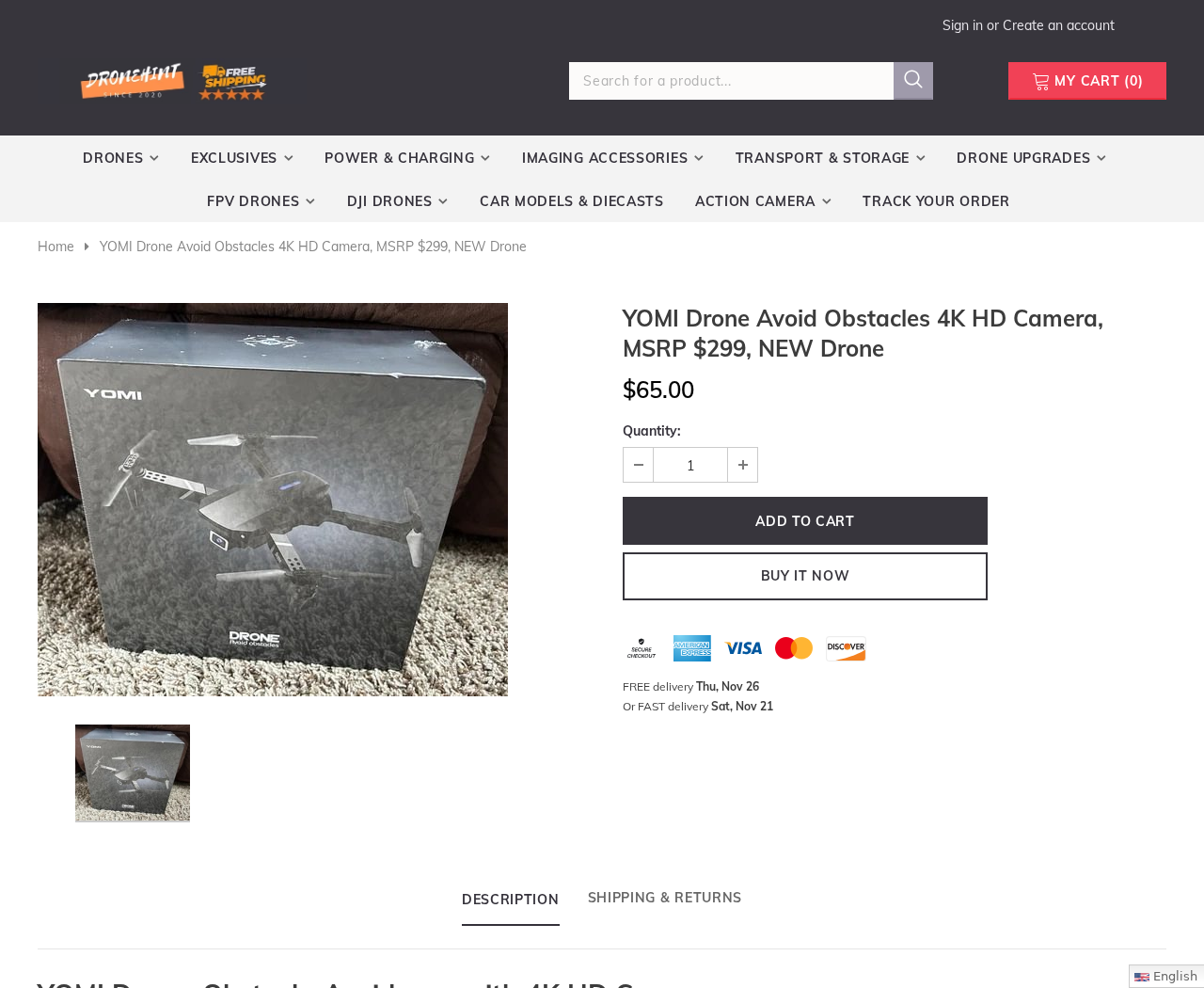
The box presents a foldable aircraft with a forward-facing camera. A Dronehint listing shows the same front-box artwork and puts both 4K and obstacle avoidance in its title.
That photo is useful for recognizing this version of the packaging. It does not show native recording resolution, which batteries ship, or which directions the drone can sense.
- For video, ask for an original recorded file from the exact model and camera mode.
- For flight time, find out whether the number describes one battery or the whole kit.
- For obstacle sensing, ask which directions and conditions the manual actually covers.
One outdoor test shows why the distinction matters
In a published test of a visually similar Yomi drone, phone control did not get it into the air. The handheld controller did, and the aircraft initially responded.
Later in that flight, the reviewer reported wind and an unresponsive landing command. The aircraft came down on a road and was hit by a vehicle.
The video does not clearly show a model label. It documents one loss of control, not a test of every boxed LF620 on sale.
Wind drift and hitting an obstacle are also different problems. The clip is not a controlled demonstration of a sensor failing to spot an object in its path.
How to Read a Yomi Drone Offer Before You Pay
Step 1: Start with the box and model, not the search result
Search results can use Yomi, LF620, and broad descriptions like foldable 4K drone. A model label on the box is more useful than the search engine’s product name.
Look at the face with the camera, the shape of the nose and the exact accessories depicted. If the label is not shown, ask for a clear photo.
Some listings show only the front of the box. That can identify the design being advertised, but the side label matters when sellers use several similar titles.
Step 2: Ask how the seller reached its flight-time figure
Seven minutes and 34 minutes are not close enough to treat as interchangeable. Start by asking how many batteries come in the package and how long one lasts.
Then ask what that number describes. Hovering briefly and making a longer flight while recording are different uses, so the conditions behind the number belong with it.
A multi-battery bundle can give you more total time outside. It does not keep the drone in the air while you land it and swap batteries.
Step 3: Separate recording from live preview
A phone app can show the camera’s view without proving what the aircraft records. Ask how the original video is saved and at what frame size and rate.
Check whether the seller means the front camera or another camera in the kit. Even if both take pictures, a specification for one is not a specification for both.
A file’s dimensions are useful, but they still don’t prove the source image contains that much detail. Look for fine detail in some ordinary daylight footage.
Step 4: Compare the offer you will actually buy
Dronehint showed $65 for the boxed Yomi in one current capture and displayed $299 as an MSRP in the product title. That headline is not a transaction record.
Buya showed $129 for its LF620 kit, alongside a separate last-sold figure of $49.99. The page does not show that the earlier figure was for an identical kit.
Compare the full cost, included batteries and return restrictions. A lower price means little if it buys a different package or the shop will not accept ordinary returns.
Seller, Shipping, and Return Checks
The listings belong to separate sellers
Keep the Dronehint, Buya and eBay examples separate. Their photos and product titles are useful for comparison, but their promises apply to different purchases.
Buya’s page supplies an inventory number for the kit. Record it if that’s your offer, along with the listing and any correspondence about the condition or missing parts.
The pickup address does not identify a factory or repair shop
The Buya page gives a pickup location in Helena, Montana. It separately describes the unit as made in China. Those statements refer to different points in the sale.
A local pickup point can be useful when you need to inspect the box. It does not establish who made the camera or who handles warranty repairs.
A return window is not always a chance to fly and decide
The Buya listing shows a 14-day return field, while the ten-minute eBay listing specifies that the seller does not take returns. Match the policy to your order.
The eBay Money Back Guarantee describes separate protection for eligible purchases that don’t arrive, arrive damaged or differ from the listing.
A change of mind is not that type of claim. If you want the option to return a working drone, check the seller’s ordinary return terms.
Check the conditions before buying and keep your purchase on the platform. Off-platform payments can leave you without protections you expected to use if a problem arises.
Make sure the package has the parts you need
Buya’s notes name a controller, batteries, spare propellers and other accessories. A photo of a sealed box does not show how many batteries are inside or their condition.
If you’ll need replacement parts, ask for the part numbers and where to buy them. A listing that only says extra propellers does not answer that question.
If phone control matters to you, ask for the app publisher and official store listing. Never let a seller pressure you to install an unfamiliar file from a message.
What You Can and Cannot Learn From the Flight Video
Responsive at first does not mean dependable later
The controller got the drone airborne after the phone attempt failed. That sequence shows the aircraft was capable of flying, but not that either control method always works.
The test does not tell us whether the later loss of control came from wind, signal, setup or a fault. The reviewer described what happened, not a diagnosis.
Repeatedly pressing land did not produce the result the reviewer expected. An emergency control only helps if the aircraft receives the command and can carry it out.
Detecting an object is different from holding position
A sensor that detects an object nearby doesn’t necessarily hold the drone still as air pushes it. Different features are needed to detect obstacles and maintain a position.
Look for an exact description of the field of view and operating limits. The term obstacle avoidance does not tell you whether the system sees behind or above itself.
Don’t use trees, walls or traffic as test targets. Read the model’s manual and the FAA’s recreational guidance before flying in the United States.
Short clips cannot settle the resolution claim
The flight video shows the drone’s visibly modest footage. An online upload can lose detail, so it is a poor way to determine what pixels the camera originally recorded.
For a useful comparison, put the original clip on the screen where you plan to watch or edit it. Check whether the detail you need is actually visible.
If all you want is a brief overhead view, the requirements may be modest. If you intend to film a project, camera stability and useful detail both matter.
Three Claims to Nail Down Before Buying the LF620
Ask the seller to explain the range number
The Buya offer lists a range of 328 feet. The ten-minute eBay example advertises 426 feet. There is no common test setup shown next to those figures.
Controller range, usable video range and the distance from which you can safely follow the aircraft are not the same thing. Know which one a specification describes.
Do not plan a flight around a number pulled from an online product title. Ask what the manual says happens when the aircraft loses contact with the controller.
Read separately how the drone reports a low battery and what happens when it runs out. A good advertised range will not answer either of those questions.
Check whether GPS means positioning or a documented recovery feature
The Buya copy names GPS, Wi-Fi control and obstacle avoidance together. No description on that listing tells you how those systems interact when control is interrupted.
If you see optical flow mentioned elsewhere, ask whether it is on the exact unit. A downward-facing positioning feature is not the same thing as satellite navigation.
A return function, if included, also has its own conditions. Ask for the manual’s explanation rather than taking a GPS label as confirmation of automatic recovery.
These questions matter when you are paying extra for convenience. Someone buying a simple practice drone may not need automation, but should know what is missing.
Make the battery comparison on the same basis
Imagine two packages with the same photo. One comes with a single battery, while another includes spares. The packaging can look almost identical at a glance.
A long total quoted for the second package would not explain how long either unit can stay airborne. Find the number for one charge first.
If the product is secondhand or the box has been stored for a while, ask about the battery’s condition. The presence of an original seal cannot answer that.
Also find out whether the charger is included or whether the kit only supplies a cable. Buya’s listing names a USB charging cable, not a separate wall adapter.
Check replacement cost before paying a premium for the bundle. A used model with an unavailable spare battery can be less useful than a simpler drone with support.
Do not turn an ended auction into a firm guide to current prices. The seven-minute example ended without bids, so its asking price was not a confirmed sale.
Save the figures you rely on and the item number beside them. If a merchant later changes the listing, that record shows what you believed you were ordering.
What to Do If You Already Ordered a Yomi Drone
-
Copy the listing, confirmation and seller notes. Save any written promise about the model, camera mode, battery count or return window before the listing changes.
-
Request cancellation promptly if the shop cannot confirm the version you ordered. Use the retailer or marketplace order page so the request stays attached to the transaction.
-
Compare the label and supplied parts with the listing when it arrives. Keep the packaging and photograph the box if the model or accessories are different.
-
If the camera is the problem, keep an original video and note the selected recording mode. That gives the seller something more specific than a complaint about image quality.
-
Use the applicable return process if the item is faulty or not as described. Ask for shipping instructions before sending it, especially if the battery has been damaged.
-
If the seller cannot resolve a delivery or description dispute, check the marketplace or payment provider’s process and deadline. Keep your records together instead of paying for refund help.
Frequently Asked Questions
Is Yomi LF620 a real drone?
Retailers list a physical foldable camera drone under that name. The independent video also shows a Yomi drone flying, although its exact model label is not clear.
Do Yomi drones actually record native 4K?
A 4K label doesn’t settle native capture. Ask for the unedited original file and a model-specific camera specification before buying it for video work.
What flight time should I expect?
The listings reviewed differ sharply and do not explain their test conditions. Get a written estimate for one battery from the seller of the kit you plan to buy.
Does the obstacle feature prevent a crash?
No feature advertised on these pages should be treated as a guarantee against a crash. Do not rely on it to compensate for wind or loss of control.
Does the phone app replace the controller?
The reviewer could not start the flight using the app but succeeded with the controller. Verify what the manual says for your exact model and phone.
Is the $299 MSRP proof that $65 is a bargain?
The higher figure is in a seller’s title. Compare what similar kits actually include and what you can return rather than using that number as your budget.
The Bottom Line
Do not buy the Yomi drone for dependable obstacle avoidance or 4K aerial filming on the strength of these listings. The model name does not resolve the conflicting details.
If you want a basic hobby drone, choose an offer with a clear manual, battery count and return route. If you already ordered, compare the label with the listing.

Join the discussion
0 commentsShare your experience or ask a question about this article.
Community experiences
Did this happen to you?
Your experience could help someone recognize the same scam. Submit a private report for our team to review.
I experienced this tooReports are reviewed before publication. Sharing publicly is always your choice.
Discussion
Start the conversation
Have a question or something useful to share? Add the first comment.