


A potential business partner wants a short introductory call. Their booking page offers the usual choices, and finding a convenient time seems straightforward.
Then the final confirmation takes an unexpected turn. Before copying that reference or completing another sign-in, pause to consider what you are actually being asked to approve.
Overview
A meeting invitation disguises a different kind of approval
Huntress investigated a construction-sector impersonation that disguised device authorization as meeting confirmation. Its team contained the resulting account access.
The issue is not that Microsoft Teams is fraudulent. Someone used its familiar meeting context to make an unrelated account authorization seem like the next booking step.
You can want the meeting without agreeing to every technical instruction attached to it. Those are separate decisions, even when the page presents them together.
The real Microsoft page is not the whole story
Microsoft’s device authorization documentation describes a legitimate process where a code connects your browser approval to a client requesting access elsewhere.
That process has ordinary uses, but the identity of the requesting client matters. Authenticating yourself correctly does not mean you intended to authorize that particular request.
A page can be genuine while the reason you were sent there is deceptive. Checking the address is important, but understanding the requested action matters too.
Separate an unfinished booking from completed account authorization
- Selected a meeting time only: stop before the unexpected authorization request.
- Copied the reference only: do not enter it into a sign-in page.
- Entered the code and approved access: contact your account administrator immediately.
- Received a later confirmation: do not treat that as proof the earlier authorization was harmless.
How the Fake Teams Booking Scam Works
Step 1: A plausible executive opens a business conversation
The email used a lookalike sender domain and a real executive’s identity. Huntress withheld the legitimate names in its account.
A partnership request gives the recipient a practical reason to respond. It can arrive in an ordinary work queue rather than looking like a dramatic security emergency.
A recognizable name or plausible job title is not enough to verify the sender. Check the conversation through an independently established business contact before moving forward.
Step 2: The page starts with ordinary scheduling choices
The imitation scheduler asked for a duration, date, and time. Those familiar choices placed the recipient in a meeting-booking mindset.
After making several small decisions, the next screen can feel like paperwork needed to finish. That makes it easier to overlook a change in the request’s purpose.
A calendar’s professional appearance does not tell you what its later prompts will authorize. Read the confirmation as a new request, not an automatic continuation.
Step 3: Continuing begins an authorization request behind the scenes
Continuing the booking initiated a Microsoft device-code request, Huntress found. The earlier scheduling selections had not been submitted.
This is the point where the visible task and the background task diverge. You are thinking about a conversation, while a separate sign-in process is being prepared.
You do not need to inspect the page’s programming to refuse that change. An unexplained request to authorize another session is enough reason to stop.
Step 4: The device code becomes a booking reference
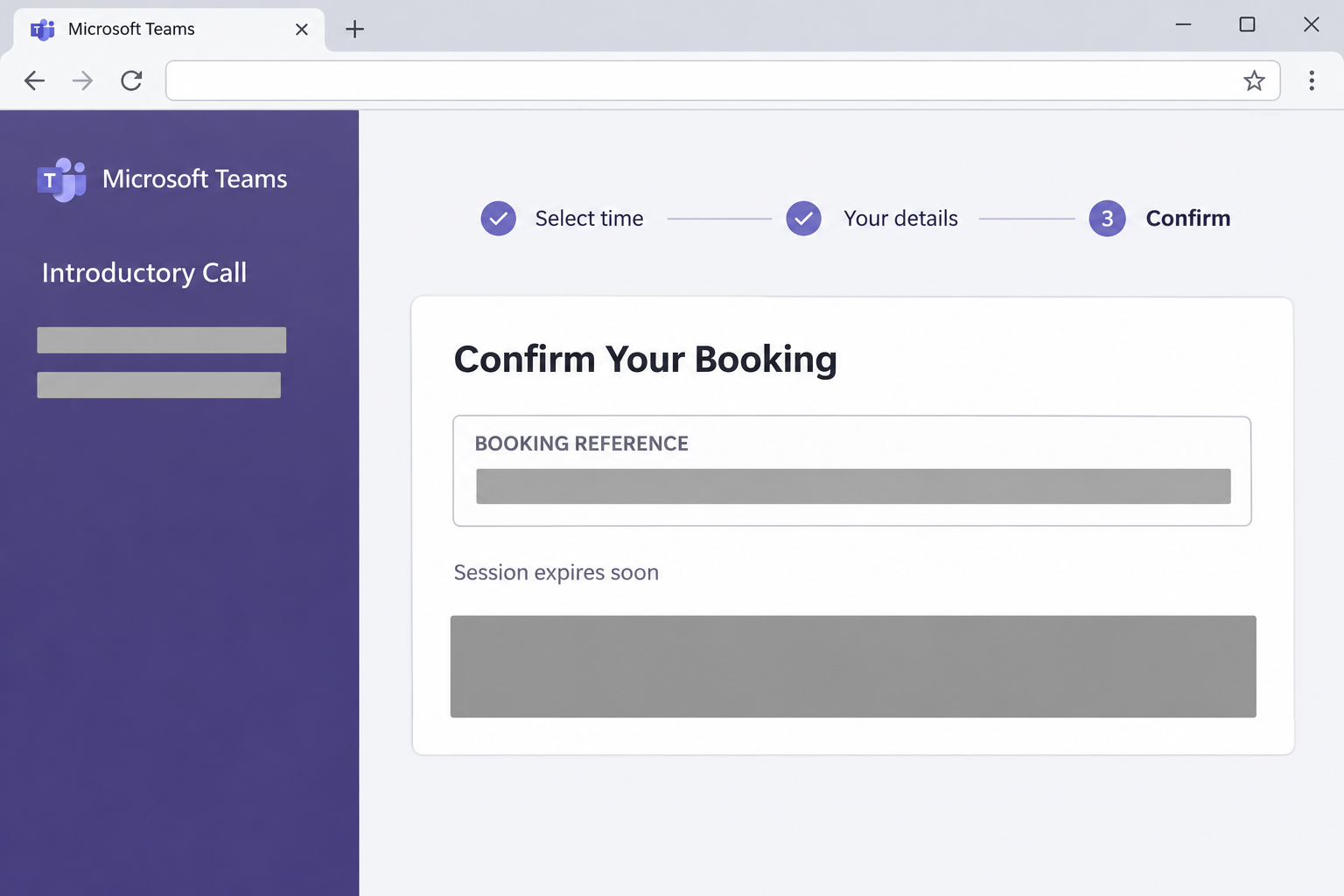
Confirmation presented a device code as the booking reference. Copying or confirming led toward Microsoft’s device sign-in.
The reconstructed prompt above shows that booking-reference stage, with the code and confirmation control concealed. It does not provide a code for completing an authorization.
A reference label describes what the page wants you to believe. The destination and the requested approval determine what the code actually does.
Step 5: The genuine sign-in authorizes someone else’s session
Entering the code on Microsoft’s genuine page completed the attacker’s pending authorization. The familiar login address was part of the deceptive sequence.
The important question is whose request you are approving. A successful identity check cannot answer whether a stranger gave you the code for the wrong reason.
Do not approve another sign-in simply to find out whether the invitation is genuine. Verify the business request through a separate conversation instead.
Step 6: A normal-looking booking page hides the detour
After authorization, the reported flow redirected to Calendly. This left the recipient looking at a plausible booking destination after access had already been granted.
That ending can change how someone remembers the incident. They may describe a meeting reservation rather than the intervening account approval that needs attention.
When reporting, include what happened between the first invitation and the final page. The brief sign-in detour can be more important than the page left open afterward.
Why a Genuine Sign-In Can Still Be the Wrong Approval
The code identifies an authorization request, not your meeting
Device authorization lets one client request access while you complete sign-in through a browser. Microsoft then issues tokens to the requesting client after successful authorization.
The ordinary sequence is worth understanding before dealing with an unexpected prompt:
- A client requests a device sign-in and obtains a user code.
- You enter that code through the provider’s genuine verification page.
- The requesting client can receive the access authorized through that process.
A legitimate use starts with a client you mean to connect. Receiving a code from an unsolicited website is not equivalent to starting that connection yourself.
The code has a limited lifetime while authorization is pending. Once the request succeeds, waiting for that code to expire is not an account-recovery step.
Knowing a password is different from possessing access
An attacker does not always need a copied password to misuse an account. A token can allow the requesting client to use the access it was granted.
That is why response must address active access as well as passwords. Changing a secret and invalidating an authorization are related tasks, not interchangeable descriptions.
Tell your administrator whether you entered a password on an unfamiliar site or only on Microsoft. That distinction helps separate possible password exposure from unwanted authorization.
This incident does not prove every MFA defense failed
The reported victim had no MFA enrolled. This incident therefore does not demonstrate that every MFA method can be bypassed.
Keep your account’s security protections enabled. If an unexpected approval appears, decline it and ask your administrator to explain the event through a trusted channel.
A stronger sign-in method remains useful, but no meeting invitation should persuade you to approve a request you did not intend to initiate.
What to Do if You Have Fallen Victim to This Scam
-
Stop before finishing another unexpected booking confirmation. Close the booking page and unexpected sign-in window, then avoid entering any replacement code the invitation supplies.
If you only copied the reference, replace your clipboard contents with harmless text from a trusted document. Do not paste it into a provider’s authorization page.
Keep your recollection of the sequence, including whether Microsoft displayed a successful authorization. You do not need to generate another request to obtain that information.
-
Tell your administrator that this involved device authorization. Contact the established security or help-desk channel, not the organizer address offered by the suspicious scheduler.
Explain that the code was presented as a booking reference. Say whether you entered it, signed in, approved access, or reached a later booking website.
Include the approximate time and account involved. Do not reduce the report to an unwanted calendar invitation if you also completed an account sign-in.
-
Ask for the unwanted access to be contained. An authorized administrator should investigate the affected identity and decide whether to block sign-ins or revoke sessions.
Microsoft’s emergency access guidance explains that applications can handle tokens differently. Keep cooperating with the investigation rather than assuming every connection ends at the same instant.
Merely closing the browser window is not the same as withdrawing access already granted elsewhere. Follow your administrator’s instructions about when to resume normal account use.
-
Address any possible password exposure through trusted channels. If you entered a password on the imitation booking site, replace it through your organization’s approved account process.
If the password was entered only on the genuine provider page, still report the authorization. Do not assume an unchanged password means the account was unaffected.
Your administrator may require a reset as part of containment. Tell them about reused passwords elsewhere without sending any actual password in the support conversation.
-
Have new security settings and permissions reviewed. The investigator should check whether unfamiliar authentication methods, registered devices, or application access appeared around the incident.
Record any unexpected setup screens you accepted. Adding a method, registering a device, and approving an application can require different corrective actions.
Do not indiscriminately remove Microsoft components or company-managed devices. Ask the administrator to identify unauthorized changes while preserving the legitimate tools your workplace relies on.
-
Check the account for activity after authorization. Microsoft’s cloud-account response guidance includes reviewing suspicious mail rules, forwarding, sent messages, and relevant account logs.
Tell the investigator if replies vanished, recipients received unexpected requests, or a business conversation changed direction. Save examples without trying to conceal the incident by deleting them.
If payment instructions were altered, alert the person responsible for the transaction. Any payment-recovery response should go through the actual bank or payment provider.
-
Verify the business invitation through independent contact information. Reach the purported company outside the message and ask whether the executive actually requested the call.
Do not accuse the real executive merely because their identity appeared on the page. Impersonation can harm the named business as well as the recipient.
If the invitation was false, coordinate an appropriate warning with your security team. Avoid broadcasting live attack links or identifying information from another person’s account.
-
Preserve the evidence without continuing the session. Keep the original email, existing browser-history entries, and any screenshots you already have, following your workplace’s reporting process.
Keep reference codes private as well. Your administrator can tell you which evidence is useful without asking you to publish an authorization code in a forum.
If you also installed anything or allowed remote access, report that separately. Device assessment may then be needed, but this authorization sequence alone does not establish malware installation.
How to Handle a Similar Invitation Next Time
Verify the organizer before accepting the technical steps
When a new contact proposes a valuable partnership, confirm who they are before completing an unfamiliar account workflow. Use your normal procurement or business-verification process.
A reply to the same sender stays inside the same conversation. A known company contact, independently sourced switchboard, or established partner portal offers a separate check.
Ask a concrete question about the meeting request and expected booking method. You do not need to discuss passwords or share a code to establish that context.
Read the purpose of the approval rather than its surrounding branding
A meeting confirmation should make sense as a meeting task. If it suddenly asks you to connect another device or session, stop and clarify that change.
Write down the application name and the permission or sign-in wording you can already see. Share that description with support rather than clicking onward for more detail.
Tell the organizer you will arrange the call through an already approved company channel. A genuine commercial discussion can continue without completing an unexplained account connection.
Let your organization control device-code access where appropriate
Microsoft publishes Conditional Access guidance for authentication flows. Organizations can audit their device-code requirements and restrict use that is unnecessary.
This is an administrative change, not a personal browser setting. Your organization should account for legitimate use, emergency access, and the effects of a proposed policy.
Do not bypass a company restriction just because a meeting organizer says it is blocking confirmation. Send the request to your administrator for a proper review.
Frequently Asked Questions
Is Microsoft Teams itself responsible for this booking scam?
The fraudulent invitation borrows Teams branding to misrepresent an account authorization. That does not make the legitimate meeting service the operator of the deception.
Why is a booking reference dangerous on a sign-in page?
The label does not control the code’s purpose. A device authorization code can connect your approval to someone else’s request for account access.
Does a genuine Microsoft address mean the whole process is safe?
A genuine page verifies the action it actually performs. It cannot guarantee that an outside organizer described that action honestly before sending you there.
Did I grant access by selecting a date and time?
Scheduling choices alone are different from completing account authorization. Tell support exactly which later sign-in or approval steps you completed instead of guessing the outcome.
Will removing the calendar entry revoke the authorization?
Deleting an appointment is not an account-access control. Ask your administrator to investigate and contain the unwanted authorization through the relevant identity system.
Should I finish the booking to check whether the organizer is genuine?
Do not complete another authorization as a test. Confirm the request with the real business through a separately verified contact and report the suspicious workflow.
The Bottom Line
Do not enter a booking reference into an unexpected account authorization flow to reserve this meeting. Verify the organizer and the purpose before approving anything further.
If you already authorized access, contact your real account administrator immediately. Removing the invitation is not enough; the unwanted access needs investigation and containment.

Join the discussion
0 commentsShare your experience or ask a question about this article.
Community experiences
Did this happen to you?
Your experience could help someone recognize the same scam. Submit a private report for our team to review.
I experienced this tooReports are reviewed before publication. Sharing publicly is always your choice.
Discussion
Start the conversation
Have a question or something useful to share? Add the first comment.