


A product recall headline can make an ordinary kitchen appliance or power bank suddenly look suspicious. Then you turn yours over and find several different numbers.
Before you decide what the announcement means, match the right details. A product name, a model label, and a purchase record answer different questions.
Overview
A brand name starts the search, not the decision
Checking a product recall means comparing your actual item with the identification criteria in the official notice. The brand alone usually leaves too much unresolved.
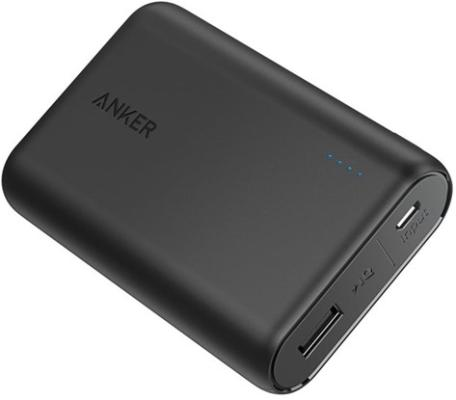
A familiar photograph helps you recognize the product family. It cannot replace a model number, serial check, date code, or other condition the notice requires.
This guide concerns U.S. consumer-product recalls published by the Consumer Product Safety Commission, or CPSC. Other countries and product categories have their own authorities.
The notice tells you which details matter
Start with the product description, then read the identification and remedy sections together. Some announcements cover a whole named model, while others narrow the affected units.
Look for the exact conditions before assuming yours qualifies:
-
The model marking printed on the product itself.
-
Any required serial number, manufacturing date, or batch range.
-
The country and sales period specified in the announcement.
-
The official verification route and available recall remedy.
A missing match is not a safety certificate
You might have a different model, an unreadable label, or insufficient purchase information. Those situations require different follow-up, rather than the same reassuring answer.
Keep an unresolved identification separate from a confirmed exclusion. A search result showing nothing does not establish that a product is safe to use.
If the notice identifies your product, follow its immediate safety instructions. Do not wait for a refund conversation before taking the precaution it specifies.
Read the Product Label Before the Marketplace Listing
The name on an order page can be a shortened marketing description. Your receipt may say portable charger, while the device carries a more specific model.
Similarly, a retailer might group several colors, capacities, or revisions under one listing. The product delivered to your home is the item you need to identify.
Find the label in the location described by the manufacturer or recall notice. Do not dismantle a device simply because its identifying information is difficult to read.
Photograph the accessible marking in good light, if doing so is safe. Keep the original photograph privately so you can enlarge small characters without guessing.
Write each field separately rather than copying every visible number into one search. That makes a later support conversation clearer and reduces transcription mistakes.
| Label or record | What it helps establish |
|---|---|
| Brand and product family | These names help locate the appropriate official announcement. |
| Model number | This marking identifies the version requiring closer comparison. |
| Serial or date code | This field may narrow which individual units qualify. |
| Order or purchase record | This record can help establish the sales route and date. |
The table explains the roles of these fields. It is not a rule that every recall uses all four, or uses them in the same way.
Compare the criteria actually printed in the notice. A purchase date does not automatically tell you when the item was manufactured, particularly for older stock.
If two labels appear to disagree, keep photographs of both. Ask the named recall contact which identifier controls instead of selecting whichever answer feels more convenient.
Find the Official Notice Without Trusting an Unexpected Message
Open the CPSC recall directory independently and search for the company or product. Read the particular notice, not only its headline.
A message arriving through a marketplace or retailer may be useful, but its timing does not authenticate every link, form, or telephone number it contains.
Use the consumer contact information in the official announcement to reach the recall program. A different dedicated domain is not automatically fraudulent or automatically trustworthy.
CPSC’s website notification guidance recognizes dedicated recall pages. The important connection is whether the official notice directs consumers to that particular program.
Save the notice number, product name, and relevant instructions with your private records. These details help distinguish one recall from another involving the same manufacturer.
A company can have several recalls running simultaneously. Entering the wrong program may produce an apparently negative result without answering the question about your particular item.
Keep the process focused on identification and the stated remedy. Do not provide unrelated account credentials or send a payment merely because an unsolicited message requests them.
A Real Example: Anker PowerCore 10000, Model A1263
The June 2025 CPSC notice numbered 25-338 provides a useful example of why the exact model matters.
It names Anker PowerCore 10000 power banks, model A1263, and describes an overheating hazard. It does not declare every product carrying the Anker name recalled.
The notice says the model and serial markings are on the bottom. It limits the recall to U.S. units with qualifying serial numbers.
That last condition matters even after you find A1263 on your charger. You still need the official serial verification route to establish whether that unit qualifies.
- Product name
- The example concerns the Anker PowerCore 10000 power bank.
- Model marking
- The specific model named in this announcement is A1263.
- Remaining eligibility check
- The manufacturer must confirm the qualifying serial through its program.
- Location boundary
- The cited U.S. announcement does not establish worldwide eligibility.
These are identification facts from one real notice, not a universal checklist for all chargers. Another recall may use different models, dates, or verification requirements.
The CPSC notice specifies replacement as its remedy. Its instructions should not be rewritten as a promise that every owner can demand an immediate cash refund.
It also says a purchase receipt will be requested but is not required to participate. Missing paperwork therefore does not automatically end this particular recall inquiry.
Follow the Recall Program’s Instructions Without Guessing
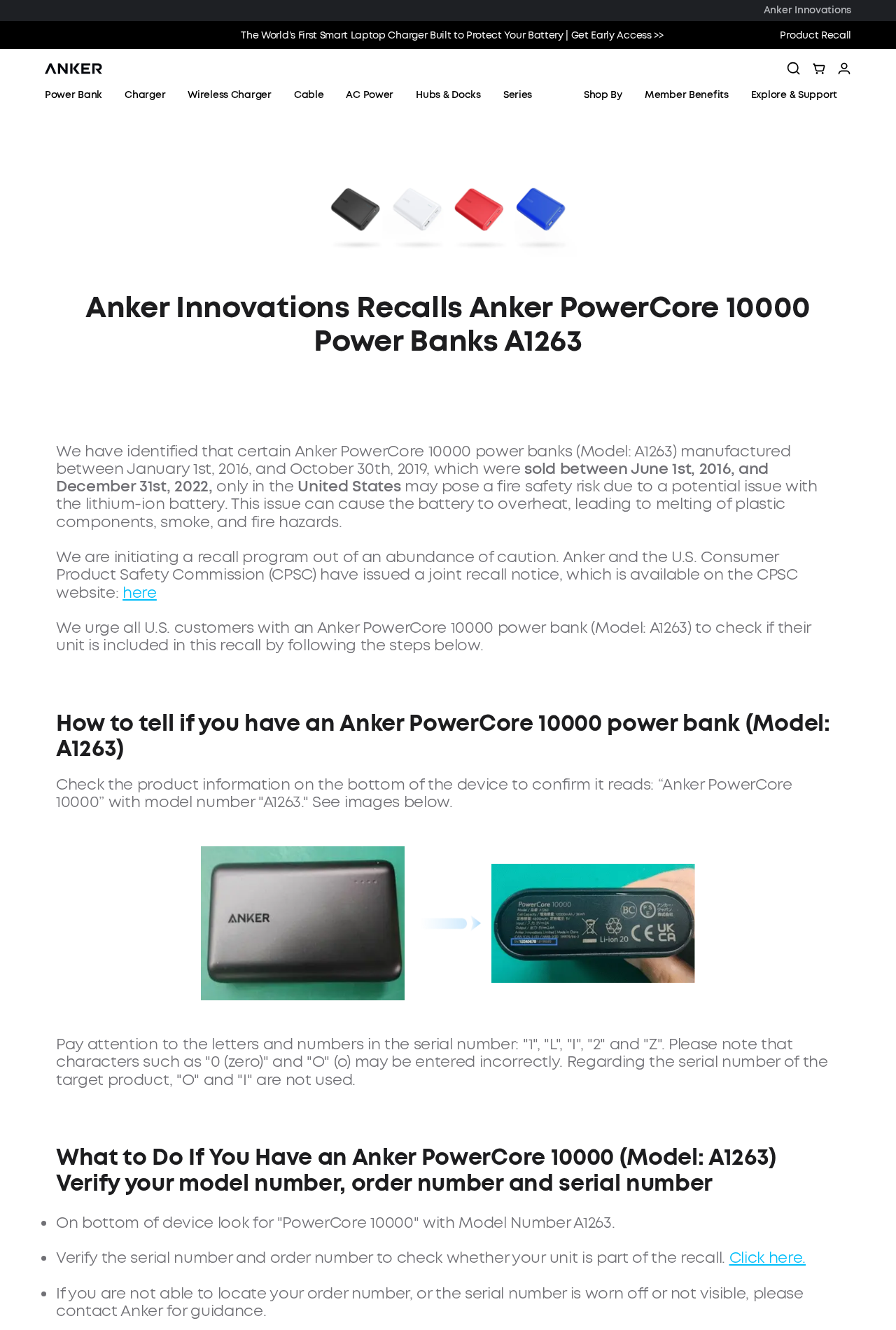
Anker’s A1263 recall page explains how to identify the model and follow its verification route. Check that exact program rather than another power-bank recall.
The manufacturer asks consumers with an unreadable serial number or missing order number to contact it for guidance. An invented replacement number cannot resolve either problem.
Its instructions also distinguish verifying eligibility from marking the power bank for a claim. Confirm the sequence before permanently changing anything on the product.
For an affected unit, follow the program’s current documentation and disposal instructions. Save the confirmation and your submitted records privately instead of relying on memory.
Do not publish a complete serial number or claim photograph in a public discussion just to ask whether the announcement applies. Contact the program directly when necessary.
You can usually explain an identification question without exposing your entire submission. Share only the non-sensitive model information needed for that conversation.
Keep Identification, Eligibility, and Remedy Separate
These three questions often become tangled during a recall search. Separating them helps you understand what a website result actually answered and what still needs attention.
-
Identify the item: Read the physical model and any accessible label details before comparing them with a retailer’s abbreviated product description.
-
Check the stated scope: Compare every applicable condition, including serial eligibility, rather than stopping after the brand name or photograph looks familiar.
-
Follow the remedy: Use the program’s own instructions for the confirmed item, retaining the records needed to complete that particular process.
Consider a household with two chargers from the same brand. Matching one device to A1263 does not settle the status of the second, differently labeled model.
Now consider two family members who bought the same model through different shops. Their receipts may help, but each device still needs its own applicable eligibility check.
In both situations, a shared brand or purchase story creates a lead. It does not replace the information printed on the individual item or its official notice.
Choose the Situation That Matches Your Product
Use the branches below to organize your next action. They do not perform a recall lookup, collect identifiers, or certify that an item is safe.
Keep an immediate safety precaution outside the search process: if your item is confirmed recalled, follow the notice rather than continuing normal use while arranging paperwork.
I have a readable model and serial number
Compare the model with the notice first. Use the official verification page linked by that notice if the recall also requires a serial check.
Save the result with the exact program and your private product record. A result from another recall does not answer the same eligibility question.
I only have the marketplace listing or purchase receipt
Use the record to locate the product family, then inspect the actual item safely. Ask the official recall contact how to proceed if identification remains incomplete.
Do not substitute a model from a similar listing. Another seller’s photograph may show a revision different from the product you received.
The label is missing, damaged, or too difficult to read
Preserve any accessible markings and purchase details without dismantling the product. Explain the missing information to the program rather than guessing characters repeatedly.
An unresolved identifier is not confirmation of eligibility or exclusion. Follow any applicable immediate safety advice while obtaining a clearer answer.
What to Do When Your Product Might Be Recalled
-
Check the safety instruction before handling the item. Read the notice’s immediate precautions and avoid testing a suspect product merely to see whether it still works.
The U.S. Fire Administration advises stopping use of lithium-ion batteries showing unusual heat, shape changes, leaking, odors, or odd noises.
A visibly failing battery is not a photography project. Address the hazard first, and seek emergency help for an immediate fire or other dangerous situation.
-
Keep a clear private identification record. Photograph accessible labels safely and save the purchase information you already have. Do not erase markings or alter the item prematurely.
Write down which information remains unknown. A short, accurate description of the problem is more helpful than supplying a guessed serial or manufacturing date.
-
Reach the right recall program independently. Start with the particular CPSC notice and follow its consumer contact route. Confirm the model before entering the applicable eligibility process.
Use your real details only through that verified process. This article does not need your serial, address, receipt, account password, or photographs.
-
Ask what the offered remedy requires. Clarify any missing-document issue, return instruction, replacement procedure, or disposal requirement before taking an irreversible step.
Do not assume one company’s receipt exception applies to every recall. Likewise, do not assume the ordinary shop return window describes the recall program.
-
Save the submission and follow-up record. Keep the program name, confirmation, requested documents, and relevant correspondence together. Note what the company says remains necessary.
If the response does not address your unit, explain the unresolved criterion precisely. Ask whether the issue concerns the model, serial, sales location, or documentation.
-
Escalate an unresolved remedy through the appropriate route. CPSC notices can provide a recall complaint option when the company does not resolve participation problems.
That complaint is separate from registering with the company for a remedy. Keep the earlier contact record and explain the specific difficulty rather than assuming registration occurred automatically.
When a Search Result Does Not Settle the Question
A zero-result search can reflect a spelling problem, an unfamiliar product name, or a different jurisdiction. It cannot replace a correct comparison with your label.
Try the manufacturer and model separately when a combined search is unhelpful. Keep the search factual rather than relying on a dramatic social-media description.
Also distinguish a product-safety warning from a recall with an arranged remedy. Read what the authority actually announced before expecting a repair, replacement, or reimbursement.
An older recall may remain relevant long after its original headline disappears. The age of the announcement alone does not establish that your item was corrected.
CPSC encourages companies to maintain recall pages indefinitely. A changed website layout therefore makes the official notice and product identifiers useful starting points for locating the program.
Finally, keep the result narrow when you obtain an answer. Eligibility for one recall is a finding about that program, not every possible hazard involving the device.
Frequently Asked Questions
Does a recall of one model cover every product from that brand?
A recall covers the products identified in its notice, not automatically the entire brand. Similar appearance or naming does not establish the same eligibility.
Is the model number the same as the serial number?
A model identifies the version or product family, while a serial can identify an individual unit. The notice may require both for eligibility.
Can I participate if I lost my purchase receipt?
Check the specific recall instructions before giving up. The cited A1263 notice requests a receipt without requiring it, but other programs may handle documentation differently.
Does a product working normally mean it is safe to keep using?
A recalled product can still appear functional. Follow the notice’s instructions, because normal operation today does not resolve the hazard that prompted the recall.
Should I throw away a recalled battery immediately?
Follow the particular recall’s safe handling and disposal sequence. The A1263 program requires confirmation and special disposal arrangements, not household trash or ordinary battery collection.
Does finding no matching recall prove my product is safe?
A search is limited by the identifiers, records, and jurisdiction checked. Resolve missing information and address visible hazards rather than treating silence as a safety certificate.
The Bottom Line
Match the physical product with the official notice, including every applicable model, serial, date, and location condition. Do not make the decision from the brand alone.
If your unit qualifies, follow the stated safety instruction and remedy. If identification remains unclear, ask the official program before guessing, altering the product, or arranging disposal.

Join the discussion
0 commentsShare your experience or ask a question about this article.
Community experiences
Did this happen to you?
Your experience could help someone recognize the same scam. Submit a private report for our team to review.
I experienced this tooReports are reviewed before publication. Sharing publicly is always your choice.
Discussion
Start the conversation
Have a question or something useful to share? Add the first comment.